10 Best Web Hosting Providers for Small Businesses in 2026


The global web hosting market is expected to cross $120 billion by 2028, and the demand for reliable hosting solutions has never been higher. Small businesses account for a significant portion of this growth, as nearly 50% of small enterprises worldwide now operate their websites to connect with customers, enhance credibility, and boost sales.
In 2026, the ideal hosting providers for small businesses will combine affordability, performance, scalability, and user-friendly features. Key factors to consider include uptime guarantees, speed, customer support, and essential add-ons like free SSL certificates, daily backups, and website builders.
Top 10 Web Hosting Platforms for Small Businesses
When it comes to hosting, small businesses require reliable, scalable, and budget-friendly solutions. Hostinger, OVH Cloud, Webspace Kit, HostGator, Hosting.com, GoDaddy, Bluehost, MikyHost, IONOS, and WP Engine offer great features. Here’s more on why these providers are considered the best for small businesses:
OVH Cloud

OVH Cloud offers robust infrastructure, scalability, and advanced security features. Offering SSD storage, DDoS protection, and multiple data centers worldwide, OVH Cloud is a strong choice for small businesses that prioritize speed and reliability. Its flexible pricing plans cater to a range of needs, from startups to growing enterprises. To save on your hosting plans and cloud subscription, use OVH discount codes for exclusive savings.
Hostinger

Known for its affordability and exceptional speed, Hostinger offers a range of features tailored for small businesses. Its user-friendly interface and scalability options make it a favorite for startups. With plans starting at competitive prices, Hostinger delivers reliable performance and includes features like free SSL certificates and weekly backups. The platform also supports multiple hosting types, such as shared, VPS, and cloud hosting, providing flexibility for growing businesses.
Hostinger is suitable for users of any skill level, whether you’re an expert or a tech spaz, it’s easy to get the hang of the platform. This is one of the reasons why Hostinger is one of the fastest-growing web-hosting solutions with over 4 million customers. If you want to save on hosting, then you can use exclusive Hostinger coupon codes and get discounts on your plans. Here’s another tip: you can try out the platform with its 14-day free trial and only subscribe to it if you like the performance.
WebSpaceKit

This provider shines with its high-speed performance and daily free backups. Its ease of use and robust features make it ideal for small businesses seeking reliability. Webspace Kit also includes free domain registration, 24/7 support, and strong security measures, ensuring a seamless hosting experience. Its comprehensive plans are designed to cater to a wide range of business needs, making it a versatile choice.
HostGator

Popular for its uptime reliability, HostGator is well-suited for businesses aiming for a consistent online presence. With its extensive range of hosting options, including dedicated servers and cloud hosting, HostGator offers scalability for businesses with growing demands. However, backup options come at an additional cost, which might be a consideration for budget-conscious users. Don’t forget to apply HostGator promos to save up to 70% on annual or monthly plans.
Hosting.com

Hosting.com offers advanced features, free daily backups, and a developer-friendly cPanel interface. Known for its “Turbo Servers,” Hosting.com claims to deliver speeds up to 20 times faster than standard hosting, making it a top choice for performance-oriented businesses. It also includes free website migrations and robust customer support.
GoDaddy

With intuitive tools and excellent uptime, GoDaddy appeals to businesses looking for simplicity and reliability. Its plans come with free daily backups, one-click WordPress installations, and a straightforward control panel. GoDaddy is particularly popular among beginners for its easy setup process and comprehensive customer support.
Bluehost
Ideal for beginners, Bluehost provides an easy onboarding process and optional advanced features, though some come at an extra cost. Bluehost’s integration with WordPress is seamless, making it a recommended choice for WordPress users. The platform also offers marketing tools, free domain registration for the first year, and scalable hosting plans.
MikyHost

MikyHost is a top-tier choice for US startups needing speed without high costs. Using NVMe SSD storage and LiteSpeed servers, they offer low-latency performance from multiple US data centers starting at just $2/month. It’s ideal for small businesses that prioritize 100% uptime and 24/7 automated support. Use MikyHost coupons for up to 50% OFF on all VPS and shared hosting packages.
IONOS

IONOS offers the best “bang for your buck” with introductory plans starting at $1/month with IONOS deals, you can save even more. They provide a rare Personal Consultant feature for direct technical help, making them perfect for non-tech owners. With free professional email, a domain, and an AI website builder included, it’s a comprehensive all-in-one starter kit for small businesses.
WP Engine

WP Engine is the premium, “hands-off” choice for established US businesses that rely on WordPress. Though pricier (around $20/month), they handle all security, updates, and backups automatically. Their EverCache technology and built-in CDN ensure elite site speed. Get additional discounts on plans with WP Engine promo codes.
Comparison Table of Hosting Providers
| Hosting Provider | Best For | Advantages | Disadvantages |
| OVH Cloud | Scalability and security | Robust infrastructure, SSD storage, DDoS protection, global reach | The dashboard and control panel can feel less intuitive |
| Hostinger | Speed and affordability | Budget-friendly, reliable performance, free SSL, and backups | No free daily backups |
| WebSpaceKit | All-around performance | Daily backups, free domain, strong security features | Slightly higher starting price |
| HostGator | Large-scale businesses | Excellent uptime, scalable options | Backup services are not free |
| Hosting.com | Tech-savvy users | Turbo Servers, advanced tools, free migrations | Slightly complex interface for beginners |
| GoDaddy | Ease of use | User-friendly, daily backups, one-click WordPress setup | Moderate speed compared to competitors |
| Bluehost | Beginners | Easy onboarding, WordPress integration, free domain for a year | Some features require additional payment |
| MikyHost | Budget performance | Exceptional speed using LiteSpeed servers and NVMe storage | Newer brand with fewer advanced developer features |
| IONOS | Absolute beginners. | Unbeatable $1/month starter deals with a dedicated personal consultant | Significant price hikes upon renewal |
| WP Engine | Professional WordPress | Elite-tier security and automatic “hands-off” maintenance handled entirely by WordPress experts. | High monthly cost and strict “disallowed plugin” lists that limit your site’s customization |
Speed of Different Web Hosting Platforms
Speed is an important factor that directly impacts user experience and search engine rankings. To evaluate the performance of six popular hosting providers from our list, we conducted a speed test using GTmetrix.
Note: Each provider hosted an identical website to ensure a fair comparison, and the test location was set to the United States, aligning with the server locations of these hosts. Here are the results:
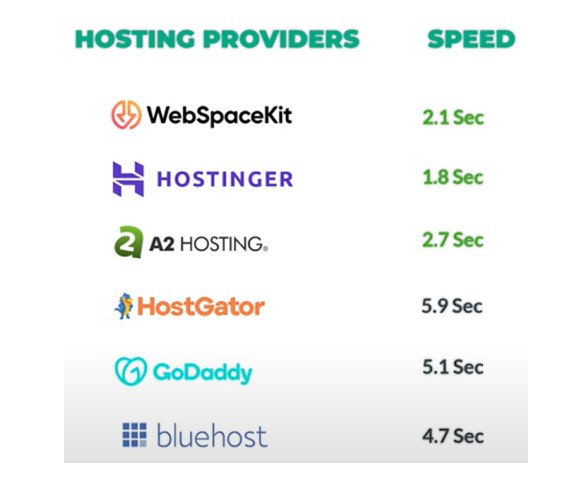
- Hostinger delivered a load time of 1.8 seconds, making it a reliable choice with good performance.
- WebSpaceKit outperformed others with an impressive load time of 2.1 seconds, marking it as the fastest in the test.
- HostGator recorded a significantly slower load time of 5.9 seconds, which might not be ideal for speed-focused websites.
- A2 Hosting (now Hosting.com) achieved a load time of 2.7 seconds, offering a solid performance.
- GoDaddy clocked a load time of 5.1 seconds, which is on the slower side.
- Bluehost managed a load time of 4.7 seconds, falling into the moderate range.
Takeaway from Web Hosting Speed Test
From this speed test, Hostinger and WebSpaceKit stood out as the top performers. These providers offer faster loading times, which are essential for keeping users engaged and improving search engine rankings. Pairing a fast host with other optimization strategies will ensure your website stays ahead in terms of both user satisfaction and visibility on search engines.
Uptime Test of Different Web Hosting Providers
Uptime is a crucial metric for any web hosting provider, as it determines the amount of time your website remains accessible on the internet. Downtime, whether due to server errors or maintenance, can result in lost traffic, reduced conversions, and a poor user experience. A reliable hosting provider should maintain uptime as close to 100% as possible.
To assess the uptime of six popular hosting providers, we used a tool that monitored each website every 15 minutes over 60 days. Here are the results:
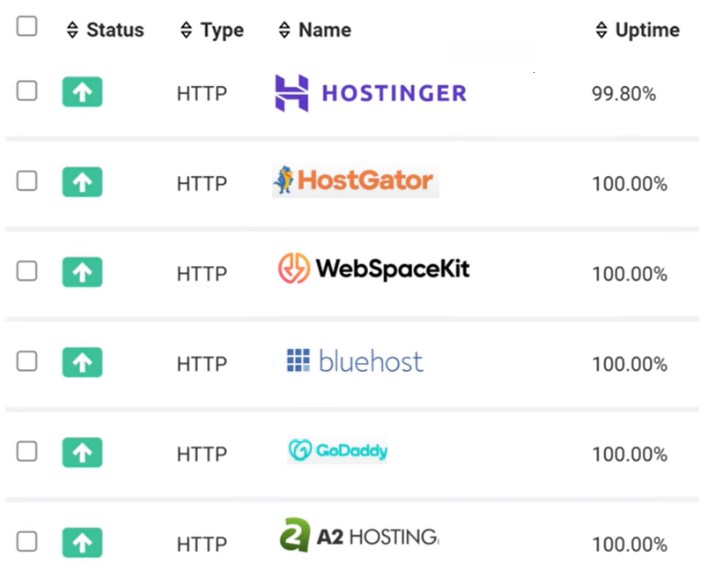
- WebSpaceKit maintained 100% uptime, ensuring uninterrupted website availability.
- HostGator delivered 100% uptime, reflecting strong reliability.
- A2 Hosting (now Hosting.com) also achieved a perfect 100% uptime score.
- GoDaddy matched the top performers with 100% uptime.
- Bluehost ensured 100% uptime, showcasing robust server performance.
- Hostinger recorded uptime slightly below 100%, but still performed commendably with minimal downtime.
Key Takeaways
All the tested hosting providers, except for Hostinger, maintained perfect uptime during the testing period. However, Hostinger’s uptime was still impressive and close to perfection, making it a solid choice. For maximum reliability, Webspace Kit, HostGator, A2 Hosting, GoDaddy, and Bluehost emerge as excellent options.
Backup Options of Web Hosting Providers
Regular backups are crucial for preserving your website’s data and functionality. They enable you to recover from unexpected issues such as plugin conflicts, theme updates, accidental deletions, or even cyberattacks. Let’s examine the backup features provided by popular web hosting providers and how they compare.
-
OVH Cloud
OVH Cloud provides automated daily backups for its hosting plans, ensuring robust protection against data loss. Users can schedule backups, access incremental backups, and easily restore their data via the OVH Cloud Manager interface. With advanced storage solutions, OVH Cloud is designed for businesses seeking scalability and security.
-
Hostinger
Hostinger provides weekly automatic backups for free, with an option to upgrade to daily backups by purchasing an add-on or opting for premium plans. Users can also generate manual backups through the admin panel, ensuring flexibility. Restoring is user-friendly, requiring just a click to select and apply a backup date. While the free weekly backups are a solid feature, the extra cost for daily backups might not suit all budgets.
| Tip: Looking to save more on your hosting expenses? Check out the Hostinger renewal discount code to enjoy deals on your plan renewals. This discount is perfect for reducing costs when upgrading to advanced plans or simply extending your hosting services. |
WebSpaceKit
WebSpaceKit offers daily backups for free across all plans, even the basic ones. Users can easily restore their website by selecting a backup date and clicking restore. Its reliable backup system and ease of use make it an excellent option for budget-conscious website owners who want robust data protection without any extra cost.
HostGator
HostGator does not include free backups. Users need to purchase the CodeGuard add-on for automated daily backups and flexible restoration options. CodeGuard offers incremental backups and one-click restoration, but the additional cost for these features makes HostGator less appealing to users who expect integrated backup services in their hosting plans.
Hosting.com
Hosting.com offers free daily automatic backups via cPanel, providing access to full and incremental backups. Users can restore their site by selecting a backup date, but navigating cPanel might be challenging for beginners. Despite this, its reliable backup process and cost-free daily backups make it a strong choice for developers and advanced users.
GoDaddy
GoDaddy includes free daily backups with all its hosting plans, including an intuitive dashboard for one-click restoration. A unique feature is the ability to preview your site on a selected backup date before restoring it, ensuring accuracy and convenience. These features, combined with a user-friendly interface, make GoDaddy a top pick for smooth data protection.
Bluehost
Bluehost offers backups through the CodeGuard add-on, which comes at an extra cost. The basic plan allows up to 3 restores per month, while advanced plans offer unlimited restores. While CodeGuard provides reliability, the lack of free built-in backup options makes Bluehost less competitive compared to hosts offering complimentary backup services.
Summary of Backup Features
| Hosting Provider | Backup Frequency | Free Backups | Restore Method | Add-On Needed for Daily Backups |
| OVH Cloud | Daily | Yes | Via OVH Manager | No |
| Hostinger | Weekly | Yes | One-click | Yes |
| WebSpaceKit | Daily | Yes | One-click | No |
| HostGator | N/A | No | Add-on required | Yes |
| Hosting.com | Daily | Yes | Through cPanel | No |
| GoDaddy | Daily | Yes | One-click | No |
| Bluehost | N/A | No | Add-on required | Yes |
Key Takeaway from the Backup Perspective
Regular backups are essential for maintaining website security and functionality, but not all web hosting providers include them for free. Providers like WebSpaceKit, GoDaddy, OVH Cloud, and Hosting.com offer free daily backups, making them excellent choices for cost-conscious users. In contrast, Hostinger provides weekly backups for free but charges for daily backups, while HostGator and Bluehost require additional paid add-ons like CodeGuard for backup services. Evaluating the cost, frequency, and ease of restoration is crucial when selecting a hosting provider to ensure your website’s data is always secure.
To Conclude
By evaluating your business’s specific needs and comparing these hosting providers, you can find the perfect solution to enhance your online presence and support your growth. Whether you prioritize speed, reliability, scalability, or backup options, the right host will empower your business to thrive in today’s competitive digital era.
Frequently Asked Questions
What is meant by web hosting?
Web hosting provides the infrastructure and services needed to make a website accessible on the internet. It involves storing website files on a server and ensuring they are available to users 24/7.
Which website hosting is best?
The best website hosting depends on your needs. Hostinger is one of the top choices for its reliability, performance, and features, including strong uptime, security, and scalability options.
Is Google web hosting free?
Google does not offer free web hosting. Google Sites allows basic website creation without hosting fees, but for more comprehensive hosting solutions, you’ll need to pay for Google Cloud or other third-party hosting services.
Do I need to pay for web hosting?
Yes, you generally need to pay for web hosting. Most reliable web hosting services require a subscription fee, though there are some free hosting options with limited features and potential limitations.
Can you host your website?
Yes, you can host your website using your server. However, this requires technical knowledge, hardware, software, and ensuring reliable uptime and security, making third-party hosting services a more practical choice for most users.
Can I publish my website without hosting?
No, you cannot publish a website without hosting. Hosting is necessary to store and serve your website files to visitors online. Without it, your site cannot be accessed on the internet.