How to Save on Booking.com in 2026


The fool who said travel is expensive is wrong. You can travel the world without much money in your pocket. You just have to be flexible. Book cheap flights, visit affordable destinations, and use Booking.com. Yes! Using this platform to book your stays (and sometimes even flights) can cut your travel costs substantially.
Since 2007, Booking.com has been responsible for 3 billion bookings, and the numbers just keep increasing. These numbers prove that the platform has played a major role in the travel industry. It is a popular choice among travelers. If you are someone who uses Booking.com regularly, then you have come to the right place. In this blog, we are going to explore how to save on Booking.com, so keep reading for some practical money-saving tips.
8 Tips to Score the Best Deals on Booking.com
Flights and accommodations are the first things we book when traveling. Sometimes, we don’t even look around much and book the first thing we can find. But if you want to save, you need to look around a little and use all the possible tricks at your disposal. Here are a few tips you can try out on your next booking.
1. Use Smart Search Tactics
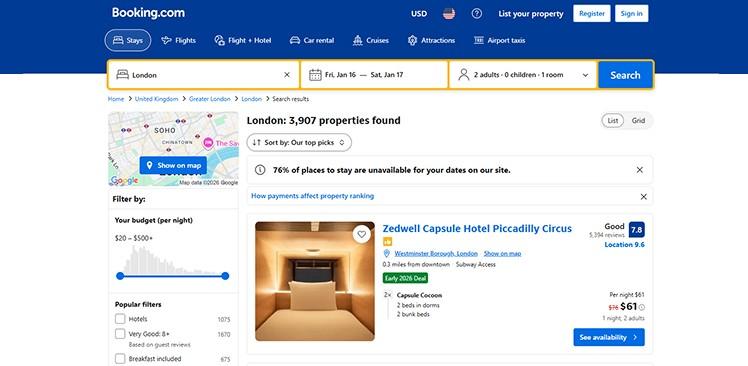
When looking for accommodations, we just enter the dates and destination and look for properties. While searching for your stay on Booking.com, you can branch out a little bit to get the best and most affordable stay option. Here are various ways you can use smart search on the Booking.com website/app.
- Free Cancellation: Use the “Free Cancellation” option under the popular filters section. This will show you properties that offer free cancellation. Book listings that allow free cancellations. So you can keep monitoring the price, and when it drops, you can cancel the booking and rebook it at the lower price.
- Price Match: Look for the “We Price Match” badge at individual properties. So that if you find a similar booking for the same property at a lower price, you can ask for price matching. TIP: Look for the “Found this room cheaper elsewhere?” section on your confirmation page.
- Various property types: Under filters, find the “Property Type filter, and you can choose entire homes, homestays, villas, apartments, hostels, farm stays, guest houses, etc. Prices are lower for homestays and hostels, as compared to villas and hotels.
| Hot Tip: When searching for properties, you can use the “Show on map” view to see the location better. This will show you the location of various properties on the map, along with the price. So you can see the location as well as the prices together and make a better decision. |
2. Use the price match policy
With Booking.com’s price match policy, you can claim a refund for the difference if you find your reservation at a cheaper price on another website. The platform will verify the price and give you a refund of the price difference, simultaneously matching the price. However, some conditions should be met to claim the refund.
- The other listing should be for the same property and the same accommodation type.
- The other offer should have the same check-in and check-out dates.
- The other listing should also have the same cancellation policy and conditions.
If the other listing meets all the criteria, then you can contact the customer support from the date of booking to at least 24 hours before the check-in date to claim the refund. Please note that you cannot claim if the other offer doesn’t show the accommodation type or offers a loyalty program that you are a part of (hence the reduced price).
| Hot tip: If you are searching for a property, do not book immediately. Bookmark the listing and wait for a day or two. Sometimes the prices drop when the system thinks you have bounced or lost interest. Try to check the prices on Sunday evenings or weekday mornings. That’s when the prices are the lowest. Additionally, you can also book listings allowing free cancellations. So you can keep monitoring the price, and when it drops, you can cancel the booking and rebook it at the lower price. |
| Hot tip: If you are searching for a property, do not book immediately. Bookmark the listing and wait for a day or two. Sometimes the prices drop when the system thinks you have bounced or lost interest. Try to check the prices on Sunday evenings or weekday mornings. That’s when the prices are the lowest. |
3. Join the Genius Loyalty Program
Booking.com also has a loyalty program that you can be a part of. It is called Genius. You can sign up for the program using your email address. It is completely free to join. Once you join the program, you can get free lifetime access to discounts on select stays and rental cars worldwide. There are three tiers in the plan. We have also highlighted the benefits below.
| Genius Level | Discounts on Stays | Extra Travel Perks | Benefit Duration |
| Level 1 | 10% off (before taxes) | 10% off select car rentals, flight price alerts | Lifetime |
| Level 2 | 10-15% off (before taxes) | 10-15% off select car rentals, flight price alerts, free breakfasts, and free room upgrades. | Lifetime |
| Level 3 | 10-20% off (before taxes) | 10-15% discounts on rental cars, flight price alerts, free breakfasts, free room upgrades, and priority support for stays. | Lifetime |
The more you keep booking on the platform, the more points you earn, and you can use them to unlock various Genius Levels. Travel rewards are yours to keep forever. You can use it whenever you want. You can also use the Booking.com Genius Rewards Credit Card to make the payment and get benefits like-
- $150 in Travel Credits after spending $1,500 on the card in the first 90 days.
- $100 in bonus Travel Credits each year after spending $15,000 or more on the card.
- Genius Level 3 status instantly upon signup.
- No foreign transaction fees
- Protection benefits, including auto rental, trip cancellation, and travel accident insurance, as well as extended warranty protection.
So, if you travel often and use the platform regularly, you can sign up for this credit card.
| Hot tip: Sometimes the discounts offered by Booking.com are higher than the discounts offered to loyalty program members. If you want to redeem these discounts, you can create a new account (that isn’t part of the loyalty program) and make your booking using that account. |
4. Use your mobile for app-only and mobile rates
Did you know that 40% of the bookings in the first quarter of 2022 were made through the app? This shows a customer behaviour that people love convenience, and booking on an app is way more suitable than on a laptop. However, here is what we would suggest.
- Use the incognito browser mode to look for various properties in your destination.
- Use a laptop or a computer to better get an idea about the property, like its location, services offered, pricing, and policy.
- Once you have decided on a place, open the Booking app and search for the property. Select the dates you want and book the place.
Remember, listings are mostly cheaper on mobile, especially on the app. Always check the prices on both the computer and the mobile. Sometimes you can find a 10-15% difference in pricing.
| Hot tip: If you are travelling internationally, then use a VPN to get regional prices. Try checking prices from various countries (with weaker currencies like India, Malaysia, Argentina). You can try out a VPN like NordVPN or ProtonVPN. |
5. Take Advantage of Seasonal & Special Deals
Booking.com offers plenty of seasonal sales that you can take advantage of. You can keep checking the website/app to find promotions year-round. Here’s a list of some major sales that Booking.com hosts:
- Early New Year Deals: Every year, through the first couple weeks of January Booking.com offers 15 to 20% discount on stays around the world. You can find affordable stays in major destinations like Rome, Tokyo, London, Paris, etc.
- Getaway Deals: During seasons, especially Summer many property owners give away discounts to promote their property. You can book your stay way ahead in the season to get significant discounts. Find Summer Deals (bookings in April/May) in January/February.
- Holiday Sales: While Booking.com has only a few holiday sales, you can still watch for major sales around Black Friday, Easter, Christmas, and Valentine’s Day. Turn on notifications for the app to get updates on deals.
6. Use promo codes
While booking your stay, do not forget to look for discounts. You can explore our dedicated Booking.com coupons to learn about ongoing offers. We curate a list of various travel deals that you can use to save more. Look for sign-up offers, student discounts, and more. Here are some ways to look for the Booking.com coupons:
- Create an account on Booking.com by using your email ID to receive regular email updates on various ongoing deals. You can also save 10% or more at select hotels and properties.
- Head over to GrabOn and search for “Booking” and find the related coupon page. Explore our travel coupons, which are updated daily.
- Check out the “Offers” section on their official page to see the newest promotions and limited-time deals. Scroll down the homepage and you can find this section.
- Stay informed about ongoing and upcoming events by following them on their social media platforms like Instagram, Facebook, and YouTube. Look for influencer partnerships and unique promo codes they share.
- Get the Booking app on your Android or iOS device to unlock exclusive mobile-only deals. Turn on price alerts to get notified the moment the prices drop.
| Hot Tip: You can sign up using a referral link shared by a travel blogger/influencer. These links help you get discounts and also benefit the bloggers. You can also use Rakuten for your travel bookings and get up to 5.5% cash back on your hotels, flights, and car rentals. Booking.com often partners with other companies to offer more competitive prices and rewards. |
7. Book early and book direct
The best way to save while booking your stay is to book early. Try to book 1-3 months before your trip to get the best prices. Because the prices soar during the peak season, booking ahead saves money. Book the room even if you are not sure about the dates (but make sure it offers free cancellation). You can use Booking.com as a search platform and look for properties. Then contact the property owners directly to get better prices. Many Reddit users shared that booking directly helped them save 30%. But that’s not the case all the time. So, compare the prices everywhere before making the booking.
| Hot Tip: Try checking the price on Agoda as well before you use Booking.com. Both companies are owned by the same company, Booking Holdings Inc. But Agoda mostly offers lower prices. You can use the Agoda coupons for better savings. So, check all the hotel booking sites before paying. |
8. Bundle up flights and stays
If you are booking your entire vacay in one go, you can save more. Booking.com offers Flight+Stay offers, wherein you can book your flights and accommodation together.
- Go to the website and click on Flight + Hotel.
- Fill in the details in the “Where from” and “Where to” sections, and select the dates.
- Click on “Search,” and you get the best results.
- Pick the option that suits you best and make the payment.
Be flexible with the dates and the accommodation to get the best deals. Sometimes, flights can be cheaper on weekdays, so keep an open mind while booking your trip.
| Hot Tip: Search for coupons/deals on travel communities like Reddit forums and Quora. Just type Booking.com coupons, travel saving tips, Booking.com deals, Booking.com saving hack, etc, in the search bar and explore. Follow subreddits like r/Booking.com, r/BookingCouponCodes, and r/TravelHacks. |
Wrapping Up
If you are keen on saving, you just need to do your research before booking your stay. Look for properties before time, select the ones that have free cancellation, search for promo codes you can apply to the booking, and use credit cards for payment that can help you earn rewards. Doing all these things for a single booking can help you reduce your spending. So, you can travel more, without worrying about overspending. Hopefully, these tips will work out for you. Happy travels! Happy savings!
Frequently Asked Questions
Is it better to book through Booking.com or directly?
You can narrow down your choice by browsing on Booking.com. Once you have lined up your options, give the property owners a call or reach out to them. See if you are getting prices that are lower than what’s displayed on the website. If you get a lower quote, you book it directly. But if the owners quote higher prices, you can book directly. Find the best possible price and book it, whether it’s directly or through Booking.com.
Does Booking.com have a free cancellation policy?
Yes, Booking.com does offer free cancellation options. But it depends on individual properties. Some properties might offer free cancellation, while others may charge a fee. Remember to check the cancellation policy (or terms and conditions) of each property before booking it.
How do I know if my reward will be applied before finalizing my booking?
You will know your reward is being applied if you see a ribbon or banner showing your offer at the top or bottom of the Booking.com site. Or you will see a confirmation message on the left side of the Final Details page (where you add your payment info). Seeing this means the offer has been applied, and you can go forward with your booking.
Does Booking.com have seasonal and holiday deals?
Yes, Booking.com has seasonal and holiday deals. You can go to the website and find the “Seasonal and Holiday deals” option at the bottom of the homepage. Here you can explore various deals like Easter, Valentine’s Day, Christmas, Thanksgiving, Winter holiday, Black Friday, and more.
Does Booking.com offer student discounts?
If you are a student, you can enjoy a 20% discount on your booking on Booking.com. You just have to verify your student status via UNiDAYS or StudentBeans. Please note you get 20% off only on stays. It doesn’t apply to flights, rentals, or vacation packages. Reach out to the customer support for more clarity.
What proof does Booking.com accept for a price match?
Booking.com mainly accepts a publicly viewable link (URL) to the cheaper offer as primary proof for a price match claim, and that offer must still be live and bookable when they verify it. They also ask for a screenshot clearly showing the hotel, room type, dates, total price, conditions (cancellation policy, meal plan, taxes/fees), and currency to speed up or support the claim, but the URL is the key evidence. Once the claim has been verified, Booking.com will change the reservation price (and refund the difference).
<a href=#6.-Use-promo-codes>6. Use promo codes</p><p> <a href=#7.-Book-early-and-book-direct>7. Book early and book direct</p><p> <a href=#8.-Bundle-up-flights-and-stays>8. Bundle up flights and stays</p><li><a href=#Wrapping-Up><b>Wrapping Up</b></li><li><a href=#Frequently-Asked-Questions><b>Frequently Asked Questions</b></li></ul></div>