


Mailchimp Coupons & Discounts
Best 14 Coupons & Offers last validated on October 31st, 2026
- All (14)
- Offers (14)
Existing User
- All (14)
- Offers (14)
15%
OFF
Grab 15% Off On Premium Plan
- Enjoy 15% off on the premium plan
- Offer valid only on selected plans
- All users can avail of this offer
- No minimum spend is required
15%
OFF
Enjoy 15% Of On Standard Plan
- Grab 15% off on standard plan
- Offer valid only when you choose 10000 contacts
- Offer applicable for -
- User Roles
- Seats
- Plan Limits
- Maximum Monthly Email Sends
- Maximum Contact Count
- Audience
- Marketing CRM
- Audiences
- Mailchimp Mobile App
- And more Specifications are there Please land on this page to grab this offer!!!
15%
OFF
Enjoy 15% Off On 10,000+ Contacts Plan
- Get 15% off on a 10,000+ contacts plan.
- Shop now and get the discount.
- The offer is valid for all users.
- Shop now and get the discount.
- Nopromo codeis needed to avail the discount.
Drop
Alert
Essential Plan - Just $1/month
- Join in the essential plan for the reducible price
- $1 for the first month then $13 per month
- It provides 3 seats for users
Mailchimp Promo Codes & Offers
Marketing Platform - Standard Plan is $1 For 1st Month
- Get the standard plan for discountable prices in a marketing platform
- The basic price for The 1st month is $1
- This offer open to all users
Website Core Plan - Starting At $10
- Get a website core plan at an affordable price.
- The plan price starts from $10.
- It includes:
- Build and Publish a Website
- Unlimited Pages
- Unlimited Bandwidth, and more.
- This deal is valid for all users.
$13
Essentials Plan: Starting At Just $13/Month
- Essentials Plan Special: $13/Month
- Plan includes -
- Owner & Admit
- 3 seats
- Plan Limits
- Monthly email sends 10x plans contact limit.
- Audience
- 3 audiences Included
- Basic
- Plan includes -
- More offers are included in this plan land this page to grab it!!!
15%
OFF
Grab 15% Off On Email Marketing Plan
- Get 15% off on email marketing plans.
- Buy now and get the deal.
- Grab the best email marketing plan with a discount plan.
- Nocoupon codeis needed to avail the discount.
Join Now: Standard Plan From $20/Month
- Standard Plan Offer - Price $20/month
- Offer applicable for -
- User Roles
- Seats
- Plan Limits
- Maximum Monthly Email Sends
- Maximum Contact Count
- Audience
- Marketing Crm
- Audiences
- Mailchimp Mobile App
- And more Specifications are there Please land this page to grab this offer!!!
$40
Get Standard Email & SMS's Plan At $40/Month
- Grab a standard email & SMS plan starting at $40/month.
- Buy the plan and grab the savings.
- Get the amazing features at the best prices.
Standard Plan Special For 2500: $60/Month
- Accommodates up to2500 people, perfect for Large groups or organizations.
- Get this extensive plan for just $60 per month.
- Access a wide range of essential services and tools.
- Tailored for companies and large teams.
- High value at a budget-friendly price.
$298
Premium Plan - Starts At $297.50 /month
- Join a premium plan for a reasonable price
- The minimal price starts from $297.50/month
- Avail features are
- It sends 150,000 monthly emails
- Unlimited Audiences
- Unlimited users
- 4 sessions of personalized onboarding & many more
$350
Premium Plan - Starts At $350 /month
- Join a premium plan for a reasonable price
- The minimal price starts from $350/month
- Avail features are
- It sends 150,000 monthly emails
- Unlimited Audiences
- Unlimited users
- 4 sessions of personalized onboarding & many more
DEAL
Tools SDKs - Get FREE API Client Libraries & Mobile SDK's
- Enjoy free API client libraries & mobile SDKs
- Its official client libraries are
- Marketing API
- Transactional API
- Official mobile SDKs
Latest Mailchimp Discounts, Coupon Codes & Offers For All Users Nov 2026
| Category | Mailchimp Promo Code & Coupons |
| Sitewide Plans | Flat 50% OFF |
| Storewide Collection | Get $5 OFF |
| Signup Offer | Free Websites & Commerce |
| Essential Plan | Just $1/month |
| Standard Plan | $1 For 1st Month |
More Ways to Save at Mailchimp
- Start on the Free tier and stay there as long as your list fits. Mailchimp Free covers up to 500 contacts and 1,000 email sends a month, which is enough for a side project, a small newsletter, or a local service business. No card needed at signup, and the upgrade prompt only fires when you actually outgrow the cap.
- Pay annually instead of monthly once you upgrade. The annual cycle quietly knocks roughly 10% off Essentials, Standard, and Premium versus the month-to-month price. Intuit does not announce this loudly, but the toggle sits right on the pricing page.
- Right-size your contact count before billing renews. Mailchimp prices by contacts, not subscribers, so unsubscribed and bounced addresses still count until you archive them. Archive cold contacts every quarter and your Essentials bill can drop a tier.
- Pick the plan that matches your automation needs, not the one with the prettiest feature list. Essentials at $13 a month handles A/B testing and basic automations. Standard at $20 a month adds more send-time optimization and journeys, but if you only run one welcome flow, you do not need it.
- Use the agency or partner discount if you qualify. Mailchimp Pro Partners earn revenue share and clients sometimes get a transferred discount. Worth asking your freelance email consultant if they bill through the partner program.
- Check this page before checkout. GrabOn lists current Mailchimp deals, free trial extensions, and any seasonal cuts that surface around Black Friday and Cyber Monday.
Best Mailchimp Offers Available on GrabOn
| Mailchimp Coupon Category | Offer Details | Best For | How to Use |
| Free tier access | Free for up to 500 contacts and 1,000 sends a month | Small lists, side projects, hobby newsletters | Sign up at mailchimp.com, no card required |
| Essentials plan entry | From $13 a month at 500 contacts | Solo founders and small businesses | Pick Essentials on the Pricing page |
| Standard plan entry | From $20 a month at 500 contacts | Marketers running journeys and segmentation | Pick Standard on the Pricing page |
| Annual billing discount | Roughly 10% off versus monthly billing | Anyone planning to stay past 6 months | Toggle Annual on the billing screen |
| Premium plan entry | From $350 a month at 10,000 contacts | Large brands needing advanced segmentation | Pick Premium on the Pricing page |
Top coupon-code offer
Mailchimp itself almost never issues typed promo codes for direct buyers. The closest equivalent is the Free tier, which acts as a permanent discount for any list under 500 contacts. Check this page for any partner code that occasionally surfaces during launch promotions.
Strongest no-code deal
The Free plan at 500 contacts and 1,000 monthly sends is the most valuable automatic offer, no card needed. After that, the annual billing toggle is the next best no-code win.
Bank or payment savings
Not currently visible. Mailchimp does not partner with Capital One Shopping, Rakuten, or co-branded cards on subscription plans. Intuit credit card holders see no automatic linkage on the Mailchimp side.
App-exclusive offer
Not applicable. The Mailchimp mobile app for iOS and Android mirrors the web pricing, with no app-only discount tier. The app is useful for monitoring campaigns on the go, not for cheaper billing.
First-time-user discount
The Free tier doubles as the new-user offer for most signups. Some seasonal promotions add a 1-month free upgrade to Essentials when you provide a card upfront, but the offer is inconsistent.
Seasonal sale highlight
Watch the Black Friday and Cyber Monday window in late November. Mailchimp occasionally runs a 30 to 50 percent first-three-month discount on Essentials and Standard during that period. Year-end SMB deal bundles sometimes pair Mailchimp credit with QuickBooks or other Intuit products.
Deepest category discount
The biggest dollar gap is between the Free tier and the lowest paid Essentials plan. If your list sits at 480 contacts, the Free tier is effectively a $156 a year discount versus the cheapest Essentials cycle at the same contact band.
The Mailchimp Free Plan and Tier Math
Mailchimp Free is the foundation of the brand's pricing strategy. You get up to 500 contacts, 1,000 monthly email sends, the basic email builder, one audience, and limited reporting. No premium templates, no A/B testing, no advanced segmentation, and Mailchimp branding stays on every email. For a personal newsletter or a five-person service business, that ceiling sits high enough to last a year.
The catch is the contact counter. Every email address on your list counts, including unsubscribed and bounced contacts, until you archive them manually. Most accounts cross the 500 line because of stale subscribers, not real growth. Archive cold contacts every quarter and you stay free longer.
Mailchimp Pricing Tiers Explained
Essentials starts at $13 a month for 500 contacts and rises with list size. You get three audiences, A/B testing, basic email automations, and 24/7 email and chat support. Standard at $20 a month adds five audiences, customer journey builder, send-time optimization, and predictive segmentation. Premium starts at $350 a month for 10,000 contacts and unlocks unlimited audiences, multivariate testing, advanced segmentation, and phone support.
The honest read on tier upgrades: most small businesses never use Standard's predictive features enough to justify the jump. Premium pricing is aimed at large lists where the per-thousand cost matters more than the feature set. If you outgrow Essentials and only need slightly more automation, weigh ConvertKit or Brevo before upgrading inside Mailchimp.
The Intuit Discount and Bundle Question
Intuit acquired Mailchimp in 2021 for $12 billion and integrated parts of the product with QuickBooks Online. Existing QuickBooks customers occasionally see bundled discount offers when they add Mailchimp through the QuickBooks app marketplace. The savings are inconsistent, usually a free month or 20% off a quarter, and only apply if you sign up through the QuickBooks portal rather than directly on mailchimp.com.
How to Use a Mailchimp Coupon Code
- Go to mailchimp.com and click Sign Up Free in the top-right corner if you do not already have an account.
- Once logged in, click your profile icon in the bottom-left, then choose Account & Billing.
- Open the Billing tab and click Plans & Pricing to see the upgrade options.
- Pick the plan that fits your contact count, for example Essentials or Standard, then toggle the billing cycle from Monthly to Annual if you want the 10% reduction.
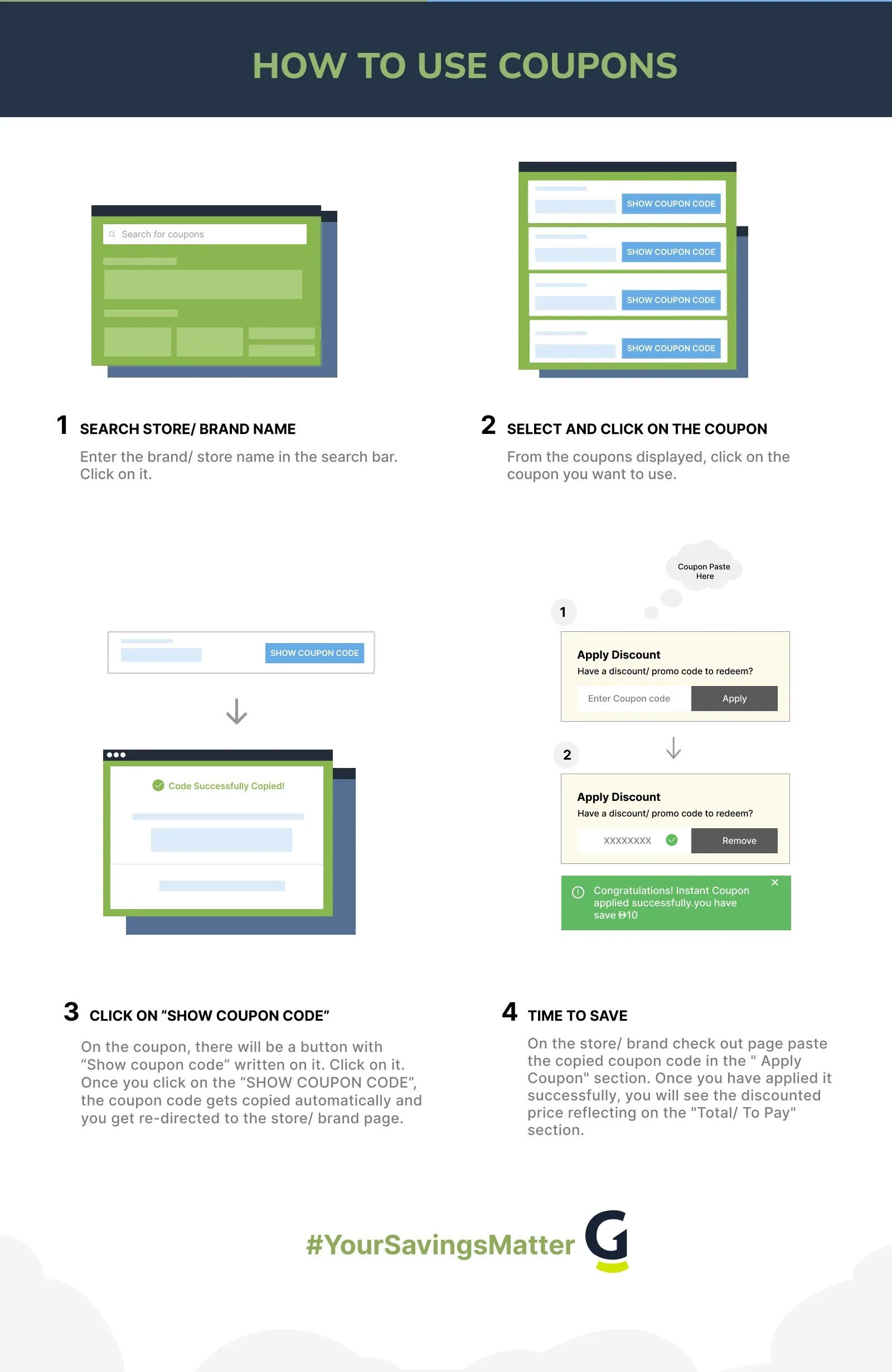
- On the checkout summary screen, look for the Promo Code link directly under the Order Total. Click it to open the entry field.
- Paste your code, click Apply, and confirm the discounted total updates on the right before entering payment details and clicking Subscribe.
Coupon Not Working? Here's What to Check
- Plan tier mismatch. Fix: Most Mailchimp promo codes target Essentials or Standard only. Premium and Free tier accounts often see the field greyed out.
- Coupon expired. Fix: Grab a fresh code from this page. Mailchimp partner promotions usually run 30 to 60 day windows.
- New-user-only restriction. Fix: Most discounts apply only to first-time billing. Existing customers reactivating an old account are treated as returning users and locked out.
- Wrong billing cycle. Fix: Some codes only fire on monthly billing, others only on annual. Toggle the cycle and reapply.
- Contact band mismatch. Fix: Promotions sometimes apply only at the lowest contact band. If you preselected 2,500 contacts, drop to 500 first and apply.
- Wrong payment method. Fix: Mailchimp accepts cards and PayPal in most regions. Crypto and bank transfer flows do not surface the promo field.
- Code already used. Fix: The platform tracks one promotional code per account. Second attempts on the same email fail silently.
- Case-sensitive entry. Fix: Codes are usually uppercase. Type or paste exactly as shown on the coupon card to avoid trailing space issues.
- QuickBooks bundle conflict. Fix: If you signed up through QuickBooks, your billing flows through Intuit's billing portal and the standard Mailchimp promo field disappears. Use the QuickBooks promotions page instead.
- Region restriction. Fix: Some Mailchimp seasonal discounts run US and Canada only. UK and EU accounts sometimes see the field but get an invalid response.
- Browser autofill. Fix: Disable autofill on the billing page. It occasionally pre-fills the promo field with a stale code from a different SaaS subscription.
Deals From Similar Stores
If you are sizing Mailchimp against the rest of the marketing stack, Semrush coupons on GrabOn are worth a look. Semrush handles the SEO and keyword research that feeds your email content calendar, and annual billing on Semrush Pro typically saves more dollars than any single Mailchimp tier swap. Pairing email with strong organic search keeps your acquisition cost honest.
For PPC advertisers running paid traffic into landing pages that then trigger email automations, ClickGuard deals protect Google Ads spend from invalid clicks. Clean traffic into Mailchimp signup forms means your contact growth is real subscribers rather than bots, which keeps you under the 500 free tier ceiling longer. Direct rivals like ConvertKit, Klaviyo, ActiveCampaign, Constant Contact, Brevo (formerly Sendinblue), and GetResponse compete on price and feature depth but do not currently have pages here.
Best Time to Buy Mailchimp
| Sale Name | When It Happens | What to Expect |
| New Year SMB Push | January | Light bundles with QuickBooks, occasional first-month-free on Essentials. |
| Tax Season Promotion | February to April | Intuit cross-sells Mailchimp to QuickBooks tax filers. Expect 20% off a quarter when offered. |
| Mid-Year Promotion | July | Lighter window. Usually a single-month discount or free trial extension on Standard. |
| Black Friday | Late November | Deepest cut of the year. 30 to 50 percent off the first three months of Essentials and Standard in past years. |
| Cyber Monday | Monday after Thanksgiving | The Black Friday code usually carries through Monday with the same first-three-month logic. |
| Year-End Renewal Window | December 26 onward | Existing customers see save offers when cancelling. Worth threatening to leave if your renewal feels expensive. |
Cross-check the official mailchimp.com pricing page against this list before subscribing. The two sometimes surface different bundles depending on your country and signup path.
Shopping and Discount Policies
| Policy or Discount Type | Details |
| Free Tier | Yes, 500 contacts and 1,000 sends a month, no card needed |
| Payment Options | Major credit cards, debit cards, PayPal in most regions |
| Annual Billing Discount | Roughly 10% off versus monthly billing |
| Money-Back Guarantee | Not officially advertised, refund decisions case by case |
| Student Discount | Not available |
| Military Discount | Not available |
| Nonprofit Discount | 15% off paid plans for verified 501(c)(3) organizations |
| Black Friday Sale | Yes, historically 30 to 50 percent off first three months |
| Cyber Monday Sale | Yes, usually mirrors the Black Friday code |
| Pro Partner Program | Yes, revenue share and client benefits for verified agencies |
About Mailchimp
Mailchimp launched in 2001 in Atlanta, Georgia, when Ben Chestnut and Dan Kurzius spun the email tool out of their web design agency. The product stayed bootstrapped and profitable for two decades, building one of the longest-running freemium businesses in marketing software. Intuit acquired Mailchimp in September 2021 for $12 billion in cash and stock, folding it into the small business arm alongside QuickBooks.
Today the platform handles email marketing, marketing automation, SMS, landing pages, basic websites, customer journeys, A/B and multivariate testing, and dozens of CRM and ecommerce integrations. The Free tier still exists, and the brand serves millions of small businesses worldwide. Direct rivals include ConvertKit for creators, Klaviyo for ecommerce-first marketers, ActiveCampaign for sales automation, Constant Contact for traditional small business email, Brevo for cost-conscious senders, and GetResponse for course creators.
Is Mailchimp Worth Using?
Best for: Solo founders, side projects, and small service businesses with under 500 contacts who can ride the Free tier indefinitely. Also strong for QuickBooks customers who want one Intuit invoice and basic email tied to their accounting data. The drag-and-drop builder is genuinely beginner-friendly and the deliverability has held up well.
Be careful if: you run a Shopify or WooCommerce store with serious email revenue goals. Klaviyo eats Mailchimp's lunch on ecommerce flows, predictive analytics, and SMS-plus-email orchestration, and the price gap shrinks fast as your contact list grows. Also be careful if you are a creator or course seller, since ConvertKit's tagging system and creator-focused automations are usually a better fit for the same money. Mailchimp's pricing rises sharply with contact count, so a 25,000-contact list on Essentials costs noticeably more than the same list on Brevo.
Best saving move: Stay on the Free tier as long as your list fits, archive bounced and inactive contacts every quarter to delay the upgrade trigger, and switch to annual billing the moment you do upgrade. If your list crosses 5,000 contacts and your use case is ecommerce, get a Klaviyo quote before renewing Mailchimp Essentials.
Frequently Asked Questions
- Is Mailchimp really free?
Yes, Mailchimp Free is genuinely free for up to 500 contacts and 1,000 email sends a month, with no credit card required at signup. The Free tier includes the basic email builder, one audience, and limited reporting, with Mailchimp branding kept in every email footer. Premium templates, A/B testing, advanced segmentation, and most automations are paid features only.
- How much does Mailchimp cost per month?
Pricing starts at $0 for the Free tier, $13 a month for Essentials, $20 a month for Standard, and $350 a month for Premium, all at the lowest 500-contact band. Costs scale with your contact count, so a 5,000-contact Essentials plan runs significantly higher than the entry price. Annual billing knocks roughly 10% off the monthly equivalent across paid plans.
- Does Mailchimp offer a discount on annual billing?
Yes, switching from monthly to annual billing saves roughly 10% across Essentials, Standard, and Premium tiers. The toggle sits on the pricing page and the billing screen, but the brand does not advertise the discount loudly. If you plan to stay on Mailchimp past six months, annual billing is the easiest no-effort saving.
- How do I apply a Mailchimp promo code at checkout?
Open Account & Billing from the profile menu, click Plans & Pricing, pick a plan, then look for the Promo Code link under the Order Total on the checkout summary. Click the link to expand the field, paste the code, and click Apply. Confirm the discount appears on the right-side total before entering card details and clicking Subscribe.
- Is Mailchimp better than Klaviyo for ecommerce?
Klaviyo is generally better for ecommerce-first brands on Shopify or WooCommerce, with stronger predictive segmentation, deeper product-feed integrations, and tighter SMS-plus-email orchestration. Mailchimp is friendlier for newcomers and cheaper at the lowest contact bands, but its ecommerce automations lag Klaviyo at scale. If your store does over $50,000 a year in email-attributed revenue, Klaviyo usually pays back its higher entry price.
- What happens when I exceed 500 contacts on Mailchimp Free?
Mailchimp pauses your sending and prompts you to upgrade to a paid plan or archive contacts to drop back under 500. Archiving is free and removes contacts from the active billing count without deleting their data. Most accounts crossing 500 are bloated by stale or bounced contacts, so a 15-minute cleanup often keeps you on the Free tier for another quarter.
- Does Mailchimp give a discount to nonprofits?
Yes, verified 501(c)(3) nonprofit organizations get 15% off paid Mailchimp plans. You apply by submitting your nonprofit documentation through Mailchimp's nonprofit page after creating an account. Approval typically takes a few business days, and the discount applies on the next billing cycle for as long as your nonprofit status remains active.
- Can I get a Mailchimp refund if I cancel mid-cycle?
Mailchimp does not advertise an automatic money-back guarantee. Refunds for unused months on annual plans are reviewed case by case by support, and approval is not guaranteed. Cancel before your next renewal date to avoid the next charge, and downgrade to the Free tier instead of deleting the account if you might come back.
- Explore Deals Beyond Mailchimp
Round out your marketing stack savings by browsing the software and antivirus hub for adjacent SaaS that pairs with email marketing. The AI tools hub covers AI copywriting and automation platforms that feed campaign content. To upskill on email strategy and CRM workflows, Udemy course discounts include certified email marketing tracks. For cost-conscious hosting that supports your landing pages and lead capture forms, the hosting deals page tracks current cuts. Seasonal buyers can also check festival offers for Black Friday and Cyber Monday SaaS bundles.
Filters
USER TYPES
Categories
Software & Antivirus
Tools
AI Tools

Coupons Info
Coupons & Offers
:14
Verified
:14
Fresh Offers You May Like

Adobe
SAVE 64% OFF
Flat 64% Off On Creative Cloud All Apps.
Verified

Ahrefs
UP TO 17% OFF
Get Up To 17% OFF On All Membership Plan
Verified
Animaker
UP TO 45% OFF
Grab Up To 45% Off On All Plans
Verified
Coupons from Similar Stores

Subscribe Now
Get The Latest & Best Coupon/Offer Alerts
