

GoTo Coupons & Promo Codes
Best 13 Coupons & Offers last validated on November 2nd, 2026
- All (13)
- Offers (13)
Existing User
- All (13)
- Offers (13)
25%
OFF
Go To meeting Annual Plan - Up To 25% Off
- Get up to 25% off on the Go to Meeting Annual plan.
- Available features are: video meetings, enhanced audio, latest security, and more.
- Nopromo codeis required.
- All users can utilize this offer.
10%
OFF
Enjoy 10% Off On Reach & Elevate Webinar Pro Plan
- Save 10% on the Webinar Reach & elevate plan.
- Unlock the best webinar features by upgrading to these plans.
- Shop more and avail of the deal.
- The offer is valid for all users.
Off
Enjoy 20% Off On Webinar Pro Plan
- Save 20% on the Webinar pro plan.
- Get the best webinar feature by purchasing this plan.
- Shop more and avail of the deal.
- The offer is valid for all users.
16%
OFF
Grab 16% Off On Meeting Business Plan
- Have a chance to get 16% off on Meeting Business Plan.
- Shop now and take advantage of the deal.
- Many meeting features are available on this plan.
- Buy now and enjoy the deal.
GoTo Discounts & Offers
14%
OFF
Get 14% Off On Professional Meeting Plan
- Get 14% off on a professional meeting plan.
- Its contain,
- Hd Video clarity
- Screen sharing
- Web audio
- No meeting Time limits
- Grab the deal with a discount.
- Make your meetings more useful by buying these plans.
20%
OFF
Save 20% Off On Webinar Enterprise Plan
- Grab 20% off on the Webinar Enterprise Plan.
- Shop now and save more on your orders.
- The offer is valid for all users.
- Nocoupon codeis needed to avail the discounts.
11%
Off
Save 11% OFF On Pro Annual Subscription
| Discount | Save 11% OFF |
| Eligible On | Pro Annual Subscription |
| Starts At | $159 |
| Valid for | All users |
- Subscribe now & enjoy 11% OFF on the Pro annual plan
- The basic price starts at $159
- Starter plan features are included
- Extra features
- Breakout Collaboration
- Custom Registration
- Anytime Trainings
- Certificates
- Online Recording with HD Faces
Trial
Enjoy 7 Days Free Trial On Pro Plan
- Enjoy 7 daysfree trial on the Pro plan
- Only 50 attendees are allowed in each call
- Valid for all subscribers
DEMO
Get Your GoTo Connect FREE Demo
- Just drop your details & enjoy a FREE demo on GoTo connect
- No need of a subscription
- Valid for all customers
11%
OFF
Save 11% On Basic Annual Plan
- Bill annually & save 11% OFF on the basic annual plan
- Features
- Up to20 users
- Local or toll-free number options
- Video meetings up to4 participants
- Basic integrations like Outlook & Google Workspace
- 40 SMS credits per seat per month
DEMO
Grab A Free Demo On All Plans
- Have a chance to get a free demo on all plans.
- Book your demo and get to know more about
- It has the best feature and get more details about the features.
9%
OFF
Save 9% On Standard Annual Plan
- Get 9% OFF on the standard annual plan by billing annually
- 150 participants can be allowed in a meeting
- 80 SMS credits per seat per month
- And also all basic standard features are available
8%
Save 8% On Annual Subscription On Starter Plan
- Subscribe now & save 8% on your annual starter plan
- Price starts at just $109 per annually
- Available features
- Online Course Catalogs
- Polls, Tests, and Evaluations
- Material Management
- Recording Management
- Reporting and Analytic
- Android and iOS Apps
- GoTo Meeting 25
- RevStream
Latest Go To Offers & Disocunts For Nov 2026
| Category | Go To Coupons & Vouchers |
| Annual Subscription | Get At 15% OFF |
| Pro Annual Plan | Save 11% OFF |
| Basic Annual Plan | Grab At 11% OFF! |
| Standard Annual Plan | Save 9% OFF |
| Starter Annual Plan | Get 8% OFF |
What GoTo Discounts Are Available Right Now?
Is there an annual meeting renewal coming up, or are you evaluating communications software for your team? The question is simple: what does GoTo actually discount, and how do you get it? Here is the complete picture for June 2026.
- Annual Plan Savings: 8-25% off compared to month-to-month pricing across GoTo products. Select annual billing on the pricing page. The discount is reflected immediately in the displayed annual price.
- 7-Day Free Trial: Full product access for 7 days with no credit card required. Available on GoTo Meeting and other GoTo products. The practical way to evaluate the platform before committing to a paid plan.
- Promo Codes via GrabOn: Periodic promotional codes listed on GrabOn that can apply to GoTo product subscriptions. Check the active listing for any current code and its terms before purchasing.
- Nonprofit and Special Pricing: GoTo has a history of offering custom pricing for nonprofits and educational institutions. Contact GoTo sales directly to inquire about eligibility for your organization.
- AI-Powered Features at No Added Tier Cost: GoTo’s annual plans include AI Receptionist and AI-powered reporting at no additional charge on qualifying tiers. This is a features-as-savings consideration when comparing plans.
| Offer | Saving | Who It Is For | How to Get It |
| DEAL Annual Plan | 8-25% vs monthly | Teams committing 12+ months | Select annual billing on goto.com pricing page |
| TRIAL: Free Trial | Full access, $0 | New users evaluating the platform | Sign up at goto.com, no credit card needed |
| CODE: Promo Code | Varies | New and renewing subscribers | Enter code at checkout from GrabOn listing |
| DEAL Nonprofit Pricing | Custom (contact sales) | Nonprofits and educational orgs | Contact GoTo sales at goto.com/company/contact |
One critical detail for software buyers: GoTo subscriptions are non-refundable once purchased. This is standard practice for SaaS products, but it means the 7-day free trial is not a nice-to-have. It is the correct first step before committing to any paid GoTo plan, especially for smaller teams that have not used the platform before.
GoTo Promo Code Not Working? Check These First
- GoTo promo codes may apply only to specific products. A code for GoTo Meeting may not work on GoTo Connect or GoTo Webinar. Check the GrabOn listing for the product scope of each offer.
- Some codes apply to new subscriptions only and are not valid for renewals. Verify whether the code terms include “new customers only” before relying on it for a renewal purchase.
- Annual billing must be selected for annual plan savings to apply. If you are on the monthly billing toggle on the pricing page, you will not see the annual plan pricing. Switch the billing toggle to Annual.
- Codes may have a user-seat minimum. Enterprise-level codes sometimes require a minimum number of seats to activate. Check the terms on the GrabOn listing.
- GoTo’s checkout is software-industry standard. The promo code field appears during the account setup or subscription confirmation step. If you do not see it, look for a “Have a promo code?” link near the order summary.
- If a code is rejected at checkout and the GrabOn listing shows it as verified, contact GoTo’s 24/7 live chat support at goto.com for real-time assistance.
- Remember: GoTo subscriptions are non-refundable. Confirm all details, plan tier, billing cycle, and seat count before completing the purchase.
Which GoTo Offer Saves You the Most?
The answer depends on your team size, commitment timeline, and which GoTo product you need. Here is how the offers stack against each other.
How Do You Apply a GoTo Promo Code or Get the Annual Discount?
To Get the Annual Plan Discount
- Navigate to goto.com and select the product you want: GoTo Connect, GoTo Meeting, GoTo Webinar, or GoTo Training.
- On the pricing page, look for the billing toggle that switches between “Monthly” and “Annual.” Switch it to Annual.
- The annual pricing appears immediately with the per-month equivalent cost shown at the discounted annual rate. The percentage savings compared to monthly is displayed on the pricing page.
- Select your plan tier and proceed to account setup or checkout.
To Use a GrabOn Promo Code
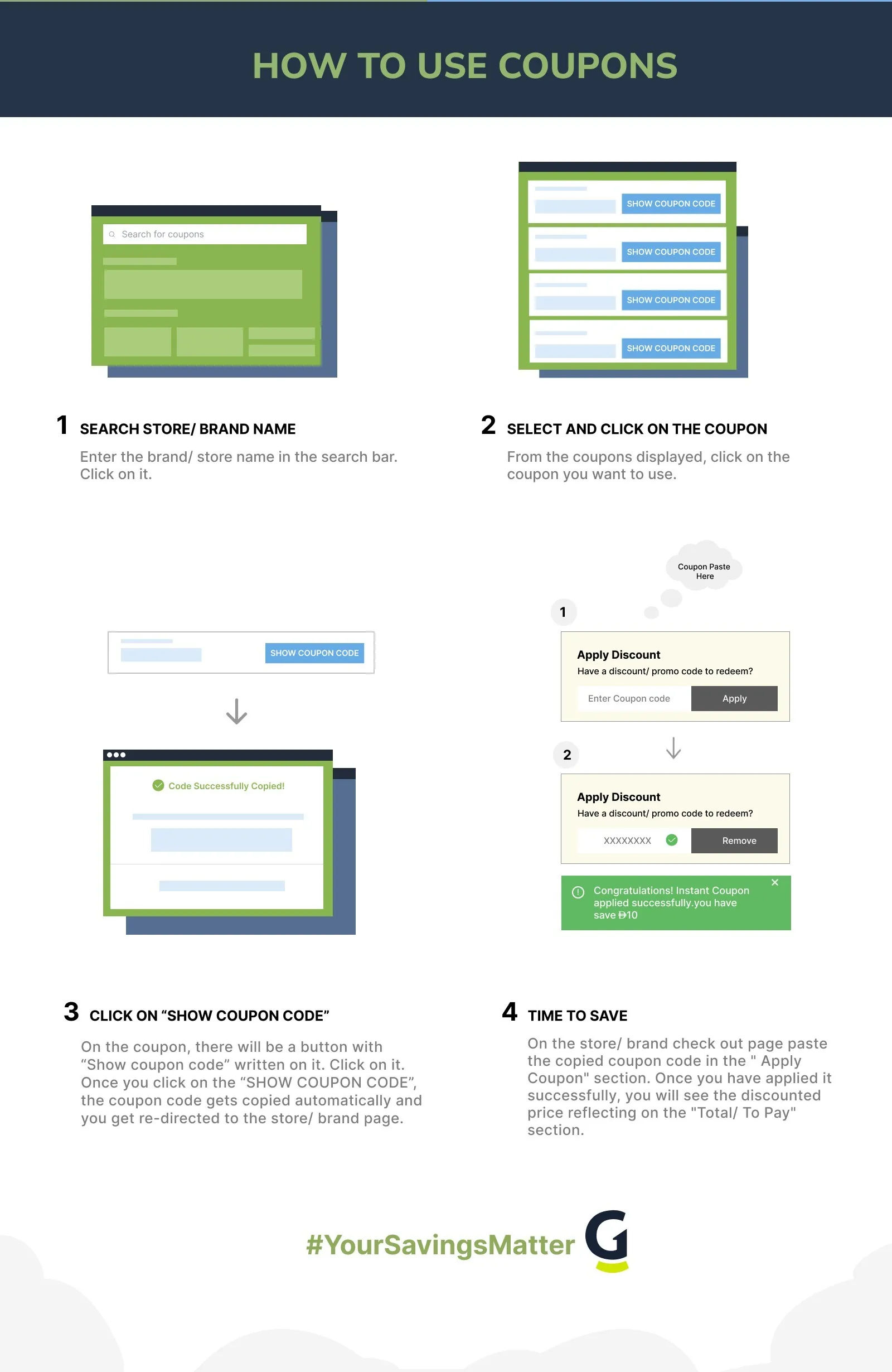
- Find the GoTo offer on GrabOn and click “Get Code.” The code is revealed and copied to your clipboard.
- Navigate to goto.com and select your product and plan.
- During the account creation or subscription confirmation flow, look for a “Have a promo code?” field or a discount code entry box near the order summary.
- Paste your code and click Apply. The discount appears in the order total.
- Complete the account setup and payment. GoTo accepts major credit and debit cards for subscription purchases.
To Start the Free Trial
- Go to goto.com and select the GoTo product you want to evaluate.
- Look for the “Start for Free” or “Free Trial” option on the product page. No credit card is required.
- Create a GoTo account with your business email address and complete the trial signup.
- You have 7 days of full product access. Use this time to run real meetings, test audio and video quality, evaluate the AI features, and confirm the platform works for your team before purchasing.
GoTo vs. Zoom: Which Is the Better Value for Your Business?
GoTo and Zoom are both widely used business communications platforms, and they frequently appear on the same shortlist for teams evaluating video conferencing and UCaaS solutions. Here is an honest comparison across the dimensions that matter for a purchase decision.
| Factor | GoTo | Zoom |
| Core Products | GoTo Connect (UCaaS), Meeting, Webinar, Training | Zoom Meetings, Zoom Phone, Zoom Webinars, Zoom Rooms |
| Annual Plan Savings | 8-25% off monthly pricing | Up to 30% off with annual billing (varies by tier) |
| Free Trial | 7 days, no credit card required | Free tier available (limited to 40-min meetings) |
| AI Features | AI Receptionist, AI-powered reporting (included in qualifying tiers) | Zoom AI Companion (included in paid plans) |
| Refund Policy | Non-refundable (standard SaaS) | Non-refundable (standard SaaS) |
| Support | 24/7 live chat and email | 24/7 phone, chat, email (paid plans) |
| Enterprise Clients | Deloitte, Tenet Health, Lenovo | Fortune 500 clients broadly |
| UCaaS (Full Phone System) | Yes, via GoTo Connect | Yes, via Zoom Phone (add-on) |
GoTo’s strongest differentiation from Zoom is GoTo Connect: a full UCaaS phone system that replaces your business phone infrastructure alongside video conferencing. Zoom offers Zoom Phone as a separate add-on, which means additional per-seat licensing. For businesses that want a single platform handling both voice calls and video meetings, GoTo Connect can represent a lower total cost when combining those two functions.
For pure video meetings with a free tier available immediately, Zoom’s free plan (40-minute meeting limit) serves as an extended evaluation tool. GoTo’s 7-day full-access trial has a shorter window but unrestricted feature access. Which one fits your evaluation process depends on how quickly your team can run meaningful test scenarios.
Does GoTo Offer Nonprofit or Special Pricing?
GoTo Pricing for Nonprofits and Educational Organizations
GoTo has offered custom pricing for nonprofits and educational institutions, though the specifics are handled through direct sales conversations rather than a self-serve discount code. Here is what to know if your organization may qualify.
- Contact GoTo sales directly. Navigate to goto.com/company/contact and reach out to the GoTo sales team. Mention that your organization is a nonprofit or educational institution and ask about available pricing accommodations.
- Prepare your nonprofit documentation. GoTo sales will typically ask for verification of nonprofit status (such as a 501(c)(3) determination letter in the US) before confirming any special pricing arrangement.
- Compare against annual plan pricing first. The standard annual plan discount of 8-25% is available to all buyers without qualification. For smaller nonprofits, the annual plan discount alone may be sufficient. Custom nonprofit pricing tends to be most impactful for larger organizations with higher seat counts.
- GoTo Training is particularly relevant for educational use cases. GoTo Training includes features designed for virtual learning environments including breakout rooms, materials sharing, and post-session tests. Educational organizations evaluating GoTo should include GoTo Training in their evaluation alongside GoTo Meeting.
- 24/7 support is available to all plans. GoTo’s 24/7 live chat and email support is available regardless of plan tier. For nonprofits or schools that may not have dedicated IT staff during standard business hours, this matters.
There is no publicly posted nonprofit discount code or self-serve discount page for GoTo as of June 2026. The channel for nonprofit pricing is direct sales contact. If your organization qualifies, this outreach is worth the few minutes it takes.
Frequently Asked Questions
- Is GoTo a legitimate business software company?
Yes. GoTo is a legitimate B2B business communications platform trusted by enterprise clients including Deloitte, Tenet Health, and Lenovo. It provides GoTo Connect (UCaaS), GoTo Meeting, GoTo Webinar, and GoTo Training with 24/7 live chat and email support included on paid plans.
- Does GoTo offer a free trial?
Yes. GoTo offers a 7-day free trial with no credit card required. The trial provides full access to the product features. This is the recommended starting point for any team evaluating GoTo before purchasing a subscription, given that GoTo subscriptions are non-refundable once purchased.
- What discount do you get with a GoTo annual plan?
GoTo annual plans save 8-25% compared to month-to-month pricing, depending on the product and tier. The annual billing option is selected on the GoTo pricing page using the billing toggle, and the discounted annual price is shown immediately. No promo code is needed to access annual plan pricing.
- Does GoTo offer refunds?
GoTo subscriptions are non-refundable. This is standard practice for SaaS subscription products. Because refunds are not available, GoTo’s 7-day free trial is the correct path for evaluating the platform before any purchase commitment.
- What products does GoTo offer?
GoTo offers GoTo Connect (a UCaaS unified communications platform with phone system), GoTo Meeting (video conferencing), GoTo Webinar (large-format virtual events), and GoTo Training (virtual learning and training sessions). AI Receptionist and AI-powered reporting are included in qualifying GoTo Connect tiers.
- How do I contact GoTo customer support?
GoTo provides 24/7 live chat and email support. Access support through the GoTo website at goto.com. Live chat is available around the clock for paid plan customers. For sales inquiries including nonprofit pricing, contact the GoTo sales team at goto.com/company/contact.
- Verdict: Is GoTo the Right Communications Platform for Your Team?
Best for: Small to mid-size businesses and distributed teams that want a single platform covering video meetings, webinars, and a full UCaaS phone system under one vendor relationship. The annual plan discount of 8-25% combined with 24/7 support makes GoTo competitive for teams that need reliable business communications software with guaranteed SLA-backed uptime.
Be careful if: You are not certain which GoTo product is the right fit for your workflows, or if your team has not tested the platform. GoTo subscriptions are non-refundable, so buying without a trial is a risk. Always start with the 7-day free trial and run real use cases before purchasing.
Best saving move: Start with the 7-day free trial. If GoTo meets your needs, purchase the annual plan via GrabOn using any active promo code at checkout. The annual billing option alone saves 8-25% versus month-to-month, and combining an annual plan with an active GrabOn code produces the maximum upfront discount on your subscription. For nonprofits, contact GoTo sales before purchasing to ask about custom pricing.
More business software deals: browse software coupons on GrabOn or compare with Zoom coupons. For broader productivity tools, see the business software coupon hub. If you are evaluating UCaaS platforms, the communication tools deals page covers additional options. For nonprofit technology resources, the tech deals hub is worth a look.
Filters
USER TYPES
Categories
Software & Antivirus

Coupons Info
Coupons & Offers
:13
Verified
:13
Fresh Offers You May Like
Adobe
SAVE 64% OFF
Flat 64% Off On Creative Cloud All Apps.
Verified
Ahrefs
UP TO 17% OFF
Get Up To 17% OFF On All Membership Plan
Verified
Animaker
UP TO 45% OFF
Grab Up To 45% Off On All Plans
Verified
Coupons from Similar Stores

Subscribe Now
Get The Latest & Best Coupon/Offer Alerts
