


Veed.io Promo Codes And Coupons
Best 9 Coupons & Offers last validated on November 1st, 2026
- All (9)
- Offers (9)
Existing User
- All (9)
- Offers (9)
50%
OFF
Get Flat 50% Off On Lite Plan
- Enjoy a flat 50% off on the Lite plan
- Get it at just $12/month
- Offer valid only when you billed annually
- All users can avail of this offer
47%
OFF
Grab 47% Off On PRO Plan
- Get a flat 47% off on the PRO plan
- Offer valid only on selected plans
- Applicable when you take annual subscription
- No minimum spend is required
Creator AI Video Plan For $25/Month per Editor
- Create studio-quality videos with the Creator Plan for just $25/month per editor.
- Get 300 credits per month to generate up to 60 video clips.
- Includes watermark removal and unlimited auto subtitles.
- Access a full stock audio and video library to enhance your projects.
Enjoy The Lite Annual Plan At Just $12/Month
- Enjoy the Lite annual plan at just $12/month
- With this plan, you can create scroll-stopping social videos
- This plan includes
- No watermark on your video
- Auto-Subtitles (12 hr/mo)
- Full HD 1080p Exports
- Some Stock Audio & Video
- Unlimited file upload size
- Simple Brand Kit (fonts, colors, subtitles)
- Auto-resize for social media
- Up to3 Editors (billed per Editor)
- Get it at the best price
Veed.io Discount Codes And Offers
$24
Get The Lite Plan At Just $24/Month
- Enjoy the Lite plan at just $24/month
- With this plan, you can create scroll-stopping social videos
- This plan includes
- No watermark on your video
- Auto-Subtitles (12 hr/mo)
- Full HD 1080p Exports
- Some Stock Audio & Video
- Unlimited file upload size
- Simple Brand Kit (fonts, colors, subtitles)
- Auto-resize for social media
- Up to3 Editors (billed per Editor)
- Get it at the best price
$29
Get PRO Annual Plan At Just $29/Month
- Grab the pro annual plan at just $29/ month
- With this plan, you can avail
- Access to all AI tools
- Translate videos to 50+ languages (20 min/mo)
- 4K Ultra HD Exports
- Full Stock Audio & Video Library
- Download Subtitles
- Full Brand Kit (images, video, audio)
- AI Avatars (20 min/mo)
- Up to3 Editors (billed per Editor)
- Caption and share from iOS
- This plan you can
- Produce studio-quality videos with AI
Enjoy The PRO Plan At Just $55/Month
- Grab the pro plan at just $55/ month
- With this plan, you can avail
- Access to all AI tools
- Translate videos to 50+ languages (20 min/mo)
- 4K Ultra HD Exports
- Full Stock Audio & Video Library
- Download Subtitles
- Full Brand Kit (images, video, audio)
- AI Avatars (20 min/mo)
- Up to3 Editors (billed per Editor)
- Caption and share from iOS
- This plan you can
- Produce studio-quality videos with AI
Trial
Try Veed.io For Free
- Enjoy Veed.io for free
- By paying $0, you can try this free trial
- This free trial includes
- Watermarked video
- Auto-Subtitles (2 min/mo)
- 720p Exports
- 10-minute video length
- Upload files up to1GB
- Try AI tools once
Scale Your Team’s Video Creation with Enterprise Tools and Custom AI Avatars
- Centrally manage teams, brand kits, and advanced video security features
- Create with custom templates, captions, and review mode for collaboration
- Get priority support, analytic, and dedicated customer success guidance
- Let's talk—custom credits and pricing tailored to your enterprise needs
Latest Veed.io Coupon Codes & Discounts For Nov 2026
| Category | Veed.io Promo Codes & Offers |
| Sitewide Offer | Flat 25% Off |
| Sitewide | 20% Off |
| Lite Plan | Get 50% Off |
| PRO Plan | Enjoy 47% Off |
| Free Trail | At $0 |
How to Get VEED.IO Coupons
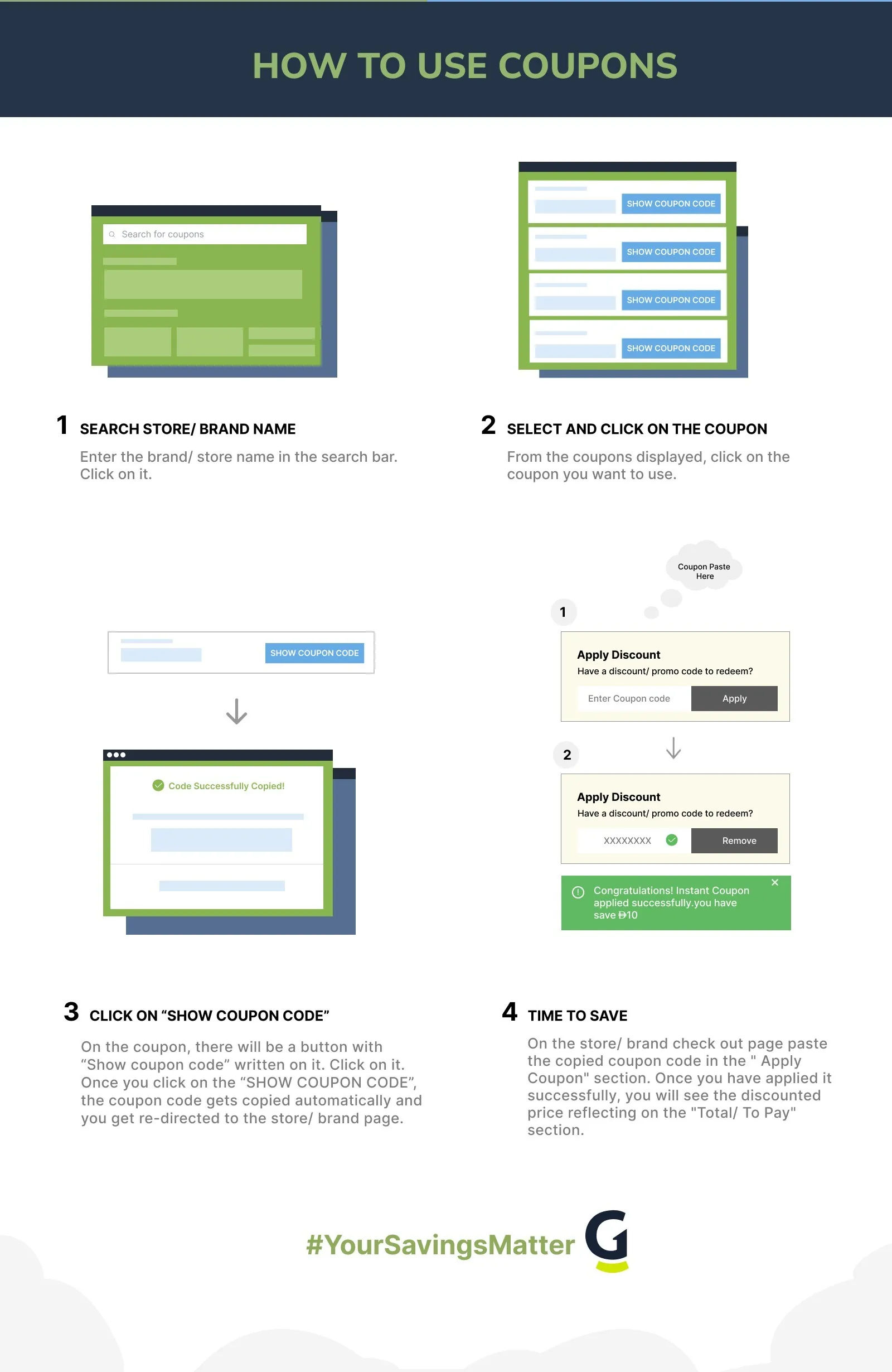
- Visit the website and look for pop-ups or banners displaying any ongoing offers on the tool. You can also check out the pricing page to know more about the discounts on various plans.
- Sign up for free using your work email ID and receive updates about the tool and its offers.
- Follow VEED.IO‘s social media pages like X (Twitter), YouTube, Instagram, TikTok, and more to get more updates on new feature releases and upcoming sales.
- You can also directly contact the sales team and talk to an expert about what VEED.IO plan is the best for you and get the right pricing for the features you use.
- Download the app to enjoy the easy-to-use features and know more about app-specific discounts on the plans.
- Browse coupon platforms like GrabOn and get your hands on active VEED.IO coupons that you can use to get the best price on plans.
- Look for VEED.IO reviews on YouTube and tech blogs. Sometimes creators share promo codes for the tools during their reviews.
How to Save More on VEED.IO (Hacks and Tricks)
- You can use VEED’s free plan to access basic editing tools, export short videos, and try out the interface before committing to a paid subscription. However, if you want to download videos without a watermark, you need to sign up for the paid plan.
- If you want to learn more about video-editing, you can also use the free resources available on the website, like articles, webinars, and video guides.
- Opt for longer subscription plans like annual or quarterly to save more. You can usually save around 20-30% off the total yearly cost if you go for long-term plans.
- Wait for major sales events like Black Friday, Cyber Monday, and New Year’s to get subscription plans at the lowest prices. VEED.IO has a dedicated Black Friday/Cyber Monday offers page that displays seasonal offers throughout the year.
- If you are a business user, you get 50% off in the first three months. Moreover, you also earn more once you start referring the tool to others.
- VEED.IO runs an affiliate program that lets you earn a commission on referrals. If you are a content creator, educator, or tool reviewer who recommends VEED to your audience, you can generate recurring income from your referrals rather than only using coupons as a one-way discount.
VEED.IO Cancellation Policy
You can cancel your VEED.io subscription at any time through the application’s account settings; if you encounter any issues, simply contact customer support via chat or email for assistance. If you cancel before two business days prior to your renewal date, your subscription will expire at the end of the current period, and you can continue to use the service until then. Refunds are generally not provided if you’ve used the services, but if you’re a consumer who hasn’t used any features and have canceled within 14 days of purchase, you may be eligible for a full refund.
VEED.IO Discount Policies (At a Glance)
| Payment Options | Visa, MasterCard, American Express, and PayPal |
| Military Discounts | No military discounts. |
| Student Discounts | No student discounts. |
| Black Friday Sales | Steep discounts on subscription plans of up to 50%. |
| Cyber Monday Sales | Yes, it offers Cyber Monday sales. |
About VEED.IO
VEED.io is an intuitive online video editing platform founded in 2018 by Sabba Keynejad and Tim Mamedov in London. You can easily cut, trim, crop, add subtitles, and enhance videos directly in your browser, without needing to download any software. VEED.io offers features like auto-subtitling, video effects, screen recording, and collaborative editing, making video creation accessible whether you’re a content creator, marketer, educator, or business professional. The platform streamlines the complex video-editing tasks and offers a user-friendly interface. It saves you both time and effort, allowing you to create professional-looking videos with ease.
Explore Deals Beyond This Store
Founded in 2020, Synthesys is an AI-powered content generation platform created to democratize access to high-quality synthetic media, helping you create media in bulk. Similarly, Invideo AI is a powerful AI video generator that lets you turn text into professional videos with stock footage, voiceovers, and multilingual support.
We have exclusive Synthesys coupon codes and Invideo AI promo codes at GrabOn that you can use to enjoy discounted plans. Do you want to save more? GrabOn offers deals on AI tools to help you access premium tech for less.
VEED.IO vs Invideo AI
Choose Veed.io if you need a powerful, browser-based editor for quick social media subtitling and high-quality screen recording. Opt for Invideo if you prefer using AI to generate full video drafts from text prompts or require access to a massive library of pre-made stock templates.
| Feature | VEED.IO | InVideo AI |
| Founded | 2018, London, UK | 2019, San Francisco, CA |
| Primary use case | Browser-based video editing with AI tools, subtitles, and team collaboration | Text-to-video AI generation from scripts or prompts |
| Free plan | Yes, full editor, 720p, limited auto-subtitles, watermark on exports | Free tier includes limited AI generation minutes and watermark; export/usage caps vary by current plan rules. |
| Paid plan starting price | From $12/month (billed annually) (subject to change) | From $20/month (billed annually) (subject to change) |
| 4K export | Pro plan and above | Max plan only |
| Auto-subtitles | Yes, 125-plus languages, AI-generated; unlimited on paid plans | Yes, AI-generated subtitles in multiple languages |
| Brand Kit | Basic (fonts and colors) on entry paid plans; full brand kit on Pro; multiple kits on Business | Available in paid tiers |
| AI video generation from text | Yes, text-to-video, AI avatars (Pro and above) | Core product feature: generates full videos with script, footage, voiceover, and music from a text prompt |
| Team collaboration | Yes, real-time time-stamped comments, shared workspaces (Pro and Business) | Per-user subscriptions; no team workspace as of 2026 |
| US availability | Full access, browser-based | Full access, browser-based |
| Best for | US creators, marketing teams, and agencies that need polished editing, consistent branding, and AI subtitle accuracy across multiple projects | Content producers who want to generate complete videos from scripts with AI stock footage and voiceover, without manual editing |
Pricing and features are subject to change. Check each platform's official pricing page before subscribing.
Frequently Asked Questions
- Can I use multiple discounts at once?
No, VEED.IO does not allow you to use two coupon codes at once.
- Is VEED.IO free to use?
Yes. You can sign up with any email address and use the free plan without a credit card. The free plan gives you full access to the editor but applies a VEED watermark to all exports, caps auto-subtitle generation at 30 minutes per month, limits video length to 10 minutes, and restricts exports to 720p resolution. For content you plan to publish professionally, a paid plan is needed to remove the watermark and unlock Full HD or 4K exports. Paid plans start from $12 per month, billed annually.
- What does VEED.IO cost, and which plan is right for me?
VEED.IO offers a free plan and several paid tiers. Paid plans start from around $12 per month (Creator) on annual billing, which removes the watermark and unlocks 1080p exports and access to over 50,000 royalty-free assets. The Pro plan, at around $21 per month billed annually, adds 4K export, AI avatars, translation into 50-plus languages, the full brand kit, and support for up to five editors on one account. A Business tier is available for larger teams that need multiple brand kits, centralized management, and advanced analytics. Enterprise pricing is custom. All prices are per user per month and are subject to change; check veed.io/pricing for current rates. Annual billing saves approximately 25 to 33 percent compared to monthly.
- What is VEED.IO's Brand Kit, and which plans include it?
The Brand Kit lets you store your logo, brand colors using hex codes, and custom fonts, so every video your team produces stays visually consistent without manual setup each time. Once saved, you can apply your full brand identity to any project with a single click. A basic version of the brand kit covering fonts and colors is available on entry-level paid plans. The full brand kit, which supports logos, images, video assets, and audio, is included in the Pro plan. Multiple brand kits for managing more than one client or sub-brand are available on Business and above. This makes the Pro and Business tiers particularly useful for agencies, marketing teams, and creators who produce videos for multiple brands (per veed.io and support.veed.io).
- Does VEED.IO work well for agencies and US marketing teams?
VEED.IO is used by marketing teams at companies including P&G, Pinterest, and Visa. For agencies managing content across multiple clients, the Brand Kit on Pro and Business plans enforces visual consistency across editors, while real-time collaboration with time-stamped comments keeps feedback organized within the platform instead of in email threads. Because VEED runs entirely in the browser with no software installation required, it works across Mac, Windows, and Chromebooks without IT approval or download permissions, which is a practical advantage for distributed US teams. All paid plans include a commercial license, meaning you own and can resell any content you produce through the platform.
- What can I do with VEED.IO's free plan without paying?
The free plan covers the full editing suite, including cut, trim, crop, filters, transitions, text overlays, and the stock asset library. You can generate auto-subtitles using the AI tool up to 30 minutes per month, record your screen or webcam directly in the browser, and export videos up to 10 minutes long at 720p resolution. The watermark appears on every export, which makes it unsuitable for published or client-facing content but fully functional for internal drafts, testing workflows, or personal projects. You do not need a credit card to sign up, and the account stays active indefinitely without a trial expiry.
Filters
USER TYPES
Categories
AI Tools

Coupons Info
Coupons & Offers
:9
Verified
:9
Fresh Offers You May Like

Candy AI
site wide off
Up To 70% Off On All Plans
Verified

EVA AI
FLAT 30% OFF
Grab 30% Off On People Analytics
Verified

Facecheck ID
Credits With Crypto - $0.10 USD Per Credit
Verified
Coupons from Similar Stores

Subscribe Now
Get The Latest & Best Coupon/Offer Alerts
