


Pixlr Promo Codes & Coupons
Best 7 Coupons & Offers last validated on October 31st, 2026
- All (7)
- Offers (7)
Existing User
- All (7)
- Offers (7)
40%
Off
Get Up To 40% Off On Annual Subscription
- Enjoy up to 40% off on an annual subscription.
- Applicable to sitewide plans.
- Nopromo codeis required to receive the savings.
- All users are eligible for this offer.
- Subscribe now and enjoy the best features with the biggest discount.
40%
OFF
Flat 40% off On Yearly Plus Plan Subscription
- Get 40% off on plus plan subscription.
- Valid on a yearly subscription.
- Features:
- Ad-Free
- Unlimited saves
- 80 monthly AI Credits
- No coupon is required to claim the discount.
- This offer is valid for all users.
35%
OFF
Premium Plan - 35% Off On Yearly Subscription
- Flat 35% off on the yearly premium plan.
- Subscribe now to access premium features.
- Enjoy a 7-dayfree trial.
- The plan price starts from $6.49 per month.
- Everyone can save money with this offer.
OFF
Save 29% On Annual Team Plan
- Grab 29% off on the annual team plan.
- The plan cost from $11.99.
- It includes:
- Ad-Free
- Unlimited saves
- 5 Premium seats
- 1000 monthly AI Credits/seat
- Five premium seats included.
- Any user can utilize this offer.
Pixlr Discount Codes & Offers
$2
Monthly Plus Plan - Starting At $2.49
- Get a monthly plan at an affordable price.
- The plan price starts at $2.49.
- Subscribe now and get 7-dayfree trial.
- This deal is open to all users.
Grab Monthly Premium Plan Are Just $9.99
- Subscribe monthly premium plan at a minimal price.
- The cost begins from $9.99.
- It includes:
- 1000 monthly AI Credits
- Private mode for AI Generations
- Big library of fonts, templates, elements, animations, and more.
- Get a 7-dayfree trial with your subscription.
$17
Monthly Team Plan - Cost begins From $16.99
- Get the monthly team plan for the best price.
- Plans start at $16.99.
- Available Features:
- Ad-Free
- Unlimited saves
- 5 Premium seats
- 1000 monthly AI Credits/seat
- Enjoy a 7-dayfree trial.
- Cancel anytime, whenever you feel like it.
Best Pixlr Coupons, Promo Codes & Offers For Nov 2026
| Category | Pixlr Coupon Codes & Discounts |
| Annual Subscription | Get Up To 40% Off |
| Yearly Plus Plan Subscription | Grab 40% Off |
| Premium Plan Yearly Subscription | Enjoy 35% Off |
| Annual Team Plan | Save 29% Off |
| Monthly Plus Plan | Starting at $2.49 |
More Ways To Save on Pixlr
- Start with the free plan before upgrading. Pixlr offers a fully functional free tier that includes basic editing tools across its web, desktop, and mobile apps. Trying the free plan first lets you test which features you actually need before committing to a paid subscription.
- Start a 7-day free trial on Plus or Premium. Pixlr offers a free trial on both paid plans with no commitment required. You can cancel at any time from your account page before the trial period ends, and you won't be charged.
- Choose an annual subscription over monthly billing. The Plus plan drops from $2.49/month to $1.49/month when billed yearly, and Premium goes from $9.99/month to $6.49/month. Paying annually can save you between 30% to 35% compared to the monthly rate.
- Watch for seasonal discount codes. Pixlr runs promotional codes throughout the year, particularly around Back to School season in September and during the December–January holiday period. Discounts of 30% to 40% off subscriptions have been tracked during these windows. You can check GrabOn for verified Pixlr promo codes before subscribing.
- Apply for Pixlr for Education if you qualify. Schools, teachers, and administrators at recognized educational institutions can apply for a free Pixlr upgrade through the PixlrEdu program. Approved schools get ad-free access, unlimited saves, AI tools, and mobile app access at no cost.
- Purchase an AI Credit Pack as a one-time top-up. If you're on a lower-tier plan and run short on AI credits before your billing cycle renews, Pixlr sells credit packs separately. These never expire and are counted independently from subscription credits, so they can be a cost-effective option for occasional heavy use.
- Check Pixlr's promotions page for current offers. Pixlr maintains a dedicated page for active promotional codes and deals. The promo code feature has had periods of downtime, but checking the page directly or emailing [email protected] may surface discounts not widely listed elsewhere.
Pixlr for Education Program
Pixlr offers a free upgrade program called Pixlr for Education, designed for teachers, educators, administrators, and qualified educational NGOs at recognized institutions. Approved accounts get ad-free access, unlimited saves, AI tool access, mobile app support, and enrollment in Pixlr's official certification course at no cost.
Applications are submitted by a staff representative using a school domain email address. Individual student applications are not accepted directly; students gain access once their school's domain has been whitelisted. The application is reviewed by Pixlr's team, and approval is communicated via email.
This program is available to institutions worldwide and is compliant with GDPR, CCPA, and COPPA requirements. If your school qualifies, it covers an unlimited number of teacher and student registrations under a single approved domain.
Return and Refund Policy
Pixlr's stated policy is that subscription payments are non-refundable once processed. This applies to both Plus and Premium plans purchased on the website. If you subscribed through a mobile app on Android or iOS, refund requests must be directed to the relevant app store, as those transactions are managed by Google Play or the Apple App Store.
The 7-day free trial on paid plans is the main protection against being charged for a plan you don't intend to keep. You can cancel at any time from your account page before the trial ends, and access to premium features continues until the end of the paid billing period after cancellation.
For questions about billing errors or exceptional circumstances, Pixlr's support team can be reached at [email protected]. Always review the current terms on Pixlr's official website before subscribing for the most up-to-date policy details.
Pixlr vs Canva vs Adobe Express vs Fotor
All four platforms are browser-based and serve creative professionals, marketers, and everyday users. But they're built around different core strengths. Pixlr leads when photo editing depth is the priority, with layer-based tools that get close to desktop software. Canva is best for template-driven graphic design and team workflows. Adobe Express fits users already in the Adobe ecosystem who need fast, brand-consistent output. Fotor fills the middle ground for users who want quick photo enhancement and light design without a learning curve.
| Feature | Pixlr | Canva | Adobe Express | Fotor |
| Primary strength | Photo editing depth, AI tools, retouching | Template-driven graphic design, collaboration | Quick graphic creation tied to the Adobe ecosystem | Balanced photo enhancement and simple design |
| Advanced editing (layers, masks) | Yes, in Pixlr E | No | Yes, it has built-in layers and masking tools | Yes. Permanent free tier with limited features. |
| Template library | Moderate | Very large | Large (Adobe-branded) | Moderate |
| Free tier | Yes, with ads and limited AI credits | Yes, generous | Yes, with Adobe Firefly AI | Yes, with limited features |
| AI tools | Yes (generative fill, background removal, batch editing) | Yes (Magic Studio, text-to-image) | Yes (Adobe Firefly integration) | Yes (AI image generator, background removal) |
| Brand kit and team collaboration | Limited | Yes, core feature | Yes, via Adobe accounts | Limited |
| Mobile app | Yes (iOS and Android) | Yes | Yes | Yes |
| Education program | Yes (free for verified institutions) | Yes (free for educators and students) | Yes (via Adobe Education) | No confirmed program |
| Best for | Photo editors and designers who need Photoshop-like tools in-browser | Marketing teams, non-designers, social media content at scale | Adobe ecosystem users needing fast graphic output | Beginners wanting photo touch-ups and simple designs |
Deals From Similar Stores
Adobe offers professional-grade creative software including Photoshop, Illustrator, and Lightroom through its Creative Cloud subscription. Pricing varies by plan, with single-app and all-apps bundles available, and Adobe periodically runs promotional discounts of 20% to 40% off for new subscribers. Students and teachers can access significantly reduced Creative Cloud rates through Adobe's verified education program. Look for Adobe coupon codes and subscription deals before you sign up.
Canva is a browser-based design platform that offers a free tier alongside its Canva Pro subscription, which runs at $15/month or less on annual billing. Canva also provides free access to verified students, teachers, and eligible nonprofits through its dedicated programs. The platform runs seasonal promotions on Pro plans, particularly around back-to-school and new year periods. You can check GrabOn's Canva promo codes to get offers on Canva Pro subscriptions.
Best Time To Buy at Pixlr
| Sale Name | When It Happens | What To Expect |
| Back to School Sale | September | Discounts of up to 40% off subscriptions, targeted at students and educators. September is one of the most consistent months for active Pixlr promo codes. |
| Holiday / Year-End Sale | December–January | Historically, Pixlr's deepest discount period, with reductions of up to 60% off tracked during this window. Good time to lock in an annual subscription. |
| Black Friday / Cyber Monday | Late November | Sitewide subscription discounts typically available. Discount depth varies by year; annual plan deals are usually the highlight. |
| Spring Promotions | March–April | Promotional codes appear periodically in spring, often in the 25% to 30% off range for Plus and Premium plans. |
| Seasonal / Campaign Drops | Throughout the year | Pixlr releases limited promotional codes tied to marketing campaigns. These are announced via email and social media and may have short redemption windows. |
Dates and discount depths change each year. Check Pixlr's official website and GrabOn closer to each period for the latest verified offers.
Pixlr Shopping & Discount Policies
| Policy or Discount Type | Answer |
| Free Plan | Yes. Pixlr offers a permanently free tier with basic editing tools and limited AI credits. |
| Free Trial | Yes. 7-day free trial available on Plus and Premium plans. Cancel anytime before the trial ends. |
| Payment Methods | Visa, Mastercard, PayPal. Mobile app purchases processed via Google Play or Apple App Store. |
| Annual vs. Monthly Billing | Annual plans save 30 to 35% vs monthly. Plus: $1.49/mo (annual) vs $2.49/mo. Premium: $6.49/mo (annual) vs $9.99/mo. |
| Student / Education Discount | Yes. Free upgrade available to qualifying schools and educators via Pixlr for Education program. Individual student sign-ups not accepted directly. |
| Military Discount | No confirmed dedicated military discount program. |
| Senior Discount | No confirmed senior discount program. |
| Black Friday Sale | Yes. Subscription discounts typically available in late November. |
| Cyber Monday Sale | Yes. Usually runs alongside Black Friday promotions. |
| AI Credit Packs | Yes. Purchasable separately as a one-time top-up. Credits never expire. |
| Team Plan | Yes. Team plan available at $16.99/month (monthly) or $11.99/month (annual). |
| Refund Policy | No refunds once payment is processed. Free trial available to test before committing. |
| Gift Cards | Available. Check Pixlr's website for current availability and terms. |
| Price Match | No official price match policy. |
| Apps | Available on iOS and Android. Subscription purchased via the app is managed through your app store account. |
About Pixlr
Pixlr was founded in 2008 and is headquartered in Sweden. The platform provides browser-based and app-based photo editing, graphic design, and AI-powered image generation tools. Its product suite includes Pixlr Editor, Pixlr Express, Pixlr Designer, a Batch Editor, and a background removal tool, accessible across web, desktop, and mobile.
Pixlr operates across multiple languages and markets worldwide, with users spanning casual editors, students, educators, and small business owners. The platform is notable for offering a capable free tier that does not require software installation, making professional-grade editing tools accessible without upfront cost.
Frequently Asked Questions
- Does Pixlr offer a free plan?
Yes. Pixlr has a permanently free tier that includes access to its core editing tools across web, desktop, and mobile. The free plan includes limited AI credits and carries ads. You can upgrade at any time to remove ads and access a larger AI credits allowance.
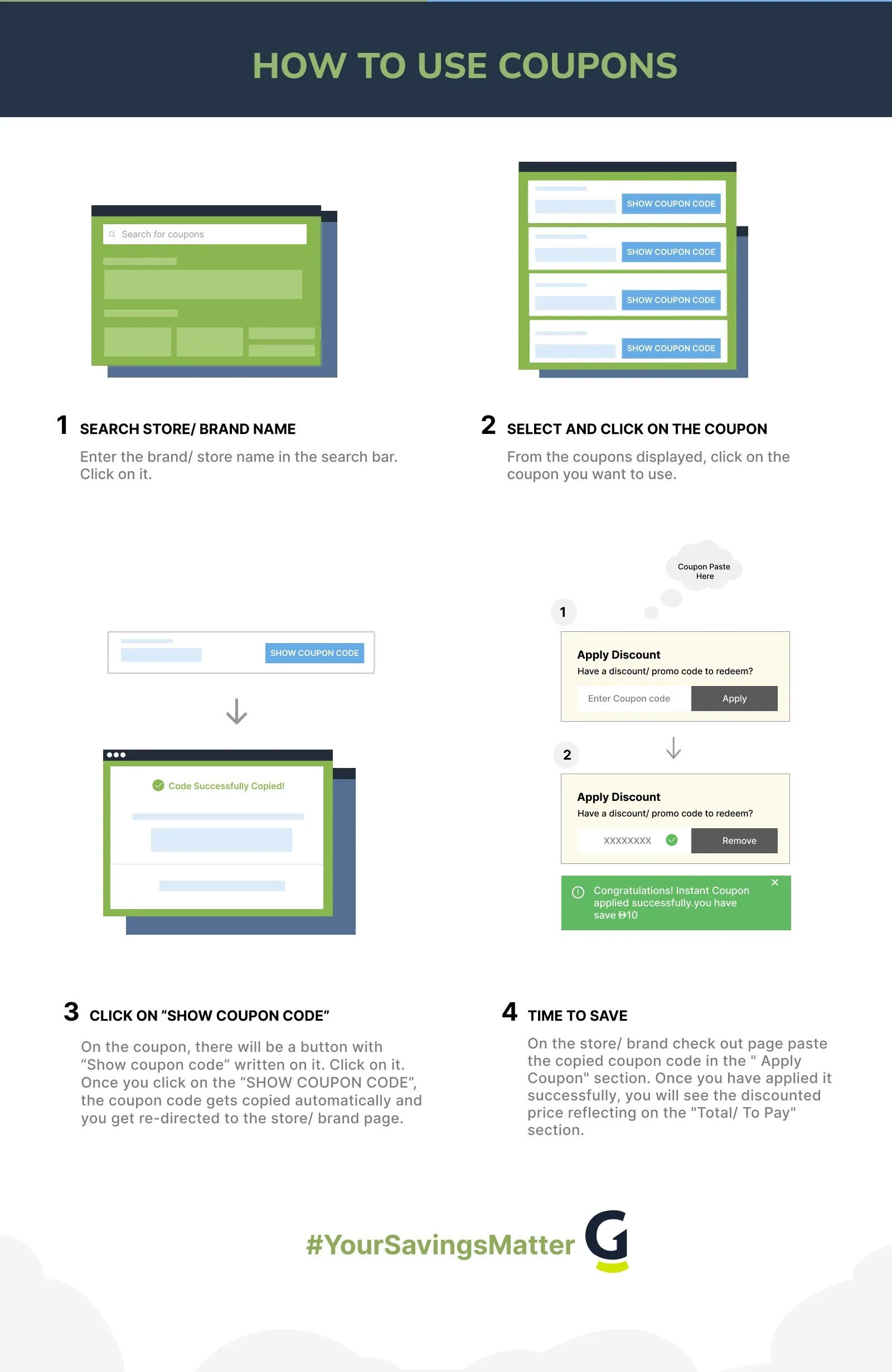
- How do I use a Pixlr promo code?
Pixlr's promo code feature has had intermittent availability on its website. When active, you can enter a code on the pricing or checkout page before completing your payment. If the promo code field is not showing, you may be able to email [email protected] for assistance applying a code to your subscription.
- Is there a student discount at Pixlr?
Pixlr offers a free upgrade program for students and educators through its Pixlr for Education initiative. Access is granted at the school domain level, meaning an administrator or teacher at your institution needs to apply on behalf of the school. Individual student applications are not accepted directly.
- What is the difference between Plus and Premium?
Both plans are priced in USD and include a 7-day free trial. The Plus plan costs $1.49 per month on annual billing ($2.49 monthly) and is ad-free with 80 monthly AI credits and unlimited saves. The Premium plan costs $6.49 per month on annual billing ($9.99 monthly) and includes 1,000 monthly AI credits, Pixlr's full template and font library, private mode for AI generations, and additional design elements. If AI tools are central to your workflow, the credit gap between the two plans is the main reason to upgrade.
- Can I use my Pixlr subscription on multiple devices?
Yes. A Pixlr subscription covers access across web, desktop, and mobile platforms under a single account. You can switch between devices without purchasing additional plans.
- What happens to my AI credits if I cancel?
Subscription-based AI credits reset to zero when your plan is cancelled. AI Credit Packs purchased separately behave differently. Those never expire and remain in your account regardless of subscription status. If you use AI tools heavily but don't want to stay on a paid plan, topping up with a Credit Pack is worth considering before cancelling.
- What is the difference between Pixlr E, Pixlr X, and Pixlr Remove BG?
These are three separate tools within the Pixlr suite, each built for a different task. Pixlr E is the advanced photo editor with full layer support, masks, adjustable brushes, and retouching controls. It is the closest browser-based equivalent to Photoshop. Pixlr X is a faster, simpler editor focused on quick adjustments, templates, filters, and graphic creation, suited to users who don't need deep editing controls. Remove BG is a standalone AI tool that strips backgrounds from images in one step, with no manual selection required. A single Pixlr subscription gives you access to all three, along with Pixlr Designer and the Batch Editor for bulk image processing.
- Is Pixlr suitable for professional creative work?
It depends on the task. Pixlr E supports layers, masks, RAW file editing, and retouching workflows that professional designers and photographers rely on, making it a credible alternative to desktop software for browser-based work. US-based graphic designers, social media managers, and marketing teams regularly use it for production work. That said, Pixlr has limitations compared to full desktop applications: its template library is smaller than Canva's, and complex multi-layer projects can run slower in-browser than on native software. For photo editing, retouching, and background work, it holds up well professionally. For large-scale brand design or print production, pairing it with more specialized tools is common.
- Does Pixlr work without downloading or installing software?
Yes. Pixlr is entirely browser-based and works on any modern web browser without installation. This covers both Pixlr E and Pixlr X on desktop and laptop. Mobile apps are available separately on iOS and Android for on-the-go editing. Subscriptions purchased through the mobile apps are managed by Google Play or the Apple App Store, separate from web account billing.
Filters
USER TYPES
Categories
AI Tools

Coupons Info
Coupons & Offers
:7
Verified
:7
Fresh Offers You May Like
Candy AI
site wide off
Up To 70% Off On All Plans
Verified

EVA AI
FLAT 30% OFF
Grab 30% Off On People Analytics
Verified
Facecheck ID
Credits With Crypto - $0.10 USD Per Credit
Verified
Coupons from Similar Stores

Subscribe Now
Get The Latest & Best Coupon/Offer Alerts
