

Opus AI Promo Codes And Coupons
Best 8 Coupons & Offers last validated on October 22nd, 2026
- All (8)
- Offers (8)
Existing User
- All (8)
- Offers (8)
Player Plan - Prices Starts From $8/Month
- Get a player plan starting from $8/month.
- It is billed annually at the checkout.
- Buy the plan and get the best editing AI features.
- The plan has many AI features.
$16
Grab Playerx Plan Starting From $16/Month
- Grab PlayerX plan starting at $16.
- Get the best editing features at your budget.
- Buy the plan and grab the features.
- It will help you to clarify the images and videos.
$30
Get Fan Annual Subscription Plan Starting AT $30
- The fan annual plan is available for $30.
- Shop now and get the deal.
- Grab the best animated images at affordable prices.
- Get the plan and enjoy the offers.
$83
Get Producer Plan Starting From $83/Month
- Subscribe to the Producer Plan starting from just $83 per month.
- Enjoy the best editing features at an affordable price.
- Same pricing available for all users with no restrictions.
- Buy now and upgrade your editing experience for less!
Opus AI Discount Codes And Offers
Enjoy ProducerX Plan Available from $166/Month
- Get the ProducerX plan starting from $166/month.
- The prices are The same for all users.
- Buy the plan and get the exciting features.
- Grab the offer and edit your images and videos easily.
Moon Plan - Prices Starts From $1250/Month
- Grab the moon plan starting at $1250.
- The plan is billed annually.
- It has very useful features like editing the voice, images and videos.
- Shop now and get the plan now.
$100
Get Yearly Player Plan Starting $100
- Get the annual Players Plan starting at just $100.
- Subscribe today to enjoy top AI-powered features for players.
- The plan comes at an affordable price.
- Purchase now and take advantage of the discount.
Get Planet Plan Starting From $6,250/Month
- Get the planet plan available from $6,250.
- The plan will be very useful to The film makers.
- It have many AI generative features.
- Buy now and get the deal.
Verified Opus AI Promo Codes & Discounts For Oct 2026
| Category | Opus AI Coupon Codes & Offers |
| Player Subscription Plan | Starting at $8/Month |
| PlayerX Plan | Starting at $16 per Month |
| Fan Plan | Starting at $30 |
| ProducerX Plan | Prices Begin From $166 per Month |
| Moon Plan | Prices Starting From $1,250/Month |
What’s the Best OpusClip Deal Right Now?
The clearest saving on OpusClip in June 2026 is switching from monthly billing to annual billing on any paid plan. OpusClip’s own pricing page shows annual rates that are roughly 40 to 50% cheaper than paying month-to-month. For the Player plan, that means $8 per month on annual versus a higher monthly rate if you pay month by month. For the Producer tier, the annual rate versus monthly is also substantially lower.
There are no active public coupon codes for OpusClip listed on the pricing page at time of writing. All current OpusClip discounts are built into the plan pricing structure itself. Any time-limited promo codes that become available will appear on GrabOn’s Opus AI page first. Check back before your next billing cycle if you are on a monthly plan, as OpusClip occasionally runs new-subscriber codes during product launches and feature announcements.
| Offer Type | Discount | Who It’s For | How to Get It | Notes |
| Annual billing (Player) | ~40 to 50% vs monthly | Solo creators, casual use | Select Annual on the pricing page at opus.ai/opusclip | $8/mo billed annually ($100/yr) |
| Annual billing (PlayerX) | ~40 to 50% vs monthly | Solo creators needing more credits | Select Annual on pricing page | $16/mo billed annually |
| Annual billing (Fan) | ~40 to 50% vs monthly | Regular content creators | Select Annual on pricing page | $30/mo billed annually |
| Annual billing (Producer) | ~40 to 50% vs monthly | Agencies and team accounts | Select Annual on pricing page | $83/mo billed annually |
| Free tier | Free | Anyone testing the product | Sign up at opus.ai/opusclip, no card required | 60 minutes upload per month, limited exports |
| Promo code (if available) | Varies | New subscribers | Check GrabOn for current verified codes | Rare; check during product launch events |
OpusClip Plan Breakdown and Pricing
OpusClip uses a credit-based system where 1 credit equals 1 minute of source video processed. Understanding this before selecting a plan is important, because how many credits you need depends directly on how much source video you process per month, not how many output clips you want.
| Plan | Annual Rate (per month) | Best For | Key Features |
| Free | $0 | Testing, light use | 60 min upload per month, watermark on exports, limited clip count |
| Player | $8/mo (annual) | Solo creator, occasional use | 150 credits/mo, no watermark, clip customization, social auto-posting |
| PlayerX | $16/mo (annual) | More active solo creator | Higher credit allowance, additional export features |
| Fan | $30/mo (annual) | Regular multi-platform creator | Higher credit pool, collaboration features |
| Producer | $83/mo (annual) | Agency or team | High credit volume, team seats, priority support |
| ProducerX | $166/mo (annual) | Large team, high-volume content | Expanded team seats, highest standard credit pool |
| Moon | $1,250/mo (annual) | Enterprise / media company | Massive credit volume, dedicated support |
| Planet | $6,250/mo (annual) | Large enterprise | White-label options, highest credit and team capacity |
For most individual content creators, Player at $8 per month or PlayerX at $16 per month covers typical usage. If you upload more than 2 to 3 hours of source video per month, move up to Fan or Producer to avoid running out of credits mid-month. Running out of credits pauses processing until the next billing cycle or until you purchase additional credits.
How to Save on OpusClip
- Choose annual billing, not monthly. This is the primary and most reliable discount available from OpusClip. The annual rate across all tiers is roughly 40 to 50% lower than paying month-to-month. If you plan to use OpusClip for more than 6 months, annual billing is almost always cheaper overall even if you cancel partway through the year.
- Start on the free tier first. OpusClip offers a free tier with 60 minutes of upload processing per month and no credit card required. Before committing to any paid plan, use the free tier to evaluate whether the AI clip quality, editing workflow, and output format fit your content needs. Many creators discover the free tier covers their volume adequately.
- Right-size your plan. The biggest unnecessary cost on OpusClip is being on a plan tier above what your actual usage requires. If you upload 45 minutes of source video per month, Player at $8 covers that. If you are on Producer at $83 per month and only using a fraction of the credits, downgrading is the fastest way to cut your AI tools cost.
- Check GrabOn for new-subscriber codes. OpusClip occasionally releases promo codes during product feature launches or major AI industry events. GrabOn’s Opus AI page is updated when these codes appear. The codes are rare but offer a meaningful first-month or first-year discount when available.
- Follow OpusClip on social media for launch deals. When OpusClip launches a major new feature or model update, they typically run a short promotional window with discounted plan pricing or extended trial periods. These are announced on their social channels and product blog before they appear on coupon sites.
How to Get an OpusClip Discount
Unlike retail brands, OpusClip’s primary savings are built into the billing toggle rather than a promo code field at checkout. Here is the complete process to pay the lowest available rate:
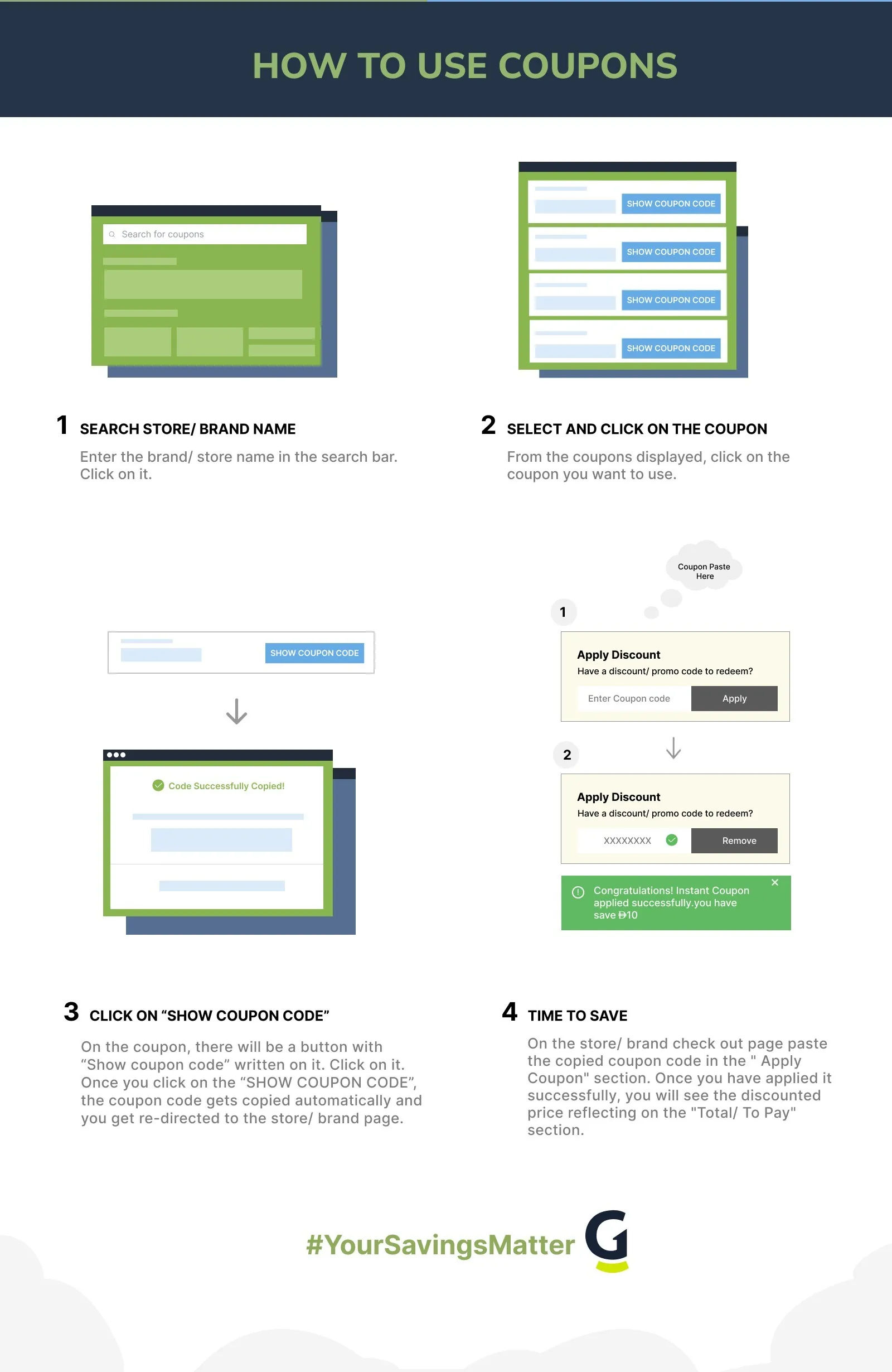
- Go to opus.ai/opusclip and click “Pricing” in the top navigation.
- On the pricing page, look for the billing toggle at the top of the plan cards. Switch it from “Monthly” to “Annual.”
- The plan prices update to show the lower annual rates. Confirm you are seeing the annual per-month rate (which is billed as a lump sum for the year).
- Click “Get Started” on the plan you want. You will be taken to the account creation or login page.
- During checkout, if a promo code field appears, paste any current code from GrabOn’s Opus AI page. If no field is visible, the annual billing discount is already applied from the pricing toggle.
- Enter payment details and confirm. Your annual subscription starts immediately. Credits are available right away for processing.
One important note: OpusClip does not offer refunds once processing credits have been used. If you are uncertain about the right tier, start with Player or the free tier and upgrade once you have a clearer picture of your monthly credit usage.
OpusClip Coupon Not Working?
OpusClip does not currently run frequent public coupon codes, but when codes are available, these are the common failure points:
- Code is for new accounts only. Most OpusClip promo codes apply only to first-time subscribers. If you already have an active account, the code will not apply. Fix: Log out, use a different email to create a new account, or wait for a returning-subscriber promotion.
- Code is expired. OpusClip codes tied to product launches expire quickly, often within a week. Fix: Check GrabOn for a currently active verified code. The listing shows the date the code was last verified.
- Code applies to monthly billing only. Some promo codes discount the first month’s payment and are not compatible with the annual billing option. Fix: Compare whether the code discount plus monthly pricing beats the annual billing rate over your planned usage period. Often annual billing is still cheaper.
- No promo code field visible. The annual billing discount is applied through the pricing toggle, not a code field. If you do not see a “promo code” or “coupon” field during checkout, that is normal for the standard annual plan purchase. Fix: Ensure you have toggled to Annual billing on the pricing page before clicking through to checkout.
- Code not valid for the selected plan tier. Some codes only apply to specific tiers (for example, Player only). Fix: Check the GrabOn listing for which plans the code applies to, then reapply after switching to the eligible tier.
- Browser extension blocking checkout. Adblockers occasionally interfere with SaaS checkout pages. Fix: Disable the extension for opus.ai during checkout and re-enter the code.
OpusClip Program Details
The Credit System Explained
OpusClip measures usage in credits, where 1 credit equals 1 minute of source video that you upload and process. When you upload a 60-minute podcast to generate short social clips, that uses 60 credits. A 90-minute webinar recording uses 90 credits. The output number of clips does not affect credit usage. The calculation is purely based on the length of video you upload for processing, not the number of clips you download.
This matters for choosing a plan: estimate your monthly source video upload volume in minutes, then match it to the credit allowance of each tier. If you regularly upload two 45-minute videos per month (90 minutes total), Player at 150 credits covers you with room to spare. If you run a daily show, your monthly source minutes will be much higher.
Supported Content Types
OpusClip works with direct video file uploads and YouTube links as input. Output clips are formatted for TikTok, Instagram Reels, YouTube Shorts, LinkedIn, and Twitter/X. The platform’s AI identifies high-engagement moments in long-form videos, captions them automatically, and formats them to platform aspect ratios. It was built specifically for the podcast-to-short-clip and webinar-to-social-clip workflow, which is also where it performs best.
Refund Policy
OpusClip does not offer refunds after processing credits have been used. If you purchase a plan and have not used any credits, contact their support within the billing period for refund eligibility. For the annual plan, standard practice is that refunds are not guaranteed once the subscription period has started and credits have been accessed. Read the current terms on opus.ai before committing to the annual plan if you have not tested the free tier first.
OpusClip Price Drop and Cart Tactics
- The annual plan is the price drop. Unlike retail where you wait for a seasonal sale, the best price on OpusClip is always the annual billing option. There is no separate clearance event or better pricing at any particular time of year outside of rare promotional launch codes. If you are on monthly billing and have decided OpusClip is a long-term tool, switching to annual now is the most impactful savings action available.
- Downgrade before canceling. If you are on a higher tier and not using the credits, downgrading to a lower tier mid-year on annual billing may still be cheaper than canceling and re-subscribing. Check the OpusClip account settings for downgrade terms before canceling.
- Monitor for feature-launch discounts. OpusClip raised $50 million from investors including SoftBank Vision Fund 2 in 2025 and continues to add AI features. Major feature releases (new AI models, new platform integrations) are often accompanied by short promotional pricing windows. These are the SaaS equivalent of a flash sale and are the most common times a time-limited code appears.
- Free-tier maximize before upgrading. The free tier gives you 60 minutes of source video per month. If your monthly usage is close to that ceiling, test for 2 to 3 months on the free tier to confirm the tool fits your workflow before committing to an annual plan payment.
- Team plans for agencies. If you are buying OpusClip for a team, the Producer and ProducerX plans include team seats. Splitting the annual cost across team members can make the per-person cost comparable to lower individual tiers, with higher credit volume benefiting everyone on the account.
OpusClip Subscription and Billing Policy
OpusClip offers monthly and annual subscription billing. Monthly billing is charged each calendar month. Annual billing is charged as a single lump-sum payment for 12 months and offers roughly 40 to 50% savings per month versus the monthly rate.
Credits (1 credit = 1 minute of processed source video) are allocated at the start of each billing period and reset monthly even on annual plans. Unused credits do not roll over to the next month. Excess credit usage beyond the plan allowance may require a plan upgrade or credit top-up purchase, depending on OpusClip’s current policies.
For subscription changes, cancellations, and billing disputes, contact OpusClip support through the account settings page on opus.ai or via their support channels listed on the pricing page. Refund availability depends on whether credits have been used in the billing period. Review current terms at opus.ai before purchase.
Similar AI Video Tools
If OpusClip is not the right fit for your workflow, GrabOn’s AI tools coupon codes section covers a range of competing products. For AI video editing and clip tools, Veed.io promo codes on GrabOn are worth comparing, as Veed.io covers a broader video editing scope alongside short-clip generation. For AI writing and content creation beyond video, GrabOn’s Jasper AI deals page lists current verified codes. For teams focused on video B-roll generation rather than clipping existing content, Runway ML coupon codes cover the generative video space.
Best Time to Buy an OpusClip Plan
| Timing | What to Expect |
| Right now (annual toggle) | The annual billing rate is permanently 40 to 50% below monthly. No need to wait for a sale for this discount. It is always available. |
| Product launch windows | OpusClip releases feature updates periodically. New model releases and major platform integrations are typically accompanied by 1 to 2 week promotional codes for new subscribers. GrabOn’s Opus AI page will list these when available. |
| Black Friday / Cyber Monday (November) | SaaS brands including AI video tools increasingly run Black Friday promotions. OpusClip may offer codes or extended trial periods in November. Not guaranteed but worth checking GrabOn during that window. |
| New Year (January) | Content creation platform growth campaigns in January sometimes include new-subscriber discounts for creators starting new projects. Annual plan pricing in January can include first-month-free or similar offers. |
| Mid-year sales (June to July) | Less common for SaaS, but mid-year promotional sweeps have been used by AI tool companies to grow subscriber bases before H2 feature pushes. Less predictable than November, but worth monitoring. |
OpusClip Subscription Policies at a Glance
| Policy or Feature | Details |
| Free Tier | Yes. 60 minutes of source video per month, watermarked exports, no credit card required to sign up. |
| Annual Billing Discount | Yes, approximately 40 to 50% off monthly rate across all paid tiers. Applied via billing toggle on the pricing page. |
| Credit System | 1 credit = 1 minute of source video processed. Credits reset monthly. Unused credits do not roll over. |
| Refund Policy | Refunds not guaranteed after processing credits have been used. Contact support immediately if you have not used credits. |
| Student Discount | Not currently offered. |
| Military Discount | Not currently offered. |
| Payment Methods | Major credit and debit cards via standard SaaS checkout. Check opus.ai for current accepted payment methods. |
| Cancellation | Cancel anytime through account settings. Annual plans do not auto-renew without notice. Check current cancellation terms on opus.ai. |
| Team Plans | Producer, ProducerX, Moon, and Planet tiers include multiple team seats. |
| Mobile Access | No dedicated iOS or Android app. Mobile-browser optimized. Full features available via mobile web. |
About OpusClip (Opus AI)
OpusClip is an AI video clipping tool founded in 2022 in Palo Alto, California. The platform uses AI to process long-form video content, such as podcasts, webinars, and interviews, and automatically identifies high-engagement segments to convert into short clips for social media platforms. The company raised approximately $50 million in funding, including a SoftBank Vision Fund 2 investment in 2025 that valued the company at $215 million.
OpusClip serves individual content creators, podcasters, marketing teams, and agencies. Its primary use case is turning one piece of long-form content into multiple short-form clips formatted for TikTok, Instagram Reels, YouTube Shorts, LinkedIn, and Twitter/X. The platform handles automatic captioning, clip selection, and aspect-ratio formatting. It operates as a web-based application with no dedicated mobile app, accessible through any modern browser on desktop or mobile.
The service is listed on GrabOn as “Opus AI” (reflecting the parent platform branding at opus.ai) and the product itself is marketed as OpusClip. Competitors in the AI video clipping space include Pictory, Veed.io, Submagic, and Runway, though each covers a different subset of the broader video-creation workflow.
Is OpusClip Worth It?
Best for: Content creators, podcasters, and marketing teams who produce long-form video content and want to repurpose it for social media without manual editing time. The AI clip selection is genuinely useful for finding the best 60 to 90 second moments from a 45-minute episode. At $8 per month on annual billing for the Player tier, it is a low-cost tool for casual use volume. Agencies and teams at the Producer tier get meaningful credit volume and team collaboration features.
Be careful if: You need generative AI video (creating new video from scratch) rather than clipping existing content. OpusClip is a repurposing tool, not a generator. Also be cautious if you process less than 30 minutes of source video per month. At that usage level, the free tier may cover your needs entirely and no paid plan is necessary.
Best saving move: Start on the free tier for two months to confirm the workflow fits your content production volume, then switch to the Player annual plan at $8 per month if you need more credits. The annual commitment is the biggest single discount available. Check GrabOn’s AI tools coupon page before checkout for any current promotional codes that appear during OpusClip feature launches or the November Black Friday window.
Frequently Asked Questions
- How do I get an OpusClip discount?
The primary OpusClip discount is switching from monthly to annual billing on the pricing page. Toggle from “Monthly” to “Annual” and the plan cards update to show rates roughly 40 to 50% lower than monthly pricing. This is always available and does not require a promo code.
If a promotional code is available (which happens during feature launches and sometimes during Black Friday), it will appear on GrabOn’s Opus AI page. Enter it during checkout in the promo code field if one appears. The annual billing toggle plus any active promo code is the maximum available savings.
- Is OpusClip free?
Yes. OpusClip has a free tier that allows 60 minutes of source video processing per month. Exports on the free tier carry a watermark and there are limits on the number of clips. No credit card is required to sign up for the free tier.
If your monthly source video volume is under 60 minutes, the free tier may fully cover your needs. If you exceed 60 minutes or need watermark-free exports, the Player plan at $8 per month on annual billing is the lowest paid tier.
- What is an OpusClip credit?
An OpusClip credit equals one minute of source video you upload for processing. If you upload a 45-minute podcast, that uses 45 credits. The number of clips you generate from that video does not affect credit usage. Credits are based entirely on the length of source video you feed into the platform.
Credits reset monthly. Unused credits from one month do not carry forward. Choose a plan tier with a credit allowance that matches your typical monthly source video volume. Running out of credits mid-month pauses processing until the next billing cycle or until you upgrade your plan.
- Does OpusClip offer refunds?
OpusClip does not offer refunds after processing credits have been used in the billing period. If you purchase a plan and have not yet processed any video, contact OpusClip support immediately to discuss refund eligibility. For annual plans, the standard practice is that refunds are not guaranteed once the subscription is active and credits have been accessed.
This is why starting on the free tier before committing to an annual plan is strongly recommended. It lets you confirm the tool works for your content type and volume before making a 12-month financial commitment.
- Does OpusClip have a free trial on paid plans?
OpusClip’s free tier functions as the ongoing free trial rather than a time-limited trial with full paid features. The free tier is permanent (not a 14-day trial) and gives you 60 minutes of processing per month indefinitely. Paid features like watermark-free exports and higher credit volumes require a paid plan.
Promotional codes occasionally offered during feature launches may include extended free-credit allocations for new subscribers, effectively functioning as an enhanced trial. Check GrabOn for any current codes of this type. These are the closest thing to a traditional free trial on paid plan features.
- What social media platforms does OpusClip support?
OpusClip formats output clips for TikTok, Instagram Reels, YouTube Shorts, LinkedIn, and Twitter/X. The platform handles aspect-ratio conversion automatically, so a horizontal podcast recording can be reformatted to vertical 9:16 for TikTok and Reels in the same workflow. Captions are added automatically and can be styled within the platform before export.
Direct auto-posting to connected social accounts is available on paid plans. The free tier requires manual download and upload of clips to each platform. For teams managing multiple platform accounts, the Producer tier’s team seat and auto-posting features are designed for that workflow.
Filters
USER TYPES
Categories
AI Tools

Coupons Info
Coupons & Offers
:8
Verified
:8
Fresh Offers You May Like

Candy AI
site wide off
Up To 70% Off On All Plans
Verified

EVA AI
FLAT 30% OFF
Grab 30% Off On People Analytics
Verified

Facecheck ID
Credits With Crypto - $0.10 USD Per Credit
Verified
Coupons from Similar Stores

Subscribe Now
Get The Latest & Best Coupon/Offer Alerts
