


CapCut Promo Codes & Discount Codes
Best 17 Coupons & Offers last validated on October 31st, 2026
- All (17)
- Offers (17)
Existing User
- All (17)
- Offers (17)
20%
OFF
Save 20% on Annual Subscription!
- Enjoy a yearly subscription at $20.84 per month when billed annually.
- Get 21,600 credits annually plus 500 GB of storage for your projects!
- Unlock AI-powered creation tools with our annual plan—save today!
- Manage 3 social media accounts with advanced analytic and scheduling!
Purchase CapCut Monthly Subscription Plan For $9.99
- Buy CapCut Monthly Subscription Plan at a low price of $9.99.
- Easily create stunning AI-generated shorts that engage your audience.
- Make eye-catching YouTube clips that keep viewers coming back for more.
- Craft unique clips that showcase your creativity!
$10
Monthly PRO Plan At Just $9.99
- Get a monthly Pro plan for just $9.99.
- Discover how to enhance your videos with music for increased appeal.
- Grab it at the best price
- All users can avail this offer
- Keep your audience engaged with your creativity reels.
$26
Join Monthly Plan for Just $25.99!
- Subscribe monthly at $25.99 and get 1,800 credits each month!
- Manage 3 social media accounts with our monthly subscription plan.
- Enjoy 500 GB storage and AI-powered creation tools every month!
- Access performance analytic and free creative assets for your projects!
CapCut Coupon Codes & Offers
$90
Get Yearly Pro Plan Subscription For $89.99
- Avail Yearly Pro Plan Subscription for just $89.99.
- Create captivating Shorts to maximize your reach.
- Keep your audience engaged with your creativity reels.
- Find out how to add music to your videos for greater appeal.
Unlock the Starter Plan for Enhanced Creativity!
- Access a powerful video generator and smart crop tools in your plan!
- Enjoy background removal and custom avatars for seamless video creation!
- Manage 500GB cloud storage and easily import third-party content!
- Collaborate with your team using our analytic and scheduling features!
OFFER
Transform Your Photos with Our Editing Tips
- Discover the best batch editor for effortless photo enhancements online!
- Change your picture background easily with our step-by-step guide!
- Explore the top 8 bulk image resizers to streamline your editing!
- Master transparent backgrounds with our expert tips for stunning images!
OFFER
Grab Free Trail For Desktop Users
- Grab a chance to get a free trial for the best desktop users.
- Buy the plan and get more features like a pro plan.
- The offer is valid for 7 days only.
- Sign up now and grab the Free trial.
Elevate Your Marketing with Effective Promotion Tips!
- Create sales-boosting promo videos that captivate your audience instantly!
- Explore 10 creative promo video ideas to enhance your marketing strategy!
- Discover top promo video template websites for effortless video creation!
- Get inspired with 7 promotional poster ideas that grab attention!
Boost Your Social Media Presence with Expert Tips
- Learn how to create engaging YouTube videos that attract viewers quickly.
- Master the art of making captivating YouTube Shorts for maximum reach.
- Craft the perfect YouTube outdo video to keep your audience engaged.
- Discover how to add music to your TikTok videos for enhanced appeal.
Unleash Your Creativity with Powerful Video Tools!
- Create stunning AI-generated shorts that effortlessly captivate your audience.
- Automatically generate engaging Reels to enhance your social media presence.
- Make eye-catching YouTube clips that keep viewers coming back for more.
- Easily craft TikTok clips that showcase your creativity in unique ways.
Trial
Grab 7 Day Free Trail On All Plans
- Get a free trial on all plans.
- Grab the deal and get more features from the plan.
- You can get to know all the features on the trails.
- Buy the plan and get more discount.
Grab Discounted CapCut Pro Pricing With Annual Billing
- CapCut has a special offer on discounted pro pricing with annual billing right now.
- Annual billing lowers the effective monthly rate compared to the month-to-month Pro subscription.
- Add to cart, review your basket, and pay the already-reduced total; it is that simple.
Claim Free CapCut Pro Access For Campus Creators
- Enjoy exclusive savings on free pro access for campus creators at CapCut.
- Limited to enrolled students at CapCut Creative Campus partner universities in select regions.
- The offer works without a voucher, since the saving is set by the retailer directly.
$15
Unlock The CapCut Teams Plan From $15 Monthly
- CapCut has the teams plan available from $15.
- Starting seat price applies to annual billing for new CapCut Teams subscriptions purchased online.
- The deal is active for eligible purchases right now, so add and checkout to save.
$19.99
Order The CapCut Pro Subscription At $19.99 Monthly
- Get the pro subscription at CapCut starting at just $19.99.
- Monthly rate for the CapCut Pro tier with the full AI toolkit and 1TB storage.
- No extra clicks or code entry are required; the lower price applies at listing level.
OFF
Save $59 By Choosing The CapCut Annual Plan
- CapCut brings you $59 off on by choosing the annual plan.
- Based on the published monthly versus annual list prices for the CapCut Pro plan.
- Nopromo codeis needed; the discount is already reflected in the listed price.
Best CapCut Coupons & Offers For Nov 2026
| Category | CapCut Discounts & Promo Codes |
| CapCut Annual Subscription | Flat 20% Off |
| Yearly Subscription | Start From $20.84 |
| Monthly Subscription | Start From $25.99 |
| Transform Your Photos | From CapCut Editing Tips |
| Elevate Your Marketing | Effective Promotion Tips |
Cut Your CapCut Total Today
Here’s the thing about CapCut savings: the app itself is free, so the real game is getting the paid tiers cheaper. A few moves that actually work:
- Annual plan over monthly. The Pro plan billed annually runs $14.99 per month ($179.99 per year), compared to $19.99 month-to-month. That’s $60 saved without any coupon. Sitewide discount codes on top of this drop it further, occasionally to under $12 per month.
- 7-day free trial. No code required. CapCut lets new Pro subscribers test the full feature set for 7 days at zero cost. Cancel before the trial ends and you’re not charged. The trial is attached to your ByteDance account, so you can’t run it twice on the same email.
- Student discount. CapCut offers 50% off the Pro plan for verified students, bringing the monthly cost to roughly $3.99 (pricing subject to change). Verification runs through your school email address. This is one of the steeper student discounts in the AI tools category.
- Email signup offer. Subscribing to CapCut’s newsletter sometimes unlocks a welcome discount code. Check the signup confirmation email before going straight to checkout.
- Black Friday and Cyber Monday. CapCut has historically run its deepest subscription discounts in late November, sometimes 40% off annual plans. If you’re not in a rush, waiting for Q4 can be worth it.
- GrabOn verified codes. Check the CapCut coupons page on GrabOn before checkout. The 20% off annual subscription code is currently the top offer, verified as of June 15, 2026.
Top CapCut Offers Worth Grabbing on GrabOn
| CapCut Offer | Details |
| Annual Pro subscription | 20% off, drops to approx $14.39/mo billed annually |
| Monthly Standard plan | $9.99/mo, no code needed, auto-applied |
| Monthly Pro plan | $25.99/mo with 1,800 credits and 500 GB storage |
| Free trial | 7-day full Pro access, no payment info required until trial ends |
| Student discount | 50% off Pro for verified students via school email |
| Offer Angle | What’s Live | How to Grab It |
| Best coupon-code offer | 20% off annual Pro subscription | Apply code at checkout; confirm discount before completing purchase |
| Best no-code deal | Standard plan at $9.99/mo, auto-applies, no coupon needed | Select Standard tier on the pricing page; discount is built in |
| Best bank/payment offer | Rakuten cashback 1-3% on CapCut subscription purchases when available | Activate Rakuten in your browser, then navigate to CapCut checkout |
| Best app offer | Mobile-exclusive flash deals and first-month discounts via the iOS/Android app | Download the CapCut app, check the Subscription tab for app-only pricing |
| Best new-user offer | 7-day free Pro trial, no credit card required to start | Sign up with a fresh ByteDance account, start trial from the pricing page |
| Best seasonal offer | Not currently visible; watch for Black Friday (November) and Cyber Monday deals, historically 30-40% off annual plans | Check GrabOn and CapCut’s newsletter in late October for early-access codes |
| Best category offer | 50% student discount on Pro plan for verified students | Verify via school email on CapCut’s student page, then apply at checkout |
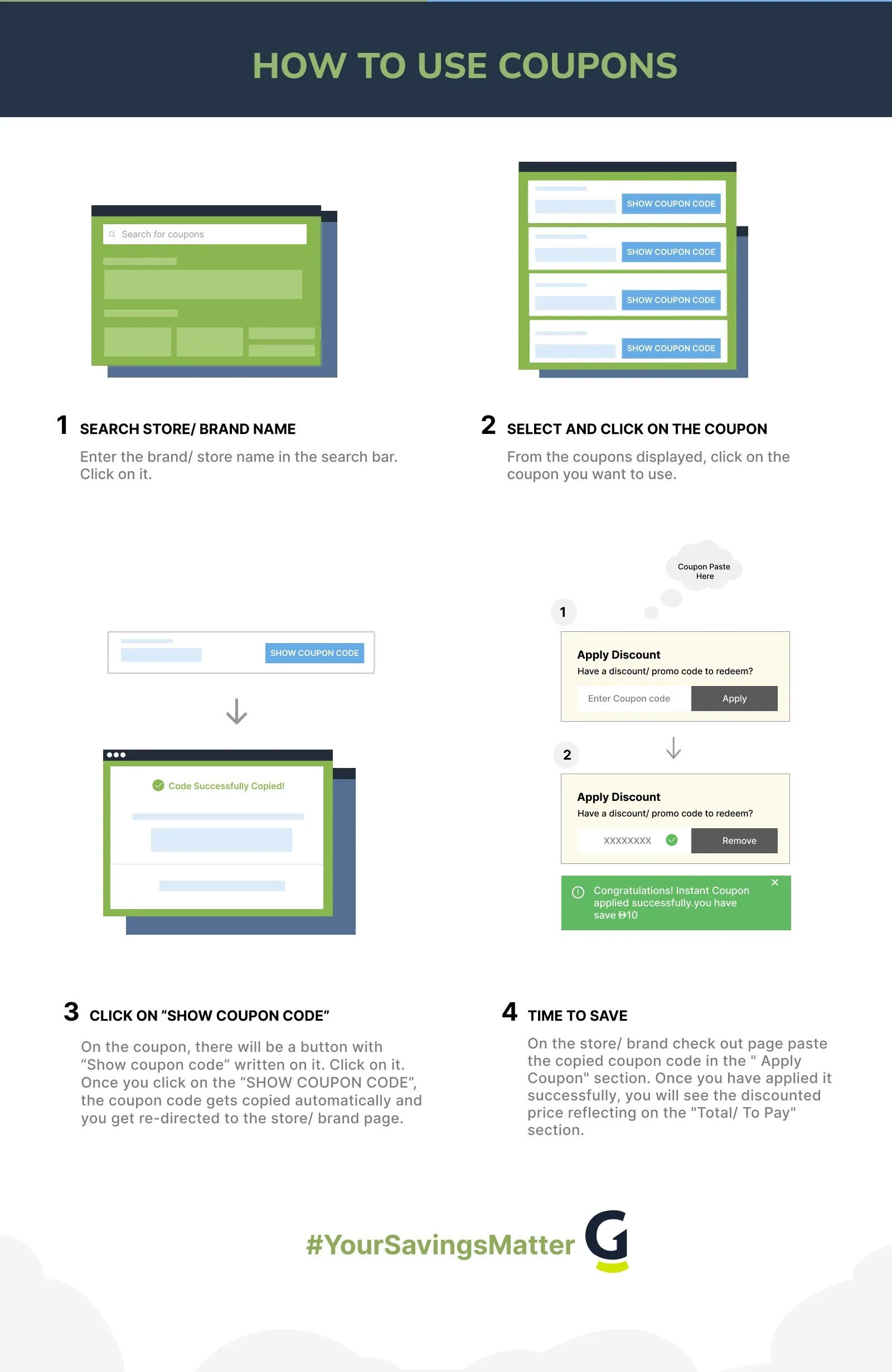
Apply a CapCut Coupon Code in Seconds
- Go to capcut.com and click the Pricing tab in the top navigation.
- Select your plan (Standard, Pro, or Team) and billing cycle (monthly or annual).
- Click Get Started or Subscribe Now on your chosen plan.
- On the checkout screen, look for the field labeled “Have a promo code?” or “Coupon code” and click to expand it.
- Paste your CapCut coupon code from GrabOn, then click Apply. The discounted total appears immediately below the field. Confirm the number looks right before you hit Complete Purchase.
One thing worth knowing: the code field sometimes only appears after you select a billing cycle. If you don’t see it, toggle between monthly and annual before looking again.
Fix a CapCut Promo Code That Fails
- Code says “invalid.”Fix: Copy the code again from GrabOn directly rather than retyping. CapCut codes are case-sensitive and sometimes include hyphens that get dropped.
- You already have an active subscription.Fix: Most CapCut codes are new-subscription-only. Existing subscribers won’t see the discount apply. Check if there’s a renewal promo instead.
- Trial account conflict.Fix: If your account previously used a free trial, certain welcome codes won’t fire a second time. Try the code on a fresh account or contact CapCut support.
- Annual-only restriction.Fix: Some sitewide codes only work on annual billing, not monthly. Switch to annual in the checkout toggle and re-apply the code.
- Plan not eligible.Fix: A code marked “Pro plan only” won’t apply to Standard or Team plans. Read the coupon card on GrabOn for the eligible tier.
- Student code on non-student account.Fix: The student discount requires verification via a school email. Non-verified accounts cannot use student-specific codes.
- Code already used.Fix: CapCut tracks redemptions per account. One code, one use. If you’ve used it before on this account, it won’t apply again.
- Geographic restriction.Fix: Some CapCut promotional codes are region-specific. US-only codes won’t apply if your billing address is outside the US.
- BNPL split-pay conflict.Fix: Paying via Klarna or Afterpay (if offered at checkout) sometimes prevents code application. Pay with a credit card first, then use BNPL on the next billing cycle.
- Expired code.Fix: Return to GrabOn and grab a fresh CapCut coupon code. Codes are verified daily; expired ones are removed from the active list.
CapCut Cashback and Stacking Guide
CapCut subscriptions are eligible for cashback through Rakuten and occasionally TopCashback, depending on the current merchant agreement. The rates fluctuate (typically 1-5%), so check before you click through to checkout. Here’s the stacking order that yields the biggest total discount:
- Apply the GrabOn coupon code first. Enter the 20% off code in the “Have a promo code?” field and confirm the discounted subtotal.
- Activate Rakuten before completing payment. Open your Rakuten browser extension or navigate to CapCut via Rakuten’s portal. The cashback percentage is calculated on the final amount after your coupon code applies.
- Pay with a cashback credit card. Cards like Capital One Savor or Chase Freedom Flex earn 1-5% back on digital subscriptions. That layers on top of Rakuten.
- Check for browser extension stacking. Capital One Shopping sometimes offers its own CapCut discount independently of GrabOn codes. Compare offers before checkout.
One caveat: Rakuten cashback on digital subscriptions is not always available. If the Rakuten extension shows “No cash back available,” the merchant hasn’t activated the program for that billing period. The coupon code still works independently.
CapCut Programs Worth Joining
CapCut Pro Plan
The Pro plan runs $19.99 per month or $179.99 per year. It includes 4K and HDR export, the full AI toolkit (camera tracking, vocal isolation, speaker-ID captions, text-to-video, AI avatar generation, voice cloning, and bulk background removal), 1 TB cloud storage with cross-device sync, and 1,200 AI points per month. If you edit video regularly, the annual plan cuts the effective monthly cost to about $15.
CapCut Standard Plan
Standard sits at $9.99 per month with no annual discount available. It covers 1080p export, basic AI tools, and 500 GB storage. Good for casual creators who don’t need the full AI suite. The cap on AI points is lower than Pro, so heavy users of features like text-to-video will hit limits faster.
CapCut Team Plan
At $24.99 per month per user, the Team plan adds shared brand kits, a team workspace, and collaborative asset libraries. For small agencies or social media teams running multiple brand accounts, the per-seat cost is competitive with tools like Adobe Express and Canva Pro.
Student Discount
Verified students get 50% off the Pro plan, dropping the rate to roughly $3.99 per month. Verification happens through your school email address directly on CapCut’s pricing page. No third-party verification platform is required. The student rate is one of the most generous in the AI video editing category.
The CapCut App Deals Worth It
CapCut’s iOS and Android apps sometimes surface subscription pricing that differs from the web. App store billing goes through Apple or Google, which means promo codes entered on the web checkout don’t carry over. But the app occasionally shows introductory monthly pricing that’s lower than the published rate.
Push notifications from the CapCut app are worth keeping on if you subscribe. Flash sale alerts for annual plan discounts tend to drop without much advance notice, and they’re delivered via push first. The in-app editor also has a dedicated AI tools panel not always prominent on the desktop version, which is worth exploring before paying for the Pro tier to see if the Standard plan covers your needs.
The CapCut Sale Calendar Worth Knowing
CapCut’s deepest subscription discounts cluster around late-year events and product launches. Here’s when to watch:
| Sale Event | When It Happens | What to Expect |
| Summer Promo | June to July | Sitewide 10-20% off annual plans; current June 2026 offer is 20% off Pro. |
| Back to School | August | Student discount activation period; CapCut pushes verification campaigns heavily. |
| Black Friday | Late November | Historically the deepest cuts: 30-40% off annual Pro subscriptions. Plan around this window if you can wait. |
| Cyber Monday | Monday after Thanksgiving | Online-only continuation of Black Friday pricing; sometimes extends discount through the week. |
| Year-End / New Year | December to January | Creator resolution season; CapCut typically runs “new year, new content” promotions on annual plans. |
For the current best CapCut discount codes active this month, check GrabOn’s CapCut page before purchasing any plan tier.
CapCut Returns, Without the Runaround
CapCut subscriptions are digital, so there’s no physical return window. Cancellation works differently: go to your CapCut account, navigate to Settings > Subscription, and click Cancel auto-renewal. Your access to Pro features continues until the current billing period ends. After that, the account reverts to the free tier.
If auto-renewal is already off, nothing further is required. The subscription just expires. CapCut does not offer partial-month refunds as a standard policy, though users who were charged in error report success contacting support at support.capcut.com within 48 hours of the charge. This is shorter than competitors like Adobe Creative Cloud, which offers a 14-day refund window, so flag any billing errors quickly.
Frequently Asked Questions
- Where Else Can You Get a Deal?
If CapCut’s pricing doesn’t fit right now, inVideo coupon codes are worth checking. inVideo runs regular first-month discounts on its AI video generation plans and covers a similar creator workflow. For teams that need transcription and caption tools alongside video editing, Movavi deals include bundle pricing on its full software suite that can run cheaper per license than CapCut Pro annual.
Both stores have verified coupon pages on GrabOn updated regularly. Browse the AI tools coupons hub for a broader look at current promotions across the video and content creation category.
- Know the CapCut Policies Before You Pay
Policy or Discount Type Details Free plan Available indefinitely; covers 1080p export, basic filters, no watermark Free trial 7 days full Pro access; no charge until trial ends Cancellation Cancel anytime via Settings > Subscription; access continues to end of billing period Refund policy No standard partial-month refunds; contact support within 48 hours for billing errors Payment options Visa, Mastercard, American Express, PayPal; app purchases billed via Apple/Google Student discount 50% off Pro; verified via school email on CapCut’s pricing page Black Friday sale Participates; historically 30-40% off annual plans in November Cyber Monday sale Typically extends Black Friday pricing through the following week BNPL Not available natively; Klarna/Afterpay not supported at checkout as of June 2026 - CapCut at a Glance
CapCut is an AI-powered video editing application developed by ByteDance, the Chinese technology company also behind TikTok. It launched in 2020 and has grown into one of the most widely downloaded creative apps globally, with over 300 million monthly active users as of recent reporting. The platform operates across mobile (iOS and Android), desktop (Windows and Mac), and browser, letting creators switch between devices without losing projects.
The tool covers short-form video creation, auto-captions, background removal, video stabilization, text-to-video generation, and AI avatar features. It is used heavily by TikTok, Instagram Reels, and YouTube Shorts creators. The free tier is genuinely capable; the paid tiers unlock higher AI credit limits, 4K export, and cloud storage. ByteDance is headquartered in Beijing, with CapCut’s product and growth teams operating out of multiple offices globally.
- CapCut: The Honest Verdict
Best for: Short-form video creators on TikTok, Instagram Reels, and YouTube Shorts who want AI-assisted editing without a steep learning curve. The free tier covers most casual needs; Pro makes sense if you need 4K export, voice cloning, or heavy text-to-video use.
Be careful if: You need professional color grading or multi-track audio production. CapCut is optimized for social content, not broadcast-level production. For that workflow, Adobe Premiere Pro or DaVinci Resolve are better fits, even though they cost more.
Best saving move: Use the 7-day free trial to confirm the Pro features cover your workflow, then buy an annual subscription with the current 20% off code from GrabOn, and run a Rakuten cashback click at checkout. Combined, that’s roughly 22-24% off the full annual price.
- How do I get a promo code for CapCut?
Check GrabOn’s CapCut coupons page, where codes are verified and updated daily. The current top offer is 20% off annual Pro subscriptions, active as of June 2026.
You can also sign up for CapCut’s newsletter, which sometimes delivers a welcome discount code in the confirmation email. Following CapCut on social media (TikTok and Instagram) occasionally surfaces limited-time promo codes ahead of platform announcements. Black Friday is historically the highest-discount window of the year if you can plan ahead.
- How do I use a CapCut coupon code at checkout?
Go to capcut.com, select your plan and billing cycle on the Pricing page, then click Subscribe. On the checkout screen, click the “Have a promo code?” field, paste your code, and click Apply. The discounted total updates immediately before you complete payment.
The code field sometimes only appears after you choose a billing cycle (monthly vs. annual), so toggle if you don’t see it. Codes are case-sensitive, so copy-paste rather than retype. If you’re purchasing through the iOS or Android app, codes entered on the web don’t carry over; app store purchases go through Apple or Google billing.
- Can I try CapCut for free?
Yes. CapCut offers a 7-day free Pro trial with no credit card required to start. The trial is tied to your ByteDance/CapCut account, so it’s available once per account.
During the trial, you get the full Pro feature set: 4K export, all AI tools, and 1 TB cloud storage. Set a calendar reminder before day 7 if you want to cancel before any charge. After the trial, the account reverts to the free tier automatically if you don’t subscribe.
- Does CapCut have a student discount?
Yes. Verified students get 50% off the Pro plan, roughly $3.99 per month. Verification is through your school email address directly on CapCut’s pricing page, no third-party platform needed.
This is one of the stronger student discounts in the AI tools category. The discount typically applies to the monthly Pro plan rate; check whether it also applies to annual billing on CapCut’s student page, as the annual rate would make the per-month cost even lower.
- How do I cancel my CapCut subscription?
Go to Settings in your CapCut account, select Subscription, and click Cancel auto-renewal. Your Pro access continues until the current paid period ends, then the account drops to free.
If you subscribed through the iOS App Store, cancel via Apple’s Subscriptions settings (not the CapCut app). Android subscribers cancel through Google Play > Subscriptions. CapCut does not offer partial-month refunds as standard, so cancel a few days before the renewal date rather than immediately after being charged.
- Is CapCut Pro worth it?
Pro is worth it if you create video content more than a few times per week and regularly hit the free plan’s AI credit limits or need 4K export. At the discounted annual rate with a coupon, the cost is around $14-15 per month.
If you only edit occasionally, the free plan covers most basic edits without any payment. Students and teams get better value from the specific discount tiers. The 7-day trial is the right way to test whether you actually use the Pro features before committing.
- What payment methods does CapCut accept?
CapCut accepts Visa, Mastercard, American Express, and PayPal for web subscriptions. App purchases are billed through Apple (iOS) or Google (Android) and use whatever payment method is on file in those accounts.
BNPL options like Klarna and Afterpay are not natively supported as of June 2026. Cashback via Rakuten is available when the merchant program is active; check Rakuten before clicking through to checkout.
- Why is my CapCut coupon not working?
The most common reasons: the code is annual-plan-only (switch billing cycle to annual), the code is new-subscriber-only (won’t apply to existing accounts), or the code has been used already on this account (one use per account).
Copy-paste the code directly from GrabOn rather than retyping to avoid case or character errors. If none of these explanations fit, return to GrabOn for a fresh code; expired codes are removed from the active listing daily.
Filters
USER TYPES
Categories
Services
AI Tools

Coupons Info
Coupons & Offers
:17
Verified
:17
Fresh Offers You May Like

Anara
SAVE 20% OFF
Sitewide Savings - Get 20% Off On All Your Orders
Verified

Aragon AI
FLAT 15% OFF
Subscription Savings - Enjoy 15% Off On All Sitewide Plans
Verified
Artflow AI
SAVE 20% OFF
Pro Plan - 20% Off On Annual Subscription
Verified
Coupons from Similar Stores

Subscribe Now
Get The Latest & Best Coupon/Offer Alerts
