



Universe Coupons & Promo Codes 2026
Best 8 Coupons & Offers last validated on October 31st, 2026
- All (8)
- Offers (8)
Existing User
- All (8)
- Offers (8)
$10
Atlanta Music Fest Event Tickets Starting From $10
- Book your Atlanta music fest tickets starting at $10.
- Get the best deals for events at universe.com.
- Grab now!
Magic Show Tickets As Low As $15
- Book your magic show tickets for as low as $15.
- Visit the landing page to know magic events available at your place.
- Grab your ticket now!
The Emporium Presents Mike Love Tickets - At $15
- Grab the mike love tickets at just $15.
- An Intimate evening with Mike Love at the Brentwood Emporium.
- Location - The Emporium, 561 1st St, Brentwood, CA 94513, USA
DEAL
The Winery Comedy Tour At Sleepy Cat Event Tickets starting At $20
- Visit the winery comedy tour by booking your tickets ta universe.com.
- Sleepy cat tickets starting at $20.
- Grab soon.
Universe Discounts & Offers
HOUR
AFRICAN Fashion During Fashion Week Event Tickets Starting At $50
- Book your african fashion week event tickets starting at $50.
- Tickets available for adults & kids at different price ranges.
- Book your tickets now by visiting the landing page.
$50
New York Fashion Week "ROBOTICS" Fashion Show Tickets - At $50
- Book your tickets for new york fashion week at universe.com.
- Tickets are as low as $50.
- Book your tickets now!
$60
Cyanotype Event - Starting At $60
- Get cyanotype event tickets at an affordable price.
- The price starts from $60.
- Everyone can utilize this deal.
OFFER
"Puff Puff Laugh" SF's Cannabis Lounge Comedy Show - FREE
| Puff Puff Laugh | FREE |
| Category | Lounge Comedy Show |
| Location | San Francisco |
| Valid | All Users |
- Avail puff laugh comedy show tickets at free of cost.
- Location - Barbary Coast Lounge, 952 Mission St, San Francisco, CA 94103, USA
- Limited time deal.
Latest Universe Coupons, Promo Codes & Offers For Nov 2026
| Category | Universe Discount Code & Offers |
|---|---|
| Music Fest Tickets | Starting At $10 |
| Sleepy Cat Event | Starts At $20 |
| Magic Show Tickets | Begins At $15 |
| New York Fashion Show | At $50 |
| Fashion Week event Tickets | Starting At $50 |

What Universe Is and How the Platform Works
Universe is an event-discovery and ticketing platform used by organizers of all sizes, from community meetups and workshop hosts to larger conferences and cultural events. It operates differently from Ticketmaster or Live Nation: rather than acting as a primary ticket seller for venue-contracted events, Universe provides the infrastructure that organizers use to sell tickets directly to attendees.
Event organizers on Universe set their own prices, create their own discount codes, and manage their own refund policies. Universe charges organizers a service fee per paid ticket (typically a percentage plus a flat fee per transaction); many free events on Universe carry no ticketing cost to the attendee at all.
The platform covers a broad range of event categories: concerts, film screenings, comedy nights, community workshops, fitness classes, corporate events, and sports-adjacent events. Universe processes payments at checkout and handles ticket delivery digitally. Founded in Canada, the platform operates across North America with a US-focused product experience at universe.com.
Our Take on Universe Ticketing
Best for: People attending organizer-driven events, community events, workshops, and smaller-scale concerts or festivals where the organizer chose Universe as their ticketing platform. The discovery feature at universe.com lets you browse local events by date and category without signing up. Free events have zero ticket cost and no booking fee from the attendee side.
Be careful if: You’re expecting the same discount-code experience as a retail site. Promo codes on Universe are set by individual event organizers, not by Universe the company. A code that works for one event will not work for a different event. This is structurally different from how coupon codes work on retail platforms.
Best saving move: Buy early-bird tickets. Almost every event on Universe that has tiered pricing offers the lowest rate in the first release window. If you’ve already missed early-bird pricing, check whether the organizer posted a promo code in the event description or their social channels. GrabOn’s Universe page lists any publicly available platform-level codes that apply at checkout.
The Universe Events Calendar and Best Times to Buy
Universe doesn’t run sitewide discount events the way a retail brand does. Savings at Universe are tied to event timing and organizer decisions rather than holiday sale windows. That said, there are predictable patterns worth knowing.
| Time of Year | Event Activity Level | Buyer Strategy |
| January to February | Lower volume; indoor events, workshops, film screenings, community events dominate | Best window for workshops and classes; less competition for seats, early-bird pricing more available |
| March to May (Spring) | Rising volume; festivals, outdoor markets, and conference season beginning | Buy conference and festival tickets as soon as they go on sale; early-bird tiers sell quickly |
| June to August (Summer) | Peak volume; outdoor concerts, food festivals, fitness events, community block parties | Summer events sell out early; buy at first ticket release for the best price |
| September to October (Fall) | High volume; conference season, Halloween events, film festivals, harvest festivals | Film festival and conference tickets often offer substantial early-bird savings; buy 4 to 6 weeks out |
| November to December (Holiday) | High volume; NYE events, holiday concerts, charity galas, community celebrations | NYE tickets are among the highest-priced Universe events; book in October or early November for best pricing |
For free events, timing matters only in terms of capacity. Universe allows free events to cap attendance; register as soon as you know you’re attending, especially for popular workshops or community events with limited venue space.
Universe Deals Worth Knowing About
| Offer Angle | What’s Live | Who It’s For | Code or Action |
| Best platform-level code | Occasional Universe platform discount codes; check GrabOn’s Universe listing for verified current codes with last-verified dates | Any attendee buying a ticket through Universe who wants a discount off the platform fee | Apply the code at Universe checkout in the promo code field; platform codes are rarer than organizer codes but apply broadly |
| Best no-code deal | Early-bird ticket pricing; most events with tiered pricing release a first-wave price that is 10% to 40% lower than the final door price | Anyone who can commit to attending early in the ticket sale window | No code needed; early-bird price appears automatically for the first ticket release tier; buy before the tier sells out |
| Best cashback offer | Rakuten cashback on universe.com purchases when the retailer is active in the Rakuten network | Rakuten members purchasing tickets directly at universe.com | Activate your Rakuten browser extension before loading the Universe event page; cashback posts after the event date in most cases |
| Best group deal | Group discount codes set by organizers for events targeting corporate groups, schools, or community organizations; typically 10% to 25% per ticket for qualifying group sizes | Groups of 4 or more purchasing together; contact the event organizer directly if you don’t see a group code on the event page | Apply the organizer-provided group code at checkout; code is tied to the specific event |
| Best free option | Free events on Universe; hundreds of community events, workshops, and meetups listed at zero ticket cost | Anyone exploring local events without a ticket budget | Filter by “Free” on universe.com; register normally through the ticket flow; no payment required |
| Best app offer | Universe mobile app allows ticket management and event discovery; organizers sometimes push exclusive early-access codes to registered app users | Frequent event-goers who want first access to new event listings | Download the Universe app, create an account or sign in, and enable notifications for event categories you follow |
Best Ways to Save at Universe Right Now
- Buy in the first ticket release window. Early-bird pricing on Universe is set by the organizer and often disappears within days of the initial sale going live. The price difference between early-bird and standard pricing is commonly 15% to 40%. Set a reminder for when tickets go on sale and buy in the first 48 hours.
- Check GrabOn’s Universe page for verified promo codes. GrabOn lists both platform-level codes and any publicly shared organizer codes. Each code shows the last-verified date so you know whether it’s worth trying. Platform-level codes are less common than organizer codes but apply across multiple events.
- Look at the event description for a code. Many Universe event organizers include their promo codes directly in the event description or in their social media posts promoting the event. Search “[Event Name] promo code” on Google before buying at full price.
- Attend free events when the experience fits. Universe hosts a substantial number of free events: community workshops, local meetups, fitness classes, film screenings, and cultural events. The platform experience is identical; there’s simply no ticket cost. Filter by “Free” on universe.com to browse current listings in your area.
- Use Rakuten before checkout. If Rakuten has universe.com active in its cashback network, activate it before you load the event page. The cashback is a percentage of your ticket cost and posts after the event. It stacks on top of any organizer promo code you apply at checkout.
- Contact the organizer for a group code. If you’re attending with a group and no group code is visible on the event page, reach out to the organizer through the contact information on the event listing. Many organizers create group codes on request for parties of four or more.
- Enable notifications on the Universe app. Some organizers push flash-sale codes or last-minute availability discounts exclusively to Universe app users. If you attend events regularly, the app notification channel is worth enabling for categories you follow.
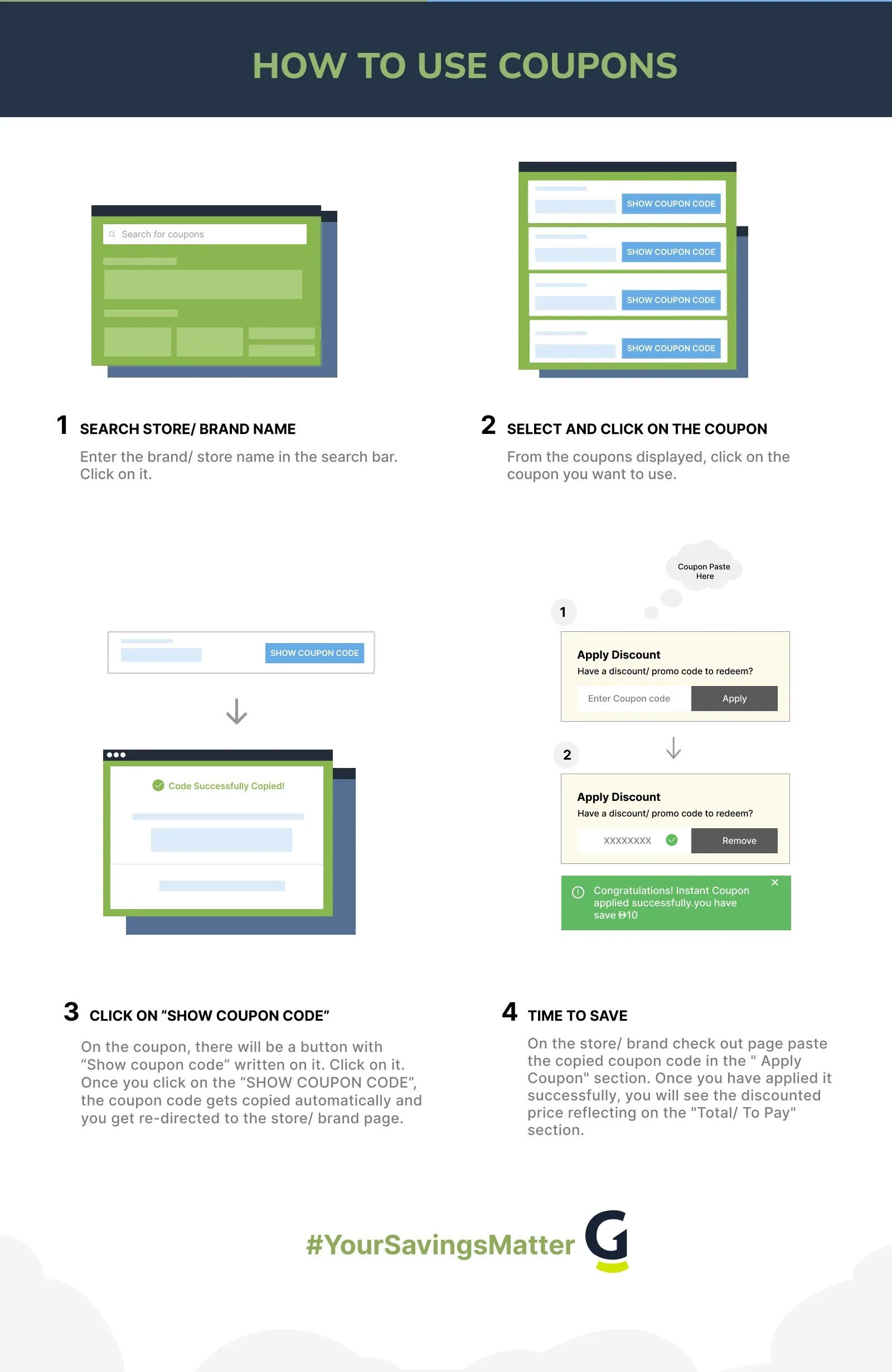
Apply Your Universe Promo Code
- Find the event you want to attend at universe.com or through the Universe app.
- Select your ticket type (general admission, VIP, early-bird if still available) and quantity.
- Proceed to the checkout page. On the checkout screen, look for the “Promo Code” or “Discount Code” field, typically located above the order total.
- Paste your code exactly as copied. Universe codes are case-sensitive. Avoid typing manually if you can copy-paste directly.
- Click Apply. The discount adjusts the subtotal before you enter payment information.
- Complete checkout using your preferred payment method. Universe accepts major credit cards, PayPal, and in some cases Apple Pay depending on the device and browser.
- Your tickets arrive by email as a digital barcode or QR code. Save them to your phone or print before the event.
Note: promo codes on Universe are event-specific in most cases. An organizer code for one event will not apply to a different event even if both are on the Universe platform. If you’re applying a platform-level code from GrabOn, it should apply across any eligible paid event.
When Universe Codes Stop Working
- Wrong event. Organizer codes are tied to the specific event the organizer created them for. Applying a code from Event A to Event B will not work even if both are on Universe.
- Code expired. Early-bird codes and limited-window promotional codes from organizers have expiry dates. Check GrabOn for the last-verified date on any code you’re using.
- Event-specific eligibility. Some codes apply only to specific ticket types (for example, General Admission but not VIP). If the code fails, check whether it applies to the ticket tier you selected.
- Sold out tier. Early-bird pricing is a ticket tier with limited quantity. If the tier is sold out, the early-bird code no longer activates the discounted price.
- Case sensitivity. Copy-paste rather than typing. A single character in wrong case causes the code to fail at Universe checkout.
- Already-discounted ticket. Some organizers set up free or deeply discounted tickets as separate ticket types rather than via promo codes. Applying a promo code on top of an already-free ticket won’t produce additional savings.
- Platform code expired. Universe platform-level codes are issued periodically and expire. If a GrabOn code no longer works, the platform code may have passed its validity date. Check the GrabOn listing for an updated code.
- Maximum uses reached. Organizers often set a cap on how many times a promo code can be used. If the code has hit its use limit before you apply it, checkout will return an error.
- Login issue. Some Universe promo codes are account-specific. If you’re checking out as a guest, try creating an account or signing in first, then re-apply the code.
- Browser or device issue. If the code field isn’t responding or the discount doesn’t apply after clicking Apply, try clearing your browser cache and refreshing the event page, or switch to the Universe mobile app to complete checkout.
Universe Refunds and the Policies You Should Know
Universe’s refund policy is set by the event organizer, not by Universe the platform. Before purchasing any ticket, check the event listing for the organizer’s stated refund policy. Policies range from “all sales final” to full refunds up to a specific number of days before the event.
If an event is canceled by the organizer, Universe processes refunds to the original payment method. In this case you do not need to contact the organizer directly; Universe handles the refund on the platform side. Processing time for refunds is typically 5 to 10 business days back to your credit card or PayPal account.
If an event is postponed rather than canceled, the organizer’s policy determines whether you’re entitled to a refund or whether your ticket transfers to the new date. Check the event page for an update from the organizer when a postponement is announced.
For disputes or issues with a refund, Universe customer support is reachable through the help section at universe.com. Have your order confirmation and event details ready when contacting support.
Policies and Platform Details
| Policy or Feature | Details |
| Ticket Delivery | Digital tickets delivered by email as QR code or barcode; accessible via Universe app or email confirmation |
| Payment Options | Major credit and debit cards, PayPal; Apple Pay supported in some checkout flows |
| Service Fees | Charged to organizers per paid ticket; attendees may see a booking fee at checkout depending on how the organizer configured pricing |
| Refund Policy | Set by event organizer; check event listing before purchase. Canceled events refunded by Universe automatically. |
| Free Events | No ticket cost to attendee; no booking fee on free events |
| Group Bookings | Contact event organizer for group discount codes; minimum group size varies by event |
| Loyalty Program | No platform-wide loyalty rewards program |
| Gift Cards | No Universe platform gift cards listed |
| Military/Student Discount | No platform-wide discount; organizers may create event-specific codes for these groups |
| Universe App | Available on iOS and Android; ticket management, event discovery, notifications |
Universe for Event Organizers
Universe is free to use for organizers running free events. For paid events, Universe charges a service fee per ticket, which is the platform’s primary revenue model. Organizers get access to event creation tools, customizable ticket types, promo code generation, attendee management, and payout processing through the platform dashboard.
The organizer promo code feature is what generates most of the discount opportunities for attendees. Organizers can create percentage or fixed-amount discount codes, set minimum purchase quantities for group codes, and set expiry dates and use limits. If you’re an event organizer, Universe’s promo code tools are free to use as part of the platform.
How Universe Compares to Other Ticketing Platforms
| Platform | Best For | Fee Structure (Attendee) | Discount Options |
| Universe | Community events, workshops, smaller concerts, organizer-driven events | Varies by organizer; free events have no fee | Organizer promo codes, early-bird pricing, platform codes |
| Eventbrite | Broader range including conferences, networking events, and ticketed experiences | Booking fee on paid events (organizer may absorb); free events are free | Organizer promo codes, early-bird tiers; Eventbrite occasionally offers platform-level codes |
| Ticketmaster | Major concerts, sports, arena events with primary ticketing rights | Service fees per ticket (typically $5 to $30+); face value plus fees | Presale codes, venue-specific discounts; less flexible than Universe or Eventbrite on organizer-level codes |
| StubHub | Secondary market for resale tickets to sold-out events | Buyer’s premium (typically 10% to 15% on top of listing price) | Occasional platform coupon codes; check GrabOn’s [INTERNAL LINK: “StubHub coupons” -> /stubhub-coupons/] page |
If you’re flexible on platform, compare event listings across Universe and Eventbrite for the same event before buying. Some organizers list the same event on both platforms with different pricing structures.
Frequently Asked Questions
- How do I apply a promo code on Universe?
Select your tickets on the event page and proceed to checkout at universe.com. On the checkout screen, locate the “Promo Code” field, paste your code, and click Apply. The discount updates your subtotal before payment. Organizer codes are event-specific; platform-level codes from GrabOn may apply across multiple events. Make sure you’re applying a code that’s valid for the specific event you’re buying tickets for.
- How does Universe ticketing work?
Universe is a platform where event organizers create and sell tickets directly. Organizers set their own prices, discount codes, and refund policies. When you buy a ticket, you pay through Universe’s checkout and receive a digital ticket by email. At the event, you show the QR code from your email or the Universe app. Universe charges organizers a service fee per paid ticket; many free events have no cost to attendees at all.
- Does Universe.com have a promo code?
Universe occasionally issues platform-level promo codes that apply across eligible paid events. These are less common than the event-specific codes that individual organizers create. GrabOn’s Universe page is the best place to check for currently verified platform codes; each listing shows the date the code was last confirmed working. For the most savings, combine any available platform code with early-bird ticket pricing where the tiers haven’t sold out yet.
- Is Universe free for organizers?
Universe is free for organizers running free events. For paid events, Universe charges a service fee per ticket sold. Organizers can choose to absorb this fee (it’s included in the ticket price) or pass it to attendees as a booking fee at checkout. The exact fee structure is disclosed during the organizer setup process. The basic event creation and management tools are included at no additional charge beyond the per-ticket fee on paid events.
- What is Universe’s refund policy?
Universe’s refund policy is set by each event organizer and displayed on the event listing. Policies range from all-sales-final to full refunds within a set window before the event date. Read the refund policy on the event page before you purchase. If an event is canceled by the organizer, Universe processes automatic refunds to your original payment method within 5 to 10 business days. For postponed events, check the event page for the organizer’s update on whether existing tickets transfer or refunds are available.
- How do I get cheaper tickets on Universe?
The most reliable way to get lower prices on Universe is to buy during the early-bird ticket window. Most events with tiered pricing offer a first-release price that is 15% to 40% below the standard or door price. Beyond early-bird, check the event description for a promo code that the organizer may have shared, or search “[event name] promo code” online. GrabOn’s Universe page lists any publicly available platform-level codes. For groups, contact the event organizer directly to ask about a group discount code for parties of four or more.
- Does Universe have an app?
Yes. The Universe app is available on iOS and Android. It provides event discovery, ticket management for events you’ve registered for, and notifications for new events in categories you follow. Some organizers release early-access codes to app users through push notifications. If you attend events regularly, the app is worth installing to stay ahead of early-bird pricing and any organizer-exclusive discount codes. Your tickets are accessible directly in the app at the venue, so you don’t need to print or forward a confirmation email.
- Can I use a Universe promo code on any event?
It depends on the type of code. Organizer-created codes apply only to the specific event the organizer created them for. Platform-level codes issued by Universe itself may apply across multiple eligible paid events. When you paste a code at checkout, Universe indicates whether it’s valid for that event. If you see an error, the most common cause is that the code is for a different event, the code has expired, or the ticket tier you selected is excluded from the discount. Check GrabOn’s Universe listing for currently valid platform codes and their coverage.
Filters
USER TYPES
Categories
Event Tickets

More About Universe
Coupons Info
Coupons & Offers
:8
Verified
:8
Fresh Offers You May Like
Ace Ticket
10% Off
Get 10% Off on Your First Ticket Purchase
Verified

Awesome Seating
5% Off
Sitewide Offer - 5% Off On All Bookings
Verified

axs
Up To 30% Off
Enjoy Up To 30% Off On Sitewide Bookings
Verified
Coupons from Similar Stores

Subscribe Now
Get The Latest & Best Coupon/Offer Alerts
