



TikTok For Business Promo Codes And Discounts
Best 15 Coupons & Offers last validated on October 31st, 2026
- All (15)
- Offers (15)
Existing User
- All (15)
- Offers (15)
OFF
Flat 50% Off On Messaging Ads In Malay Language
- Grab 50% off on messaging ads.
- Avail up to$100 ad credits.
- A flexible budget that works for businesses.
- This offer is open to all users.
DISCOUNT
Save 50% On Messaging Ads In Filipino Language
- Enjoy 50% off on massaging ads.
- Get up to$100cashback on ad spending.
- All types of promotions are available here, like fashion, retail, beauty, and more.
- This offer is valid for all users.
Off
Enjoy 50% off On Ad Spending
- Get 50% off on ad spending.
- Signup for the app and get the discount.
- Newusers are eligible for this offer.
Spend $200 And Get $200 For TikTok Ads
- Grab $200return on spending $200 on TikTok orders.
- The amount will be credited in 30 days.
- The rewards will be credited automatically.
TikTok For Business Coupon Codes And Offers
$100
Get Up To $100 Ad Credits
- Grab up to $100 Ad Credits.
- Categories: E-Commerce, Fashion, Retail, and more.
- This offer is valid for newusers only.
Spend $4000 On Spending $6000 On TikTok Ads
- Get $4000 for spending $6000 on TikTok ads.
- The offer is valid for newusers.
- Nocoupon codeis needed to avail the savings.
Enjoy $1000 Earnings By Spending $1500 On TikTok Ads
- Grab $1000 earnings on spending $1500 on TikTok Ads.
- By now and get the deal.
- Do register and get more rewards.
Grab $500 On Spending $500 On Tiktok Ads
- Get $500 on spending $500 on TikTok ads,
- Make more ads and grab more audience.
- The offer is valid for newusers who registers and spends under 30 days.
Enjoy Tier 1 TikTok Ads Credit
- Unlock $200 in TikTok ads credit.
- Spend $200 in TikTok Ads Manager within 30 days.
- The reward is added once The spend requirement is met.
- Helps you test and grow your TikTok campaigns at a lower cost.
Spend $10,000 And Earn $6,000 On TikTok Ads
- Enjoy $10,000 spend and earn $6000 on TikTok ads.
- Grab the plan and enjoy the savings.
- Only Newusers can avail the savings.
- No third-party advisers can earn these.
50%
OFF
Vietnamese Language - 50% Off On Messaging Ads
- Enjoy 50% off on messaging ads.
- Language - Vietnamese
- Nopromo codeis required to avail of this offer.
- All users can utilize this offer.
50%
OFF
Grab 50% Off On Messaging Ads For Thai Language
- Get50% off on messaging ads.
- It includes: fashion, retail, financial services, and more.
- Applicable for the Thai language only.
- All users can grab this offer.
Get Up To 87 Clicks For $20
- Grab up to 87 clicks at an affordable price.
- The price starts from $87.
- Recommend 2 days minimum.
- This offer is open to all users.
$110
Pay $110 For Up To 567 Clicks
- Have a chance to grab up to567 at a minimal price.
- Price - $110.
- The time duration is for The recommended 2 days minimum.
- All users can avail of this offer.
$520
Enjoy 2901 Clicks For Just $520
- Get 2901 clicks for just $520.
- Recommended 2 days minimum.
- Estimated 967 to 2901 clicks per day.
- This offer is valid for all users.
Top TikTok For Business Promo Codes & Discounts For November 2026
| Category | TikTok For Business Coupon Codes & Offers |
| Messaging Ads In Malay Language | Get 50% Off |
| Messaging Ads In Filipino Language | Flat 50% Off |
| Messaging Ads In Vietnamese Language | Avail 50% Off |
| Messaging Ads In Thai Language | Grab 50% Off |
| Ad Credits | Grab $100 |
TikTok for Business Coupons at a Glance
Before the breakdown, here is the quick scan of what the live offers on this page actually look like. TikTok ad deals work differently from a retail promo code, so the table below sorts them by type rather than by a flat percentage.
| TikTok for Business Coupon Category | Offer Details | Best For | How to Use |
| New-advertiser ladder credit | Spend a set amount, get matched bonus credit (a spend-and-get tier) | Brands running their first TikTok campaign | Register, then redeem under Tools, Payments, Promotions |
| Percentage discount credit | A percent off each ad charge, capped at a maximum subsidy | Lower-budget testers who want savings on every dollar | Activate the code, discount applies automatically per charge |
| Free first-campaign credit | Bonus credit issued at account creation if an offer shows | Sellers signing up through an official entry point | Access via the ticket icon in Ads Manager |
| TikTok Shop seller incentive | Acquisition coupon tied to your first GMV Max campaign | Shop owners advertising products directly | Find it under Marketing, Shop Ads in Seller Center |
Code values change as TikTok rotates its acquisition program, so check the live cards above this article for the current tier amounts before you commit a budget.
More Ways to Save on TikTok Ad Spend
- Sign up as a brand-new advertiser to qualify for the acquisition credit. The bonus credit is locked to accounts with no prior ad history, so a fresh TikTok for Business account is the entry ticket.
- Pick the right coupon type for your budget. A ladder credit rewards a bigger spend with a bigger match. A percentage discount credit shaves a cut off every charge with no minimum, which suits small testers better.
- Start with self-serve formats. In-Feed and Spark Ads run from a $50 per day campaign minimum, so you can test creative without the five-figure commitments that TopView demands.
- Use Spark Ads to stretch the credit further. They run off existing organic posts and tend to get higher engagement than fresh-built ads, which means more result per dollar of credit.
- Watch the 30-day earning window. Most spend-and-get offers count only the money you put in after the code is active, across roughly a month. Front-load your test so the spend lands inside that window.
- Check GrabOn for verified TikTok for Business promo codes before you fund the account. The deals here are sorted by type, which saves you guessing whether a code is a ladder credit or a flat discount.
Best TikTok for Business Offers Available on GrabOn
Best coupon-code offer. The headline deal is the new-advertiser ladder credit, a spend-and-get match where a qualifying spend tier unlocks a matching block of bonus ad credit. The exact dollar tiers rotate, so read the live card for today's amounts.
Best no-code deal. Some sellers get credit issued automatically at account creation when a banner shows during signup. No code typing needed; the credit lands in your account and you find it through the ticket icon in the top-right of Ads Manager.
Best bank or payment offer. Not currently visible. TikTok ad credit is a platform-side bonus, not a card-linked deal, so there is no Capital One Shopping or Rakuten layer here the way there is on a retail checkout. Pay with a standard business card and keep your receipts for accounting.
Best app offer. Not applicable in the retail sense. TikTok Ads Manager runs in the browser, and the related app is the consumer TikTok app, not a separate deals app. Campaign management happens at ads.tiktok.com.
Best new-user offer. This is the whole point of the program. First-time advertisers are the target, and the acquisition credit is the steepest incentive TikTok runs for them. One account, one coupon, no repeat under the same Business Center.
Best seasonal offer. Credit amounts often climb around big retail windows like Black Friday and Cyber Monday, when TikTok wants new brands live before the shopping surge. If you can time your first campaign to a Q4 launch, the tiers tend to be more generous.
Best category offer. The deepest value sits with conversion and TikTok Shop campaigns, where the acquisition credit pairs with formats built to drive sales rather than just views. Sellers running their first GMV Max campaign see the credit tied directly to that launch.
The TikTok Ads Acquisition Credit Program
TikTok runs two coupon shapes under one umbrella, and knowing which one you hold changes how you spend. The ladder coupon is the spend-and-get model: you accumulate out-of-pocket spend during an earning window, and once you cross a tier, the matching reward gets issued the day after the window closes. Hit the top tier and the reward arrives within one to three business days.
The discount coupon works the opposite way. It takes a percent off each ad charge with no minimum spend, up to a maximum subsidy. On a 50 percent off, up to $100 deal, a $200 spend costs you $100 and TikTok covers the rest until the cap is hit. After that, you pay full price again.
Both types carry an expiration date you can find under Coupon Progress, Details, Expiration. Free credit auto-applies to any campaign, while assignable credit has to be manually attached to a campaign before it spends. That distinction trips up plenty of first-time advertisers.
TikTok Shop Seller Incentives
Shop sellers get a separate path. Most receive an advertiser account automatically, and the acquisition coupon ties to your first GMV Max campaign rather than a code you paste. You manage it from Seller Center under Marketing, then Shop Ads, and you can track it through Ads Dashboard, Coupon Progress. In some regions you redeem manually with a join prompt; in others the credit issues the moment you publish that first campaign.
How to Use a TikTok for Business Coupon Code
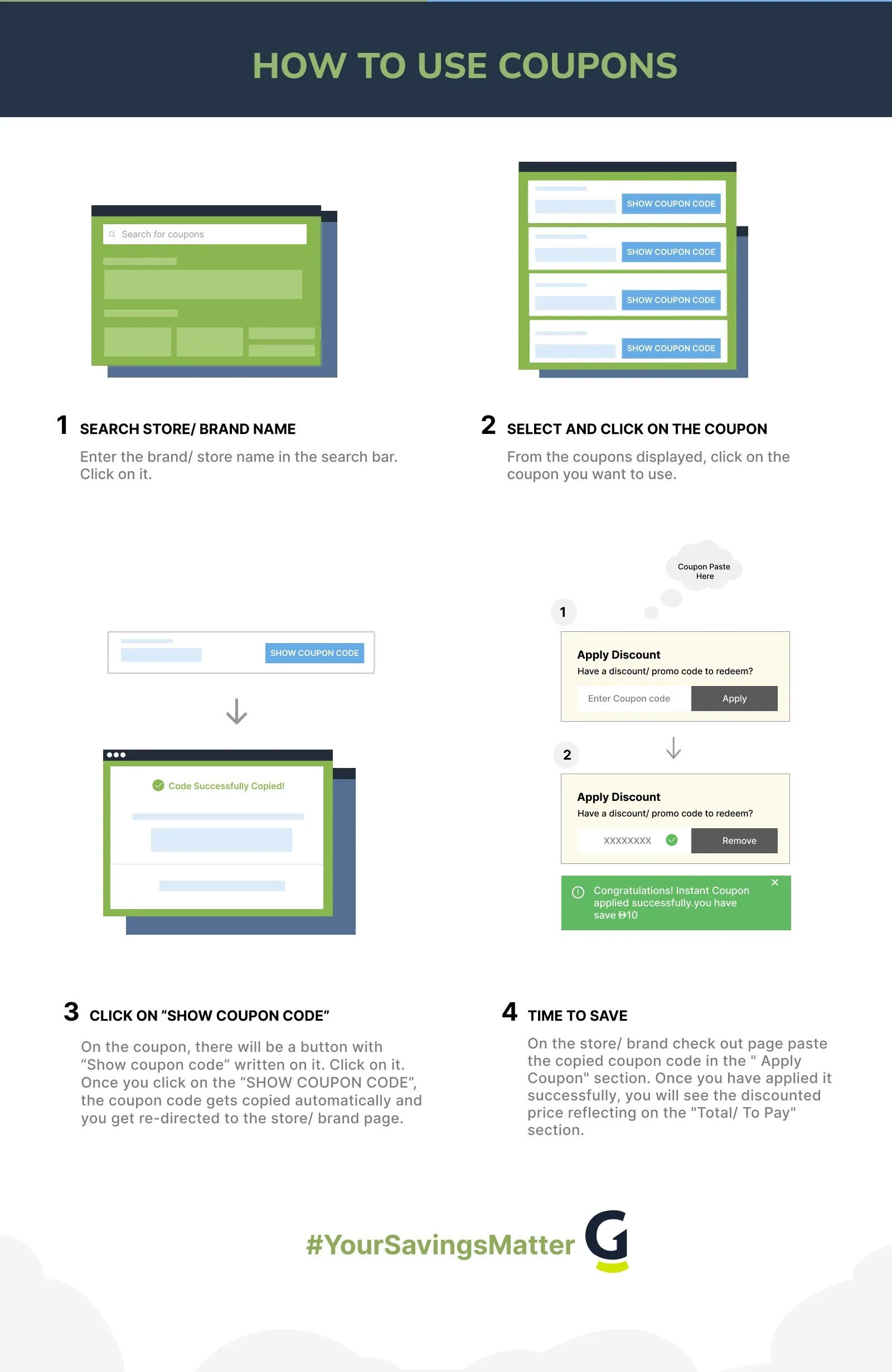
- Create your TikTok for Business account at ads.tiktok.com and add a valid payment method, a credit card, debit card, or PayPal.
- In TikTok Ads Manager, open the Tools tab, then under Settings click Payments.
- Click the Redeem Coupon button in the upper-right corner of the page.
- Enter your coupon code exactly as shown and click Activate. Do this within 14 days of getting the code.
- Fund your account and start spending. TikTok counts only the spend that lands after activation, so the code goes in first, then the budget.
To check progress later, go back to Tools, Payments, Promotions, where you can see coupon details, validity, and the eligible ad products.
Coupon Not Working? Here's What to Check
- You spent before activating the code. Fix: only spend that lands after you click Activate counts, so redeem first, then fund the campaign.
- The code expired. Fix: codes must be activated within 14 days of issue, and the credit itself has an expiration date under Coupon Progress, Details.
- Your account is not new. Fix: the acquisition credit is for advertisers with no prior ad activity. An account flagged as similar to an existing one may be excluded.
- You already used a coupon on this Business Center. Fix: it is one coupon per advertiser. A second account under the same Business Center will not get the incentive again.
- The credit is assignable, not free. Fix: assignable credit has to be manually attached to a campaign before it spends. Free credit auto-applies; assignable does not.
- You did not hit the spend tier. Fix: on a ladder coupon the reward only issues once you cross the qualifying spend inside the earning window.
- Wrong region. Fix: your Ads Manager account must be registered in your local region for the offer to apply.
- The offer was shared or forwarded. Fix: the credit is unique to the original recipient and is not valid if passed along.
- Case-sensitive entry. Fix: type or paste the code exactly as displayed, with the right capitalization.
- Risk hold on the coupon. Fix: in limited cases credit is suspended for risk reasons, and you can submit an appeal in the same Promotions interface.
- Content policy issue. Fix: TikTok can withhold credit if your ads break its policies, so review your creative against the ad guidelines.
TikTok Ads Billing and Refunds
There is no shopping-cart return here, but billing has a few quirks worth knowing. When you add a payment method, TikTok runs a verification charge of at least $10 and refunds it within 15 days. That is normal, not a duplicate bill.
You pick a billing option at setup. Manual payment means you add to your balance yourself through Tools, Payments, Add balance. Automatic payment bills you when you hit a threshold or bill date. One catch worth flagging: once you switch to automatic payment, you cannot switch back to manual, so choose carefully.
Ad credit itself is non-transferable and tied to your account. For anything involving a charge dispute, work through the Payments section rather than expecting a standard refund window.
Deals From Similar Stores
If you are weighing where to put a first ad budget, Meta's ad platform is the obvious comparison. It runs a broader format set and a deeper targeting history, and new accounts there sometimes get their own spend-and-get credit. For a side-by-side on incentives, you can browse Meta Ads coupons before you split a test budget.
On the design side, plenty of TikTok advertisers build creative in Canva before uploading. It is cheaper than hiring out every clip, and the Pro tier unlocks the assets most ad teams actually use. We track current Canva promo codes so you can trim the production cost that sits next to your media spend.
Best Time to Launch a TikTok Campaign
Ad credit tiers and demand both move with the calendar. Here is when the program tends to be richer and when costs spike.
| Window | When It Happens | What to Expect |
| Q4 holiday push | October to December | TikTok wants new brands live before Black Friday and Cyber Monday, so acquisition credit tiers often run higher. Auction costs also climb, so the credit helps offset a pricier CPM. |
| New Year reset | January | Lower competition after the holiday rush means cheaper impressions. A good window to test creative on a smaller budget while credit stretches further. |
| Back to school | July to August | Strong period for retail and app installs. Demand rises but not to Q4 levels, so the cost-to-credit math stays reasonable. |
| Mid-year lull | February to April | Quieter auction, lower CPMs. If your goal is to learn what creative works rather than chase peak sales, this is a calm runway. |
Tier amounts and dates shift each year, so confirm the live offer on the cards above or check the official TikTok for Business help center before you map a launch.
TikTok for Business Policies at a Glance
| Policy or Discount Type | Details |
| New-advertiser credit | Yes. Spend-and-get ladder credit or percentage discount credit, one per advertiser. |
| Payment methods | Credit card, debit card, PayPal. Prepaid cards cannot be used for automatic payment. |
| Billing options | Manual payment, automatic payment, and monthly invoicing for qualified businesses. |
| Minimum budget | $50 per day at the campaign level, $20 per day at the ad group level. |
| Self-serve ad formats | In-Feed Ads, Spark Ads, Collection Ads, with TopView reserved for large takeover budgets. |
| Verification charge | At least $10, refunded within 15 days of adding a payment method. |
| Credit transfer | Non-transferable. Valid only for the original recipient and only on TikTok Ads Manager. |
| US availability | Yes. The acquisition program runs in the US along with most TikTok Ads Manager markets. |
About TikTok for Business
TikTok for Business is the advertising arm of TikTok, the short-video platform owned by ByteDance. It opened its self-serve Ads Manager to advertisers in 2020, giving brands a way to buy In-Feed placements in the same feed where users scroll organic clips. The platform serves everyone from solo founders running a $50 a day test to enterprise teams buying full-screen TopView takeovers.
The acquisition incentive program is run from ads.tiktok.com and operates in dozens of markets, including the US, Canada, the UK, and much of Europe, the Middle East, and Asia. Ad formats range from In-Feed and Spark Ads to Collection Ads and TopView, with self-serve buying open to most eligible advertisers in supported regions.
Is TikTok for Business Worth Using?
Best for: brands and sellers running their first paid social campaign who want matched ad credit to soften the cost of testing. Spark Ads and In-Feed formats let you start at $50 a day, and the new-advertiser credit effectively doubles a small first budget when you hit a ladder tier.
Be careful if: you expect a flat percentage off like a retail coupon, because this is ad credit with spend requirements and an expiration date. Also be careful if your account is not genuinely new, since the program excludes advertisers with prior activity and credit can be withheld for policy reasons.
Best saving move: redeem the code before you fund anything, then concentrate your spend inside the 30-day earning window to clear the highest ladder tier you can afford. Pair that with Spark Ads to get more engagement per dollar of credit.
Frequently Asked Questions
- How do TikTok for Business coupons work?
TikTok for Business coupons give you ad credit, not a percentage off a purchase. The most common type is a spend-and-get ladder: you spend your own budget in Ads Manager, and once you cross a tier inside the earning window, TikTok issues matching bonus credit. A second type takes a percent off each charge up to a cap. Both have an expiration date listed under Coupon Progress.
- How do I redeem a TikTok ads promo code?
Open the Tools tab in TikTok Ads Manager, click Payments under Settings, then click the Redeem Coupon button in the upper-right corner. Enter your code and click Activate. Do this within 14 days of getting the code, because only spend that lands after activation counts toward the offer. You can track it afterward under Tools, Payments, Promotions.
- Who is eligible for TikTok ad credit?
The acquisition credit is for new advertisers with no prior ad activity on TikTok Ads Manager. Accounts identified as similar to an existing or previously active advertiser may be excluded, and it is one coupon per advertiser. A new account under the same Business Center will not get the incentive a second time. The offer runs in the US and most other TikTok Ads Manager markets.
- What is the minimum budget for TikTok ads?
TikTok sets a $50 per day minimum at the campaign level and $20 per day at the ad group level for self-serve formats. That covers In-Feed Ads, Spark Ads, and Collection Ads. TopView takeovers sit in a different league with five-figure daily minimums. For most first-time advertisers, a $50 a day test paired with new-advertiser credit is the practical starting point.
- Does TikTok charge a fee when you add a payment method?
Yes, TikTok runs a verification charge of at least $10 when you add a card, and it refunds that amount within 15 days. This is a standard check, not a duplicate ad bill. You can pay with a credit card, debit card, or PayPal, though prepaid cards do not work for automatic payment. Pick your billing option carefully, since switching from manual to automatic cannot be undone.
- Why is my TikTok coupon not counting my spend?
The usual reason is that you spent money before activating the code, and TikTok only counts spend after activation. Redeem the coupon first, then fund the campaign. Other common causes are an expired code, an account that is not new, a credit that is assignable rather than free, or a region mismatch. Assignable credit has to be manually attached to a campaign before it spends.
Filters
USER TYPES
Categories
Services

Coupons Info
Coupons & Offers
:15
Verified
:15
Fresh Offers You May Like
23andMe
Flat 23% Off
Flat 23% OFF On Health + Ancestry Service Plus Yearly Plan
Verified

AARP
FLAT $20 OFF
Exclusive Offer For Digital Vault at $20/year
Verified
Airalo
SAVE 10% OFF
Asia Unicom Unlimited Plan - Save 10% On Your Purchase
Verified
Coupons from Similar Stores

Subscribe Now
Get The Latest & Best Coupon/Offer Alerts
