

SSLs Coupons & Promo Codes
Best 7 Coupons & Offers last validated on October 22nd, 2026
- All (7)
- Coupons (1)
- Offers (6)
Existing User
- All (7)
- Coupons (1)
- Offers (6)
10%
OFF
Site Wide Offer - Flat 10% OFF On Secured Websites
- Get 10% OFF on sitewide secured websites
- This coupon code can not be combined with other offers & sales
- The basic price starts at $39
- All users can utilize this promo code
| Discount | 10% OFF |
| Eligible For | Sitewide Secured Websites |
| Order Value | $39 |
| Valid For | All Users |
OFF
Site Wide Website Domains - Flat 10% OFF
- Avail 10% OFF on all websites
- The basic price starts at $3
- It provides free SSL certificates
- Apply the coupon code to avail of this discount.
OFFER
Buy 2 Get 1 FREE On Selected Plans
- Buy 2, get 1 free on limited plans
- The discounted price starts at $3
- It includes - positive SSL, wildcard, Premium SSL wildcard & more
- Valid for all users
40%
OFF
PositiveSSL Wildcard - Save 40% On Your Purchase
- Grab 40% OFF on the PositiveSSL wildcard
- The cost starts at $38.53/year
- It includes
- Unlimited subdomains
- Domain validation
- Basic HTTPS
- Comoro SSL
- Low assurance
SSLs Discounts & Offers
OFF
PositiveSSL Multi-Domain - Flat 36% OFF + Free Trial
- Get 36% OFF on PositiveSSL multi-domain also a free trial after subscribing
- The price begins from 16.75/year
- Avail maximum of 5 years & charges $8.25/year for extra SAN
35%
OFF
PremiumSSL Wildcard - Grab 35% On Your Order
- Enjoy 35% OFF on PremiumSSL wildcard
- The basic price starts at $112.99
- Its functions are
- Unlimited subdomains
- Organization validation
- High assurance
- Company name in SSL & more
DEAL
Comodo Unified Communication - Starting @ $44.99/Year
- Get comoro unified communication for an affordable price
- The basic price starts at $44.99/year
- Avail an extra SAN for the discounted price of $28/year
- Visit the landing page to get more information
Best SSLs Promo Codes, Coupon Codes & Offers For All Users Oct 2026
| Category | SSLs Discounts & Coupons |
| Sitewide Offer | Flat 10% OFF |
| All Purchases | Get 10% OFF |
| PositiveSSL | Flat 50% OFF |
| PositiveSSL Wildcard | Save 40% |
| PositiveSSL Multi-Domain | Get 36% OFF |
SSLs.com at a Glance
SSLs.com is a dedicated SSL certificate retailer and part of the Namecheap Group, one of the largest domain and hosting companies in the world. The site specializes in SSL certificates from four major Certificate Authorities: Sectigo (formerly Comodo), DigiCert, Thawte, and GeoTrust. Price points start from $3.75 per year for basic Domain Validation (DV) certificates and extend to $75.99 per year and above for Extended Validation (EV) certificates.
SSLs.com holds a 4.8 rating on Trustpilot and offers 24/7 customer support. The company’s core appeal is specialist SSL pricing: it focuses exclusively on certificates, which allows it to undercut general-purpose registrars on specific products. For developers, agencies, and businesses buying multiple SSL certificates across domains, SSLs.com is worth comparing against the default pricing at your hosting provider or domain registrar.
Important note for 2026: As of March 2026, the major browser vendors (Apple, Google, Mozilla) implemented an industry-wide change limiting SSL certificate validity to approximately 200 days. This affects how you buy and renew certificates at SSLs.com. Multi-year prepaid plans are still available, but renewal cycles are now more frequent than the 1-2 year windows that were standard before March 2026. Check the current validity terms on any certificate listing before purchasing.
Top SSLs.com Offers Worth Grabbing on GrabOn
Here is what is live on GrabOn for SSLs.com as of June 2026, with specific prices and who each deal benefits most.
Best for new users MISSU10: 10% off sitewide. This code applies to all SSLs.com products with a $39 minimum order. It is restricted to new users who have not previously purchased from SSLs.com. On a PositiveSSL Wildcard at $38.53, a new user who hits the $39 minimum with a second certificate in the cart saves on both. Expires June 30, 2026.
Best automatic deal Buy 2 get 1 free. This deal applies to PositiveSSL, Wildcard, and PremiumSSL plans. For agencies or developers managing 3+ domains, buying two certificates and getting the third free is the highest-value deal on the page. No code required.
Best Wildcard deal PositiveSSL Wildcard: 40% off at $38.53/yr. A Wildcard certificate covers all subdomains of a single domain (blog.yoursite.com, shop.yoursite.com, etc.). At $38.53 per year, this is a competitive price for Sectigo-backed Wildcard coverage. No code needed; price applies automatically.
Best Multi-Domain deal PositiveSSL Multi-Domain: 36% off at $16.75/yr base. The base price covers 3 Subject Alternative Names (SANs), with additional SANs available at $8.25 per year each. This plan is available for up to 5 years. For developers running multiple separate domains on a single certificate, this is the most cost-effective option in the SSLs.com catalog.
Best bank/payment offer No verified bank-specific partnership is active on SSLs.com for US buyers. The site accepts credit cards and standard payment methods. Rakuten cashback is worth checking before any purchase over $50.
Best sitewide deal (all users) The automatic 10% off sitewide deal applies to all users with no minimum order and no code required. It is live year-round rather than a limited promotion. It applies on top of already-discounted certificate pricing, making it the baseline discount for every SSLs.com purchase.
Cut Your SSLs.com Total Today
- Multi-year plans for SAN certificates. The PositiveSSL Multi-Domain plan is available for up to 5 years. While the 200-day validity change means more renewal cycles, prepaying for a multi-year plan often locks in the current discounted rate before SSLs.com adjusts pricing. Prepaying 5 years at $16.75/yr base costs less in aggregate than renewing annually at potentially higher future rates.
- Buy 2 get 1 free on matching certificate types. The buy 2 get 1 free deal on PositiveSSL, Wildcard, and Premium plans is the strongest bulk deal on the site. If you need 3 certificates of the same type, plan your purchase to hit exactly 2 for the free third. Do not split across different certificate types if the deal requires matching types.
- Namecheap Group synergy. SSLs.com is part of Namecheap. If you already have a Namecheap account for domain registration, consider whether Namecheap’s in-house SSL pricing (for its own branded certificates) is competitive with what SSLs.com lists. In some cases, the bundled domain-plus-SSL pricing from Namecheap can match or beat SSLs.com’s standalone rates.
- Rakuten cashback. Before purchasing any certificate, check whether SSLs.com appears in your Rakuten dashboard. Even a 1-2% cashback rate on a multi-year certificate purchase compounds into real savings.
- Stack MISSU10 with a category deal. New users can apply the MISSU10 code (10% off, $39 minimum) on top of an already-discounted certificate if the terms allow stacking. The 10% off sitewide automatic deal and MISSU10 may not be combinable; test at checkout to see which produces the lower total, then proceed with the better option.
- Annual vs. monthly comparison. SSLs.com does not typically offer monthly billing on certificate plans. Most pricing shown is annual. The per-year cost displayed is the correct comparison unit when evaluating against competitor pricing from Namecheap, GoDaddy, or your hosting provider’s bundled SSL.
Tap Into SSLs.com Rewards and Programs
24/7 Live Support
SSLs.com offers 24/7 customer support, which is a genuine differentiator for SSL certificates. Certificate installation problems, validation errors, and reissuance requests do not follow business hours. Having 24/7 access to support staff who specialize in SSL matters is worth more than a discount on an equivalent certificate from a general-purpose registrar with 9-5 support.
Multiple Certificate Authority Options
Most SSL resellers carry certificates from one or two CAs. SSLs.com carries certificates from Sectigo, DigiCert, Thawte, and GeoTrust. This matters because different CAs have different reputations for customer support, reissuance policies, and compatibility with legacy systems. DigiCert is generally considered the premium CA option; Sectigo (PositiveSSL) is the value option with wide compatibility.
No Loyalty Program
SSLs.com does not run a formal loyalty or rewards program as of June 2026. There is no points accumulation or tier-based discount structure. Your best mechanism for ongoing savings is checking GrabOn’s SSLs.com page before each renewal, as promotional codes tend to post around major sale periods and at the start of each month.
Reseller/Agency Purchasing
If you are a developer or agency purchasing multiple SSL certificates for client sites, the buy 2 get 1 free deal functions as a de facto volume discount. SSLs.com does not list a formal reseller program on the main site, but the multi-certificate deals and multi-year SAN plans are structured to serve exactly this use case.
Apply a SSLs.com Coupon Code in Seconds
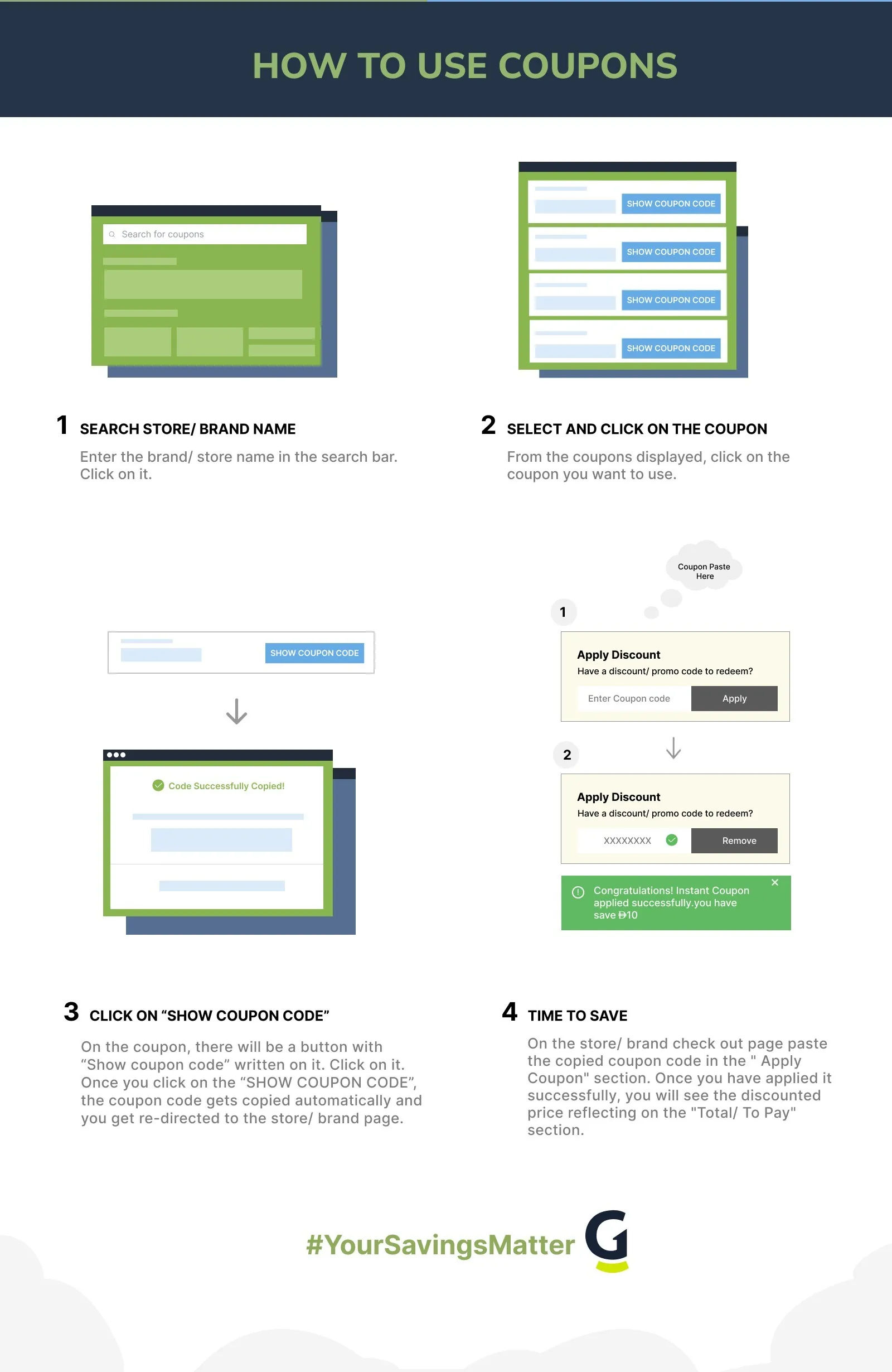
- Go to GrabOn’s SSLs.com coupons page and click “Get Coupon” on the code you want (currently MISSU10). The code copies automatically and GrabOn opens SSLs.com in a new tab.
- Browse the SSLs.com catalog and select your certificate type. For Wildcard certificates, choose PositiveSSL Wildcard at $38.53/yr. For Multi-Domain coverage, choose PositiveSSL Multi-Domain and configure the number of SANs you need.
- Add the certificate to your cart. For the buy 2 get 1 free deal, add two certificates of the same type first and confirm the third adds for free before completing the order.
- Proceed to checkout. Look for the “Coupon code” or “Promo code” field in the order summary. Paste your code (MISSU10) and click “Apply.”
- Confirm the discount shows in your order total. The new-user MISSU10 code requires a $39 minimum order. If your cart is below $39, add another certificate or a SAN to meet the threshold.
- Complete your purchase with payment information. SSLs.com will send certificate issuance instructions by email after payment. The domain validation step (for DV certificates) must be completed before the certificate is issued.
Fix a SSLs.com Promo Code That Fails
- New-user code on existing account. MISSU10 is restricted to users who have not previously purchased from SSLs.com. If your email is linked to a prior order, the code will be rejected. Use the automatic 10% off sitewide deal (no code) instead.
- Cart below the $39 minimum. MISSU10 requires a minimum order of $39. A single basic DV certificate at $3.75 will not meet this threshold. Add another certificate or a SAN to reach $39 before applying the code.
- Code expired. MISSU10 expires June 30, 2026. If you are reading this after that date, check GrabOn’s SSLs.com page for the current active code.
- Code does not stack with automatic deal. The 10% off sitewide automatic deal and MISSU10 may not be combinable. SSLs.com may apply only one discount per order. Test both at checkout and take the lower total. Sometimes the automatic deal is already applied before the code field is reached.
- Buy 2 get 1 free on mismatched certificate types. The buy 2 get 1 free deal applies when the certificates in the cart are of the same eligible type (PositiveSSL, Wildcard, or Premium). Mixing a PositiveSSL with a PremiumSSL Wildcard in the same cart may not trigger the deal. Keep your cart to matching certificate types to activate this promotion.
- Multi-Domain SAN count affecting price. The PositiveSSL Multi-Domain base price of $16.75/yr covers 3 SANs. Each additional SAN adds $8.25/yr. If your expected total does not match, recount your SAN configuration in the cart before applying a code. The discount percentage applies to the total after SAN fees are added.
- Code case sensitivity. Paste MISSU10 exactly as shown. All uppercase, no spaces. A lowercase or spaced entry will return an invalid code error even though the underlying code is active.
- Browser session conflict. SSLs.com checkout runs on a secure session. If you have an ad blocker or privacy extension that strips tracking parameters, the GrabOn referral may be severed. In that case, copy the code manually, navigate to SSLs.com directly, and paste at checkout rather than using the GrabOn redirect.
- Contact SSLs.com support. SSLs.com’s 24/7 support team can verify whether a code is valid and apply any available discount to a pending order. Reach support via the live chat on SSLs.com.
Return a SSLs.com Order the Easy Way
SSLs.com offers a 15-day refund policy on certificate purchases. If you purchased a certificate and need to cancel within 15 days, you can request a refund before the certificate has been used on a live site. Once a certificate is issued and deployed on a domain, refunds become more limited; check the specific terms for the certificate type you purchased.
Refund requests go through SSLs.com’s support team. Given the 24/7 support availability, you can initiate a refund request at any time within the 15-day window. The refund typically processes back to the original payment method within a few business days.
One practical note: certificate reissuance (getting a replacement for the same certificate if something goes wrong during installation or validation) is a different process from a refund. If your certificate was issued but is not installing correctly, request a reissuance rather than a refund. Most certificate issues during installation are validation or server configuration problems, not problems with the certificate itself.
SSLs.com Cashback and Stacking Guide
SSL certificate purchases are typically one-time or annual, not ongoing subscriptions. The stacking opportunity window is narrow but real. Here is the order of operations for maximum savings:
- Check Rakuten first. If SSLs.com is listed in your Rakuten dashboard with an active cashback rate, activate Rakuten before navigating to the SSLs.com site. Cashback tracks from first click on the merchant site, not from when you pay.
- Apply the best available code. For new users, MISSU10 (10% off, $39 minimum). For returning users, the automatic 10% off sitewide applies without any action on your part. Do not enter a code if the automatic deal is already active and a code does not improve it.
- Use the buy 2 get 1 free deal on multi-certificate orders. For agency buyers or developers covering 3+ domains, structure your cart to hit the buy 2 get 1 free trigger before applying a percentage-off code. The free certificate has more dollar value than a 10% discount on 3 certificates separately.
- Pay with a 2% cashback card. Citi Double Cash or a similar flat-rate cashback card adds 2% on top. On a $100+ multi-certificate purchase, 2% is meaningful and stacks cleanly with the SSLs.com promo code and Rakuten.
One caveat: certificate purchases typically do not repeat for 1-5 years depending on the plan. The stacking effort is a one-time event per purchase cycle, not an ongoing optimization like subscription stacking. Get it right at purchase time since you will not revisit the checkout for a while.
SSLs.com Price Drop and Cart Tactics
- Multi-year locking before future price increases. SSL certificate pricing at resellers fluctuates with CA pricing changes. If SSLs.com is currently at the lowest price you have seen for a specific certificate, buying a 3-5 year plan locks in that rate for the entire term. This is particularly relevant for Multi-Domain SAN plans, where the $8.25/yr-per-additional-SAN pricing may increase in future years.
- Compare before you commit to a CA. SSLs.com carries certificates from 4 CAs. PositiveSSL (Sectigo) is generally the most affordable for DV and Wildcard coverage. DigiCert is the premium option with stronger enterprise support. Before paying for DigiCert pricing, verify whether your use case actually requires it. For most websites, PositiveSSL DV or Wildcard provides identical end-user trust indicators (the padlock) at a fraction of the DigiCert price.
- SAN count planning. If you need a Multi-Domain certificate, count your required SANs carefully before checkout. Adding SANs later typically requires a reissuance, which may or may not preserve your original purchase price per SAN. Configure the right number of SANs upfront rather than planning to add more later.
- 200-day validity planning. With the March 2026 SSL industry change capping certificate validity at approximately 200 days, plan for at least 2 certificate renewals per calendar year if you buy on annual cycles. Automate renewal reminders or consider whether auto-renewal options are available on your SSLs.com account to avoid site security warnings from an expired certificate.
Time Your SSLs.com Purchase for Max Savings
| Window | When | What to Expect |
| End of Month | Last week of each month | SSLs.com codes on GrabOn commonly have end-of-month expiry. New codes post as old ones expire. MISSU10 runs through June 30, 2026. Check GrabOn’s SSLs page at the start of each month for the freshest codes. |
| Black Friday / Cyber Monday | Late November | Tech and cybersecurity products see strong Black Friday promotions. SSLs.com has historically offered codes or deal enhancements during the Cyber Monday window that go beyond the standing automatic 10% off. |
| Domain Registration Season | January (new year), September (back to school, new projects) | Developers and businesses registering new domains often buy SSL certificates simultaneously. SSLs.com promotions sometimes align with Namecheap domain sale periods. |
| Before a Certificate Expires | 30-60 days before expiry | SSLs.com may offer renewal promotions to existing customers. Monitor your SSLs.com account and GrabOn’s page in the window before your certificate expires. Renewing early at a discounted price is better than scrambling at expiry. |
Know the SSLs.com Policies Before You Pay
| Policy | Details |
| Refund Window | 15-day refund policy. Applies before the certificate is deployed on a live domain. Requests go through SSLs.com support. |
| Certificate Validity | As of March 2026, SSL certificates are limited to approximately 200 days of validity per industry-wide browser decision. Plan for 2+ renewals per year on annual-cycle purchases. |
| Payment Options | Credit cards and standard payment methods. No verified BNPL option on SSLs.com. |
| Support | 24/7 customer support via live chat on SSLs.com. |
| Trustpilot Rating | 4.8 out of 5 on Trustpilot as of June 2026. |
| Parent Company | Part of the Namecheap Group. |
| Certificate Authorities | Sectigo (PositiveSSL), DigiCert, Thawte, GeoTrust. |
| Coupon Stacking | Generally one code per order. Automatic deals may apply before code entry. Test both and take the lower total. |
Compare SSLs.com With Other Stores
SSLs.com competes primarily with Namecheap coupons on GrabOn. Since SSLs.com is part of the Namecheap Group, the two often carry comparable base prices on certificates. Namecheap bundles SSL with domain registration and hosting, which can produce a better per-product price if you are buying all three together. Compare the SSL-only pricing on both GrabOn pages before deciding.
For the broader tech buyer who needs domain plus SSL plus hosting in one transaction, GoDaddy promo codes on GrabOn can surface bundle deals that beat SSLs.com’s certificate-only pricing when all three products are factored in. GoDaddy’s standalone SSL pricing is typically higher than SSLs.com, but bundle promotions can shift that calculus. If you already have hosting elsewhere and need only the certificate, SSLs.com’s focused pricing and 4-CA selection is the more appropriate starting point.
SSLs.com: The Honest Verdict
Best for: Developers, agencies, and businesses who need to buy SSL certificates without being upsold on hosting, domains, or other products. SSLs.com’s focused catalog, 4-CA selection, competitive Wildcard pricing at $38.53/yr, and 24/7 support make it a strong specialist choice. The buy 2 get 1 free deal is particularly valuable for anyone managing 3+ certificate-covered domains. The 4.8 Trustpilot rating supports the brand’s customer service claims.
Be careful if: You need a certificate immediately for a live site issue. Certificate issuance requires domain validation (for DV certificates) or organization/extended validation (for OV/EV), which can take hours to days depending on the validation type and how quickly you respond to validation emails. If your site is down due to an expired certificate, call your hosting provider’s emergency support rather than ordering a new certificate and waiting for issuance.
Best saving move: New users should apply MISSU10 (10% off, $39 minimum, expires June 30) on a PositiveSSL Wildcard purchase at $38.53. Add a second certificate or a SAN to hit $39 if needed. Combine with Rakuten cashback if active. For agencies buying 3+ certificates, skip the code entirely and use the buy 2 get 1 free deal, which produces higher savings than a 10% percentage code on the same cart.
Quick Answers on Saving at SSLs.com
Frequently Asked Questions
- How do I apply an SSLs.com coupon code?
Copy your code from GrabOn’s SSLs.com coupons page, add your certificate to the SSLs.com cart, and proceed to checkout. Look for the “Coupon code” or “Promo code” field in the order summary, paste your code, and click “Apply.” Confirm the discount shows in your total before paying.
The current active code is MISSU10 (10% off sitewide, $39 minimum, new users only). If you are a returning user, the 10% off automatic deal applies without any code entry.
- Is SSLs.com legitimate?
Yes. SSLs.com is part of the Namecheap Group, one of the largest domain and hosting companies in the world. The site holds a 4.8 rating on Trustpilot and offers 24/7 customer support. Certificates are issued by recognized Certificate Authorities including Sectigo, DigiCert, Thawte, and GeoTrust.
SSLs.com is an authorized reseller for these CAs, not a certificate generator. The actual certificate validation and trust chain comes from the CA, not SSLs.com directly. Purchasing from SSLs.com gives you the same certificate trust chain as buying from the CA directly, typically at a lower price.
- How much does an SSL certificate cost at SSLs.com?
SSLs.com prices range from $3.75 per year for basic DV certificates to $75.99 per year and above for EV certificates. Current deals on GrabOn bring PositiveSSL Wildcard to $38.53 per year (40% off) and PositiveSSL Multi-Domain to $16.75 per year for the base 3-SAN plan (36% off).
PremiumSSL Wildcard is $112.99 per year after the automatic 35% off. Comodo UC certificates start at $44.99 per year with additional SANs at $28 per year each. All prices shown are after the automatic deals applied; the buy 2 get 1 free deal applies additionally on top for qualifying purchases.
- What is the difference between a DV and EV SSL certificate?
A DV (Domain Validation) certificate confirms that the certificate applicant controls the domain. It is issued quickly (hours) and produces the standard padlock icon in browser address bars. It is appropriate for most websites and blogs.
An EV (Extended Validation) certificate requires verification of the organization’s legal identity, address, and operational status. Issuance takes 1-5 business days. EV certificates are used by financial institutions, e-commerce sites, and enterprises that want the highest level of identity assurance for visitors. For most small business and blog use cases, a DV certificate is sufficient. EV certification makes sense when your visitors need assurance that your organization has been independently verified.
- What does the 200-day SSL validity change mean for SSLs.com buyers?
Starting March 2026, major browsers (Apple, Google, Mozilla) aligned on a policy limiting SSL certificate validity to approximately 200 days. Before this change, certificates were valid for 1-2 years. Now, certificates issued on a 1-year plan will need to be reissued roughly twice in that year rather than once.
For buyers at SSLs.com, this means renewal cycles are more frequent. Multi-year prepaid plans at SSLs.com are still available and still lock in the purchase price, but the actual certificate will be reissued every ~200 days within that multi-year window. Many hosting control panels (cPanel, Plesk) and certificate management tools handle auto-reissuance transparently. If you manage certificates manually, set renewal reminders for every 200 days rather than annually.
- Does SSLs.com offer a refund?
Yes, SSLs.com offers a 15-day refund policy. Refund requests must be submitted within 15 days of purchase and before the certificate is deployed on a live domain. Contact SSLs.com’s 24/7 support via live chat to initiate the refund process.
If your certificate was issued and installed but you need a replacement due to an installation error, request a reissuance rather than a refund. Reissuance replaces the certificate without a new charge. The 15-day window is for cases where you no longer need the certificate rather than cases where the certificate needs to be replaced.
- What is the buy 2 get 1 free deal at SSLs.com and how does it work?
SSLs.com’s buy 2 get 1 free deal applies to PositiveSSL, Wildcard, and PremiumSSL plans. When you add two certificates of an eligible type to your cart, the third certificate of the same type is added for free.
This deal requires no code. It is most valuable for agencies or developers who manage 3 or more domain-secured sites and would otherwise buy certificates individually. At a PositiveSSL Wildcard price of $38.53/yr, buying 2 and getting 1 free saves $38.53 compared to buying 3 individually. For most buyers, the buy 2 get 1 free deal produces a higher saving than any percentage-off coupon code applied to the same 3-certificate cart.
- What SSLs certificate authorities does SSLs.com use?
SSLs.com sells certificates from four Certificate Authorities: Sectigo (which issues PositiveSSL and PremiumSSL products), DigiCert, Thawte, and GeoTrust. Sectigo (formerly Comodo) certificates are the most affordable options. DigiCert is the premium CA option often required by enterprise environments or high-value e-commerce sites. Thawte and GeoTrust are mid-range CAs with wide browser compatibility.
All four CAs are recognized by major browsers and operating systems globally. The CA you choose affects the certificate’s issuer name and the level of organizational support, not the fundamental padlock icon or encryption strength visible to your end users.
Filters
USER TYPES
Categories
Software & Antivirus
Tools

Coupons Info
Coupons & Offers
:7
Verified
:7
Fresh Offers You May Like
domain com
FLAT 25% OFF
Grab 25% Off On All Hosting Subscriptions
Verified
Dynadot
FROM $9
Enjoy .Com New Domain Registration Starting From $8.99
Verified
GoDaddy
FLAT 25% OFF
Flat 25% OFF On All Hosting Plans
Verified

Subscribe Now
Get The Latest & Best Coupon/Offer Alerts
