



QEEQ Coupon Codes & Promo Codes
Best 9 Coupons & Offers last validated on October 31st, 2026
- All (9)
- Offers (9)
Existing User
- All (9)
- Offers (9)
96%
OFF
Orlando - Get Up To 96% OFF On Car Rentals
- Orlando offer - Get Up to 60% OFF
- Offer applicable for only Orlando City
- Land this offer to get more offers
- Applicable for all users
$30
Off
Signup Offer - Get Up To $30 OFF
- Signup Offer - Save Up To $30 OFF
- Offer applicable for Newusers
- Minimum cart value required for this offer
- Applicable for all users
| Signup Offer | Save Up To $30 OFF |
| Applicable On | New User |
| Minium Cart Value | $100 |
| Valid for | New User |
Off
App Savings - Enjoy 5% Off On First Booking
- Grab 5% off on your first booking.
- Shop now and grab the deal.
- The offer is valid for first-time app users.
- Nocoupon codeis needed to grab the discount.
30%
OFF
Competitive Insurance - Get Up To 30% OFF
- Competitive Insurance Offer
- Free PAI on postal bookings
- Get up to 30% OFF on your orders
- Valid for all users
QEEQ Vouchers & Offers
OFF
Direct Rental Discounts - Get 10% OFF On Prepaid Bookings
- Direct Rental Discounts - Save 10% OFF On Prepaid bookings
- Offer covering 800+rental bookings
- Get More Like -
- Free cancellation
- Instant confirmation and more
- Applicable for all users
OFF
Save 10% OFF On Hotel Staying
- Flat 10% OFF On hotel staying
- Offer applicable only on hotel staying
- Valid for all users
OFF
Enjoy 5% Off On Your Bookings
- Enjoy 5% off on all your bookings
- Applicable only for time users
- Valid only through App bookings
15%
OFF
Unlock Up To 15% Off Fall Car Rentals From U-Save
- QEEQ: up to 15% off on fall car rentals.
- Covers the Fall Special car rental savings.
- On U-SAVE offers listed in the deals hub.
- Applicable to destinations that include the United States.
- The discount applies to the base rental rate only.
- Excludes insurance, extras, fuel, taxes and young driver fees.
- The promotion cannot be combined with other discounts.
- Qualifying items show the deal price.
Cancellation
Use Free Cancellation On Car Rentals With No Hidden Fees
- QEEQ brings free cancellation on car rentals.
- Covers car hire booked through, which compares rental deals.
- From over 1000 partner suppliers.
- This deal includes Alamo, Hertz, Sixt and more.
- Free cancellation, no hidden fees.
- 24/7 customer service are listed on the homepage.
- Pay the already-reduced total at checkout.
Latest QEEQ Coupons, Promo Codes & Offers For Nov 2026
| Category | QEEQ Discounts & Coupon Codes |
| Signup Offer | Get Up To $30 OFF |
| Orders Over $600 | Save $30 OFF |
| Orders Over $500 | Grab $20 OFF |
| Hotel Staying | Save 10% OFF |
| Prepaid Bookings | Flat 10% OFF |
About QEEQ
QEEQ is a car rental aggregator and comparison platform headquartered in Singapore with global operations, serving travelers in over 100 countries. Founded in 2019, the platform compares prices from more than 500 rental car suppliers worldwide, including Hertz, Avis, Budget, Sixt, Enterprise, National, and independent local rental companies at airports and city locations across the US and internationally.
QEEQ’s model works differently from booking direct with a rental brand. QEEQ aggregates real-time inventory from supply partners and presents the lowest available rate across those suppliers for a given pickup date, location, and car type. For US travelers, the platform covers most major US airports and many downtown city locations. QEEQ also offers its own EasyRent cover plan (full-coverage insurance product) that can be added at booking, designed to replace the typically expensive insurance upsell at the rental counter.
Compared to Rentalcars.com or AutoEurope (established car rental aggregators), QEEQ is newer but has grown rapidly in the Asia-Pacific and US markets. The platform’s main competitive argument is its integration with a broad supplier network that includes both global brands and regional independent operators not visible on traditional booking channels.
Best QEEQ Deals on GrabOn Right Now
Best coupon-code deal. A verified QEEQ promo code from GrabOn is the most direct code-based discount available right now. The exact percentage varies by campaign. GrabOn tests and updates QEEQ codes every 24 hours, so the code listed as verified today has been confirmed working at checkout within the last day.
Best new-user deal. First-time QEEQ accounts have historically received up to 10% off an eligible first booking. This is one of the strongest introductory offers in the car rental aggregator market. To use it, create a new account at qeeq.com before searching for a rental, log in during the search, and the discount should appear in your booking summary.
Best app deal. The QEEQ mobile app sometimes shows lower rates than the website for identical booking parameters. App-exclusive rates are available on iOS and Android and can combine with promotional codes entered at the app checkout. Check the app price alongside the web price for the same rental before booking.
Best insurance deal. QEEQ’s EasyRent full coverage plan is a bundled insurance product added at booking that covers the rental car against damage, theft, and third-party liability. The cost is often $10-$20 per day, which is typically cheaper than the rental counter insurance products (which run $25-$40 per day at most US airports). Booking EasyRent through QEEQ at the time of reservation is the cost-effective approach.
Best bank or payment offer. QEEQ accepts major credit cards (Visa, Mastercard, American Express) and some digital wallets depending on your region. Some credit cards (Chase Sapphire, Amex Platinum, Capital One Venture) include built-in car rental insurance that may make the EasyRent plan redundant. Check your credit card’s rental coverage terms before adding EasyRent to avoid paying for duplicate coverage.
Best seasonal deal. Car rental aggregators like QEEQ see the most inventory and competitive pricing in shoulder seasons (March through April, and September through October). Summer holiday weeks (Fourth of July, Labor Day) and major holidays are peak pricing periods. Booking well in advance for peak travel periods, then monitoring for price drops and rebooking if the rate falls, is a viable tactic since most QEEQ bookings are free to cancel up to a defined deadline.
Best referral deal. The QEEQ referral program gives existing users a credit for each new booking they refer. If you’re planning a trip and a friend also needs a rental, the referral sequence (you book first, then share your referral link) can generate a credit on your next reservation. The exact credit amount appears in your QEEQ account’s rewards section.
More Ways to Save on QEEQ Car Rentals
- Compare airport vs. off-airport pickup. Rental rates at off-airport locations (city pickup points, hotel zones) are frequently 15-30% cheaper than the equivalent airport counter because airport concession fees are not included in the base rate. QEEQ’s map view shows alternative pickup points near your destination. Factor in transportation cost to the off-airport location when comparing.
- Book in local currency. QEEQ allows booking in your local currency. Renting in the destination country’s currency (rather than USD for international trips) typically avoids the dynamic currency conversion markup applied by some counter agents. Select the appropriate currency in QEEQ’s settings before booking.
- Avoid counter insurance upsells. QEEQ’s EasyRent cover plan bought at booking time is consistently cheaper than the same coverage offered at the rental counter during pickup. Book EasyRent through QEEQ before you arrive at the counter rather than adding coverage under pressure at pickup.
- Check GrabOn before confirming. GrabOn updates QEEQ promo codes every 24 hours. Booking a rental without first checking takes under a minute and may reveal a code worth 5-10% off the total. At a week-long rental rate of $300, that’s $15-$30 back.
- Book early for peak periods. US summer and holiday rentals (Memorial Day, Fourth of July, Thanksgiving, Christmas) frequently sell out at lower-priced tiers. Booking 4-6 weeks in advance for peak periods often produces lower rates than same-week booking when inventory is thin and prices climb.
- Cancel and rebook if rates drop. Most QEEQ bookings are free to cancel before the pickup date. If you’ve already booked and notice the same rental is now cheaper (common 2-3 weeks out as demand shifts), cancel and rebook at the lower rate. Monitor your saved searches in the QEEQ app.
- Use the app for exclusive rates. The QEEQ app regularly shows slightly lower rates for some inventory than the web version. Install the app and compare prices for your dates before confirming any web booking.
QEEQ Cover Plans and Add-On Programs
EasyRent Full Coverage Plan
QEEQ’s EasyRent plan is a proprietary travel insurance product covering rental car damage, theft, and third-party liability. It is purchased at the time of booking (not at the counter) and usually runs $10-$20 per day depending on the car category and destination. The full coverage plan eliminates the security deposit hold on your credit card at pickup in most cases, because the rental supplier recognizes the EasyRent coverage. This is one of the practical operational benefits beyond just cost saving: no large hold on your card during the rental period.
Basic Plan
QEEQ’s basic cover option (called EasyRent Basic in some markets) covers standard damage and liability at a lower daily rate than the full plan. It doesn’t typically remove the deposit hold and may have exclusion categories (e.g., tire and windshield damage). Useful for short-duration rentals where you’ve already verified your credit card includes car rental insurance for collision damage waiver (CDW).
Referral Program
QEEQ’s referral program lets existing users earn credits by sharing a referral link with friends and family. When the referred person completes their first booking, you receive a credit applied to your next QEEQ reservation. The credit amount varies by region and promotional period. Access the referral dashboard from within your logged-in QEEQ account or the QEEQ app.
Additional Driver Coverage
QEEQ allows adding additional drivers at the time of booking for an extra daily fee (or sometimes free, depending on the supplier and rate tier). Adding a second driver through QEEQ at booking is typically cheaper than adding at the counter. If you plan to share driving duties on a longer trip, configure the additional driver option in the booking before confirming.
How to Use a QEEQ Promo Code
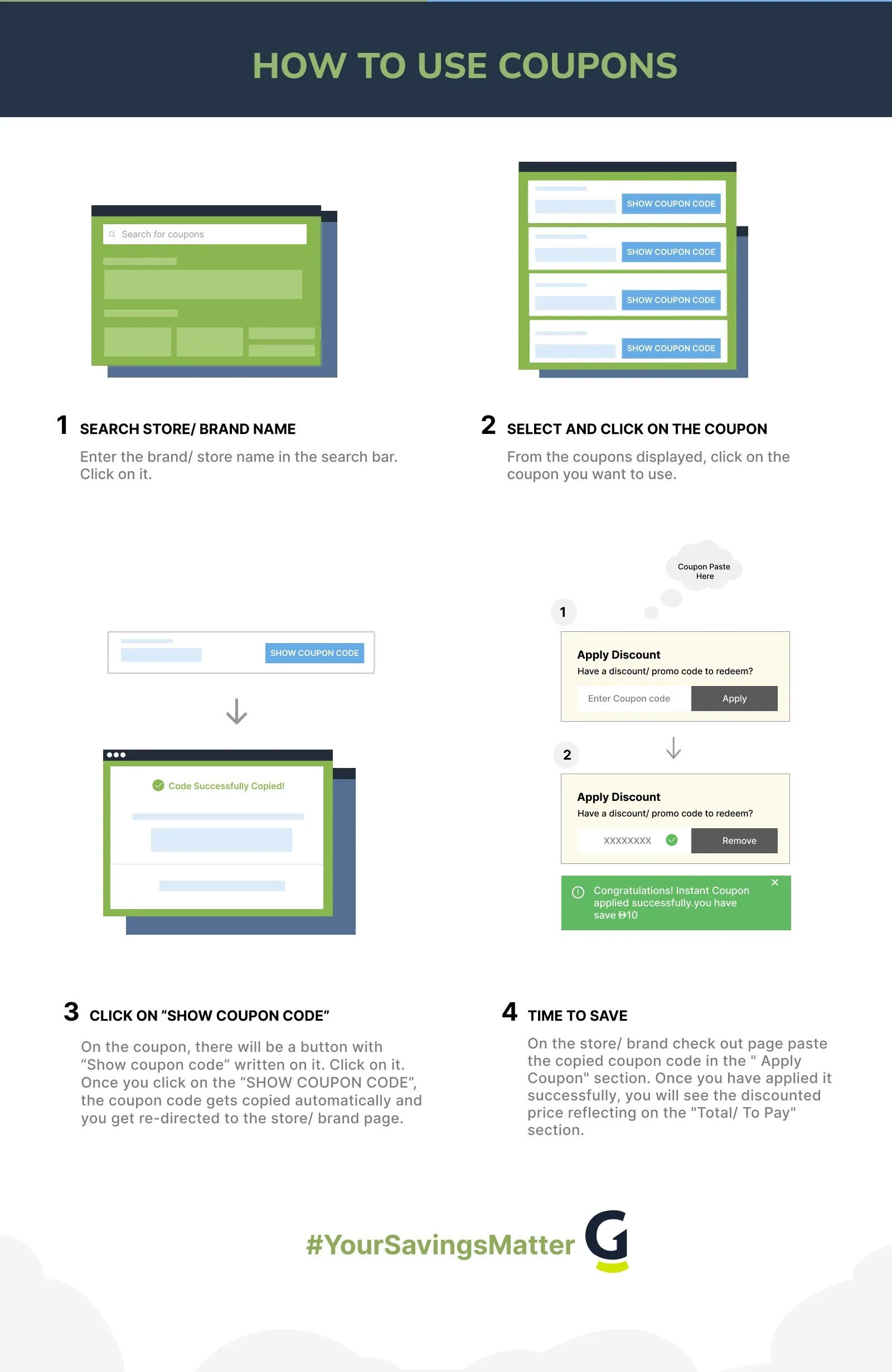
- Go to qeeq.com and enter your pickup location, dates, and times. Click Search to see available rental options.
- Select a car from the results. Compare prices across suppliers shown in the QEEQ comparison view.
- On the booking summary or checkout page, look for the “Promo code” or “Discount code” entry field. This usually appears above or below the price breakdown.
- Enter your QEEQ promo code exactly as shown on GrabOn, using the Copy button to avoid typos. Click Apply or the checkmark button.
- Confirm the discount appears in the updated price breakdown before entering your payment and driver details to complete the booking.
QEEQ Promo Code Not Working?
- Code is booking-specific. Some QEEQ codes apply only to bookings at specific pickup locations (e.g., US airports only) or for specific car categories (economy only). Fix: Review the code restrictions on the GrabOn coupon card. If the code has location or category restrictions, confirm your booking matches them before applying.
- Code has expired. QEEQ promotional codes are campaign-specific and expire when the campaign ends. Fix: Return to GrabOn and grab the freshest verified QEEQ code. GrabOn updates codes every 24 hours and removes expired ones promptly.
- Minimum booking value not met. Some QEEQ codes require a minimum booking total (e.g., $50+ rental cost before insurance). Fix: Check the minimum booking value on the GrabOn coupon card and confirm your rental total meets it before applying.
- New user code with existing account. First-timer discount codes at QEEQ only work for accounts with no prior completed bookings. Fix: Create a fresh account with a new email address to use a new-user code if you’ve previously booked on QEEQ.
- Code only for app booking. Some QEEQ promotional codes are app-exclusive and don’t work on the desktop or mobile web version. Fix: Install the QEEQ app, enter the code at app checkout, and verify the discount appears before completing the booking.
- Date window restriction. Some QEEQ codes are valid for bookings made during specific dates (e.g., book by June 30) or for rentals with specific pickup dates (e.g., travel in July). Fix: Review the date restrictions on the GrabOn coupon card. If your travel dates fall outside the code’s window, it won’t apply regardless of the booking date.
- One code per booking. QEEQ allows only one promotional code per booking transaction. Codes don’t stack. Fix: Choose the highest-value code available and enter only that one at checkout.
- Case or format error. QEEQ codes may be case-sensitive or include specific formatting. Fix: Copy the code directly from the GrabOn coupon card using the Copy button and paste without editing.
- Supplier exclusion. Some QEEQ codes apply only to bookings with specific rental suppliers and not others. Fix: Check whether the code has a supplier restriction. If so, filter your QEEQ search to show only that supplier’s results before applying the code.
- Cookie or session issue. QEEQ’s personalized pricing sometimes stores session data that conflicts with the promotional code field. Fix: Clear your browser cookies, start a new search session, and apply the code before adding any other options to your booking.
Save More with the QEEQ App
The QEEQ app is available on iOS and Android and serves as the primary channel for some of QEEQ’s most competitive rates. App-exclusive pricing applies to select inventory that QEEQ’s supply partners offer specifically for mobile bookings. The practical result is that the same pickup date, location, and car category can show a lower total price in the app than on qeeq.com. The difference is typically 5-10% but varies by supplier and date.
The app also allows you to manage existing bookings, view cancellation windows, and receive push notifications when prices change for saved searches. For travelers who book rentals frequently, the price-drop monitoring feature in the app helps automate the cancel-and-rebook strategy: if QEEQ sends a notification that your saved search has dropped in price, you can cancel your existing reservation and rebook at the lower rate before the cancellation deadline.
QEEQ promo codes entered at app checkout work the same way as on the web version. Some codes are app-exclusive and will fail on the web checkout. GrabOn’s QEEQ coupon card specifies whether a code is app-only or works across both channels. Download the QEEQ app through the App Store (iOS) or Google Play before comparing prices to capture app-exclusive rates.
QEEQ Cancellation Policy
The majority of QEEQ’s bookable inventory is listed as “free cancellation” up to a defined window before pickup, typically 24-48 hours before the rental start time. The exact cancellation deadline varies by supplier and rate type: cheaper, non-refundable rates exist on QEEQ for even lower prices but can’t be changed or refunded if plans shift. The cancellation terms are displayed clearly on the booking summary page before you confirm.
For free-cancellation bookings, QEEQ processes refunds to the original payment method within 5-10 business days after the cancellation is confirmed. EasyRent cover plan fees may or may not be refunded depending on when the cancellation occurs relative to the plan’s terms. If you cancel within the free-cancellation window, the base rental cost is fully refunded. Cancellations made after the deadline result in a partial or full forfeit of the prepaid amount depending on the supplier’s specific policy, which is shown per listing before booking.
There is no physical merchandise to return since QEEQ is a booking platform. All transaction support is handled through the qeeq.com help center or the in-app support channel.
Maximize Your QEEQ Savings: Cashback and Stacking Guide
- Credit card rental insurance first. Before adding EasyRent, check your credit card’s car rental benefits. Chase Sapphire Reserve, Amex Platinum, Capital One Venture X, and several other premium US cards include primary car rental collision damage waiver (CDW). If your card provides primary coverage, you may not need EasyRent at all, saving $10-$20 per day on a longer rental.
- Cashback portals for QEEQ. Some cashback portals cover car rental aggregator bookings. Activate any applicable portal session before clicking through to qeeq.com or opening the QEEQ app. The cashback percentage varies by portal and is not guaranteed, but when available it stacks on top of any promo code discount.
- Combine a GrabOn code with the new-user discount. If you’re a first-time QEEQ user, the platform’s new-user discount may be automatically applied at checkout while a separate promo code entered in the code field applies on top. Verify whether both discounts appear before confirming payment.
- Book early, monitor, cancel-rebook. QEEQ’s free-cancellation inventory is the core stacking tool for price-sensitive travelers. Book early (4-6 weeks out for summer travel) at a low rate, then monitor via the app for further drops. Cancel and rebook if prices fall further. Each rebook resets your cancellation deadline to the new booking’s terms.
- Off-peak pickup timing. Pickup on a Tuesday or Wednesday is often cheaper than Friday or Saturday, even for the same rental duration. QEEQ’s calendar view shows the cheapest available date within your flexible window. Shifting pickup by one day can save 10-20% on the base rate before any code is applied.
QEEQ Price Drop and Booking Tactics
- Save searches in the app and watch for drops. QEEQ app users can save searches and enable price notifications. When a saved search drops in price, the app notifies you. This is the most passive way to catch price improvements on upcoming travel without manually checking.
- Off-airport pickup saves 15-30% on the base rate. Pickup from a hotel zone or city center location avoids airport concession fees, which can add 10-25% to the counter rate. The additional cost of a taxi or rideshare from the airport to the off-airport location is often less than the fee savings on a multi-day rental.
- Book the smallest car that works. Rental rates in economy and compact categories are significantly cheaper than mid-size, full-size, or SUV rates, especially during peak weeks. Counter upgrades at pickup often happen automatically at no charge when the reserved category is unavailable. Booking economy often means driving away in a larger car at the economy price.
- Check GrabOn 48 hours before confirming. QEEQ sometimes issues short-window promotional codes tied to flash events (weekend-only deals, regional promotions). Checking GrabOn 48 hours before your planned booking date can surface codes not available earlier in the booking window.
- Stack with referral credit. If an existing QEEQ user sends you a referral link, their link may qualify you for an additional credit on your first booking alongside any active promo code. Both the referral credit and the promo code typically apply in the same booking session if they don’t conflict per the offer terms.
Best Time to Book at QEEQ
| Booking Window | What to Expect |
| 4-6 weeks before peak travel (summer, holidays) | Best rate for high-demand dates. Booking early on free-cancellation inventory locks in a good rate you can cancel if better prices appear later. |
| Off-peak travel: March/April and September/October | Lowest rental rates of the year at most US airports and international destinations. QEEQ’s comparison view shows strong pricing during these windows. |
| Weekday pickup (Tuesday/Wednesday) | Typically 10-20% cheaper than Friday or Saturday pickup for the same rental type and duration. |
| Black Friday / Cyber Monday | QEEQ and partner suppliers sometimes run promotional codes with meaningful percentage savings during this period. GrabOn posts verified QEEQ codes during this window. |
| New Year flash sale (January) | Post-holiday booking promotions sometimes appear in January. Watch the QEEQ app for limited-window deals during this period. |
| Within 48 hours of travel (last-minute) | Last-minute rates at QEEQ are unpredictable: sometimes very cheap if a supplier has unsold inventory, sometimes higher than advance booking rates. Not a reliable discount strategy for peak travel windows. |
QEEQ Booking Policies
| Policy or Feature | Details |
| Free Cancellation | Available on most inventory; cancellation window (24-48 hours before pickup) shown per booking |
| Non-Refundable Rates | Available at lower price points; no changes or refunds after booking |
| Payment Options | Visa, Mastercard, American Express; digital wallets in some regions |
| EasyRent Full Coverage | QEEQ’s own travel insurance; covers damage, theft, third-party liability; removes deposit hold at most suppliers |
| Basic Cover | Lower daily cost; covers standard CDW; deposit hold may still apply; excludes some damage types |
| Additional Driver | Can be added at booking or counter; booking through QEEQ in advance is typically cheaper |
| Minimum Driver Age | Supplier-dependent; typically 21+ in US; under-25 surcharges common; shown per listing |
| Refund Timeline | 5-10 business days after confirmed cancellation to original payment method |
| QEEQ App | iOS and Android; app-exclusive rates sometimes 5-10% lower than web; price-drop notifications available |
| Customer Support | Available via qeeq.com help center and in-app support channel; 24/7 for bookings in progress |
Similar Car Rental Sites and Travel Deals
If QEEQ’s supplier selection doesn’t include your preferred rental brand or you want to compare across aggregators before booking, Rentalcars.com promo codes on GrabOn cover an established global alternative with direct supplier integrations. For travelers who need airport pickup from major US hubs specifically, AutoSlash deals specialize in US airport car rentals with an automatic price-monitoring feature. Broader travel savings including hotel and flight deals are at GrabOn’s travel coupon category, which covers 80+ booking platforms with daily-verified codes.
Is QEEQ Worth Using?
Best for: US travelers who want to compare car rental prices across a broad supplier network (500+ globally) in a single search, who need international rental comparisons (QEEQ covers 100+ countries), and who want to add coverage at the time of booking rather than scrambling at the counter. The new-user discount (up to 10% off your first booking) and the EasyRent plan pricing are genuinely competitive against going direct with major rental brands.
Be careful if: you have strong brand loyalty with a rental program (Hertz Gold, Avis Preferred, Emerald Club at National) and want to earn or redeem points on the booking. Bookings made through QEEQ as a third-party aggregator often don’t earn rental loyalty points with the underlying supplier. If loyalty point accumulation matters for your rental pattern, book direct with the supplier. Also verify QEEQ’s supplier coverage for your specific pickup location before assuming your preferred brand is listed.
Best saving move: Create a new QEEQ account to qualify for the new-user discount, check the QEEQ app for an app-exclusive rate on your dates, apply a GrabOn-verified QEEQ promo code at checkout, and add EasyRent coverage if your credit card doesn’t already provide primary rental insurance. That combination consistently produces a better total than booking direct at full counter rates.
Frequently Asked Questions
- Is QEEQ a legitimate car rental site?
Yes. QEEQ is a legitimate car rental aggregator founded in 2019 and operating in 100+ countries. The platform compares prices from 500+ rental suppliers including global brands (Hertz, Avis, Budget, Sixt, Enterprise) and regional independent operators. QEEQ processes payments through a secure checkout and issues booking confirmations that are honored at the rental counter. Customer reviews across Trustpilot and the App Store (iOS) and Google Play (Android) are mixed to positive, with the most common complaints relating to counter upsells from the underlying supplier (not QEEQ itself). QEEQ’s EasyRent insurance product is a separate contract and is documented with its own terms at the time of booking.
- How do I apply a QEEQ promo code?
Search for a car on qeeq.com or the QEEQ app using your pickup location and dates. Select a rental from the results. On the booking summary or checkout page, find the “Promo code” or “Discount code” field and enter your QEEQ code exactly as shown on GrabOn. Click Apply. Confirm the updated price reflects the discount before entering your payment and driver details to complete the booking.
- Does QEEQ offer a first-time user discount?
Yes. QEEQ has historically offered a new-user discount of up to 10% on a first booking for accounts with no prior completed reservations. The discount often applies automatically when you’re logged into a newly created QEEQ account during the booking process. You don’t always need to enter a code; the new-user rate appears in the price breakdown at checkout. Confirm this discount is applied before adding payment details, and check GrabOn for a stackable code as well.
- What is QEEQ’s EasyRent cover plan?
EasyRent is QEEQ’s proprietary car rental insurance product, purchased at booking time and typically priced at $10-$20 per day depending on the car category and location. It covers collision damage waiver (CDW), theft, and third-party liability. At most participating suppliers, EasyRent removes the credit card security deposit hold during the rental period, which is a practical benefit beyond the cost saving versus counter insurance. Check your credit card’s rental coverage before adding EasyRent, since premium US cards often include primary CDW that makes EasyRent redundant.
- Can I cancel a QEEQ booking?
Most QEEQ bookings are free to cancel before a defined deadline, typically 24-48 hours before the rental start time. The cancellation terms (free cancellation vs. non-refundable) are displayed on the booking summary page before you confirm. For free-cancellation bookings, refunds to the original payment method process within 5-10 business days of the confirmed cancellation. Non-refundable rates are cheaper but cannot be changed or cancelled without losing the full payment.
- Does QEEQ have an app with exclusive deals?
Yes. The QEEQ app (iOS and Android) sometimes shows lower rates than the web version for the same booking parameters. App-exclusive pricing applies to select inventory from QEEQ’s supply partners. The app also supports price-drop notifications for saved searches. Some QEEQ promotional codes are app-only and won’t work on the desktop or mobile web checkout. GrabOn’s QEEQ coupon card notes whether a code is app-exclusive.
- Will booking through QEEQ earn me rental loyalty points?
Typically no. Bookings made through a third-party aggregator like QEEQ generally don’t earn loyalty points with the underlying rental supplier (Hertz Gold, Avis Preferred, Emerald Club, National Executive, etc.). If earning rental program points is a priority for your travel pattern, book directly through the rental brand’s website. QEEQ is best suited for price-focused comparison booking where the rate saving outweighs the loyalty points value.
Filters
USER TYPES
Categories
Travel
Hotel

Coupons Info
Coupons & Offers
:9
Verified
:9
Fresh Offers You May Like
Bookaway
Up To 40% Off
Grab Up To 40% OFF On All Bookings
Verified
Busbud
UP TO 90% OFF
App Savings - Grab Up To 90% Off On Bookings
Verified

FlixBus
site wide off
Get 10% Off On Your Booking
Verified
Coupons from Similar Stores

Subscribe Now
Get The Latest & Best Coupon/Offer Alerts
